Lost Mode but not in iCloud

I purchased a broken phone on ebay, when repaired I found it was icloud locked and in lost mode. I found the owner and he agreed to remove the device from his icloud (turns out he lost the phone a year and a half ago, has long moved on-doesn't even live in the same country).


However, it's still in lost mode! Since it's no longer connected to his iCloud account he can't remove it from lost mode anymore.


It's asking for his Apple ID- is there any other solution than having him give me his Apple ID? We live in different countries..

iPhone 6, iOS 9.3.2

Posted on Jun 3, 2016 12:19 AM

Reply
36 replies

Jun 7, 2016 7:38 PM in response to eldavies

Hi eldavies,


Glad to see you are still around 🙂....I think it has been a bit confusing for everyone!


So, here is what your phone looks like on your iCloud.com account when it is signed into Find My iPhone and online:


User uploaded file

My iPhone 5s is online here and showing in the devices list. When I click on that phone, because it is online, I see the same screen you posted above.


Then, I turn my iPhone 5s so that it will go Offline. And now, this is what I see on that same screen that you previously posted:


User uploaded file


As you can see, I also now have the option to "Remove Your Device". If I click on that option, it removes the device from my iCloud list:


User uploaded fileUser uploaded file


So, if you had my device right now, and I told you that I removed it from my iCloud account, then when you went to set it up, you would run into a screen that asked for MY Apple/iCloud ID and Password in order to Activate the phone. You would get that request because even though it wasn't showing on my iCloud account device list anymore, the device would still be signed in to Find My iPhone, and would still be Activation Locked.


However, once you turn on the device, and it connects to Wifi again, guess what I see on my iCloud.com account again:


User uploaded file

Since it is now back in my iCloud list, I can click on the devcie, and display the screen you had in your post, and then click on Erase Device. That would ask me to put my Apple/iCloud ID and password in in order to initiate the Erase. By doing that, it automatically turns off Find My iPhone on the device prior to erasing it. Once it is erased, I can go back in to the screen you saw for when it is Offline, and then click on Remove My Device. At that point, the device no longer is associated with my iCloud ID, and all of my data is completely erased, so it is ready for you to use as your own! 🙂


Thanks for sticking with this, and if you have any further questions or concerns, don't hesitate to post back!


Best of luck,


GB

Jun 5, 2016 7:31 PM in response to fromsouth

Clearly you do not understand how Activation Lock works. The only way Activation Lock can be removed from a device is to ERASE it and then to remove it from the iCloud account, or to manually turn it off by going to Settings>iCloud, and turning Find My iPhone off. Simply removing it from the iCloud account does not turn off Activation Lock:


If the device isn't erased

Ask the previous owner to completely erase the device by going to Settings > General > Reset > Erase All Content and Settings. They'll need to enter their Apple ID and password.

If the previous owner isn't present, connect the device to a Wi-Fi or cellular network and then contact the previous owner and ask them to follow these steps to remove the device from their account:

  1. Sign in to iCloud with their Apple ID.
  2. Go to Find My iPhone.
  3. Select All Devices to open a list of devices linked to their account, then select the device to be removed.
  4. Click Erase iPhone. When prompted, don't enter a phone number or message. Select Next until the device is erased.
  5. Click Remove from Account.

After the previous owner erases and removes the device from their account, turn off the device and then turn it back on to begin the setup process.

User uploaded file


This is from the Apple Support article on how to REMOVE THE ACTIVATION LOCK: Turn off Find My iPhone Activation Lock - Apple Support

The OP was not dealing with the Lost Mode when they posted. Lost Mode does not require an Apple/iCloud ID. It only requires the Lock Screen passcode. Since the OP indicated that they needed both the Apple/iCloud ID and the Apple ID passcode, then they are describing an ACTIVATION LOCK.


I have posted the fact that simply removing the device from your iCloud Account does not turn off Activation Lock, and when the device comes back online, because the Activation Lock is still on the device, it will appear in the iCloud account again. This is what the list of devices in iCloud are - devices with Find My iPhone turned on and signed in to the same iCloud account that you are looking at. I have had users report back that indeed, that is what happened when the device went back online. They were in a panic because they had deleted the device before erasing it. Once the device showed back up in iCloud, they were able to erase it and then remove it again.


Obviously, if you "verify that the iCloud lock is off" then that means that the device is not signed in to Find My iPhone. No one is disputing that. But that is not what the OP was reporting.


So, you can argue all day long about whether or not a deleted (but not erased) device will show back up in iCloud once it comes back online. But it will. It also will NOT show the iCloud lock as being off if someone checks the website. It will also ask for the Apple/iCloud ID and password to activate the device. That's how it works.


GB

Jun 8, 2016 7:27 PM in response to fromsouth

fromsouth wrote:


Here is what Gail didn't get. Once removed from the server(icloud website) can you elaborate on what you mean when you say "removed from the server"? Removed how? Exactly what steps are taken to remove the device from the server here?


if you were to really restore the phone there would be 2 scenarios. Restore how? Are you indicating that the device has already been erased and is now in the new phone set up prompts? If not, is the person who has the phone in hand supposed to erase the device via Settings>General>Erase>Erase All Content & Settings, in order to get the device into a state in which it can be restored?


1. If original guy really removed device from account and not just told you he did - device would activate without any apple id's

OK -I really removed my iPhone 4 from my iCloud account:

Before I removed it:
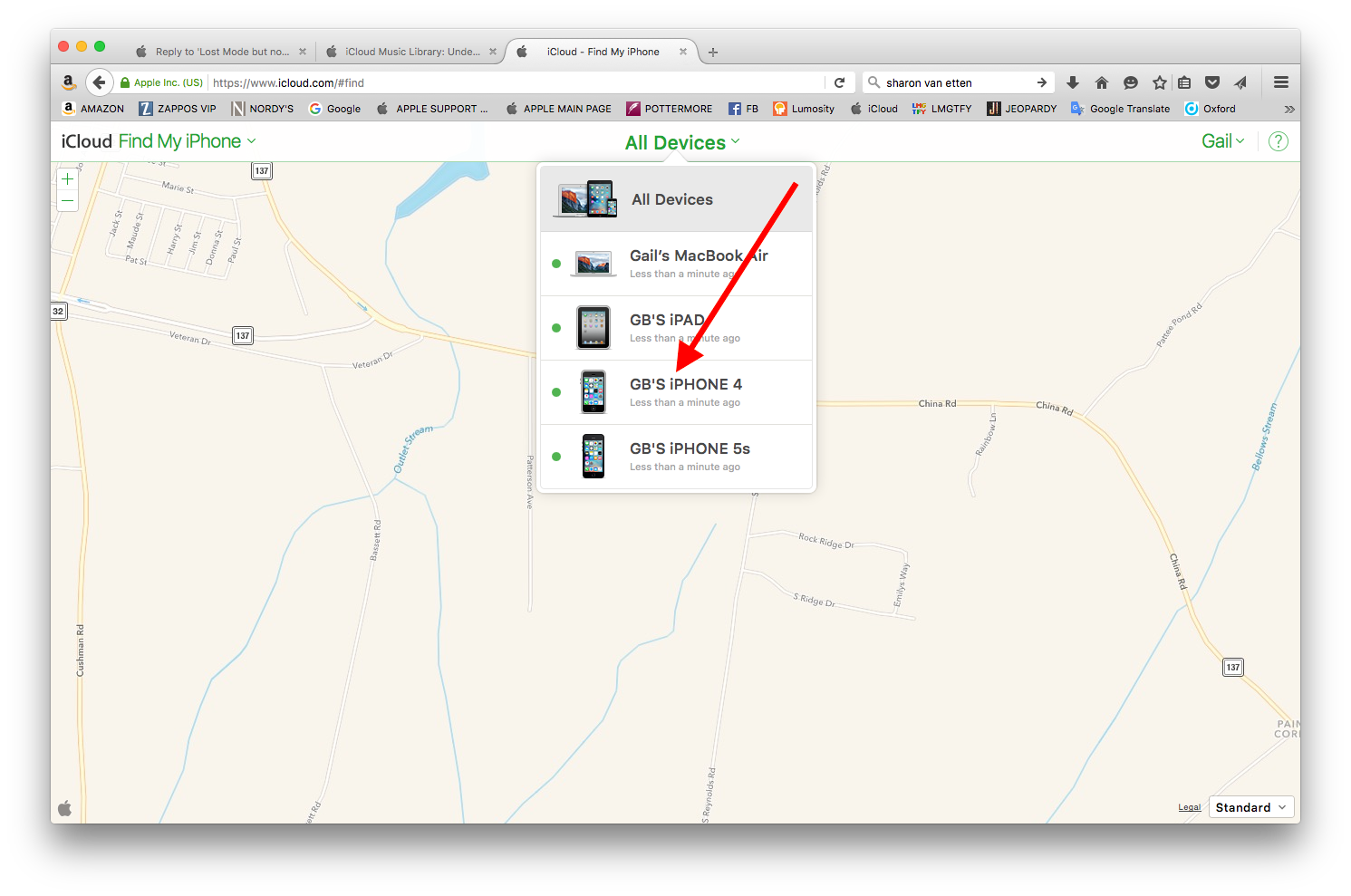
User uploaded file


Put the device offline so I could remove it in the only way I am aware of that one can remove it:
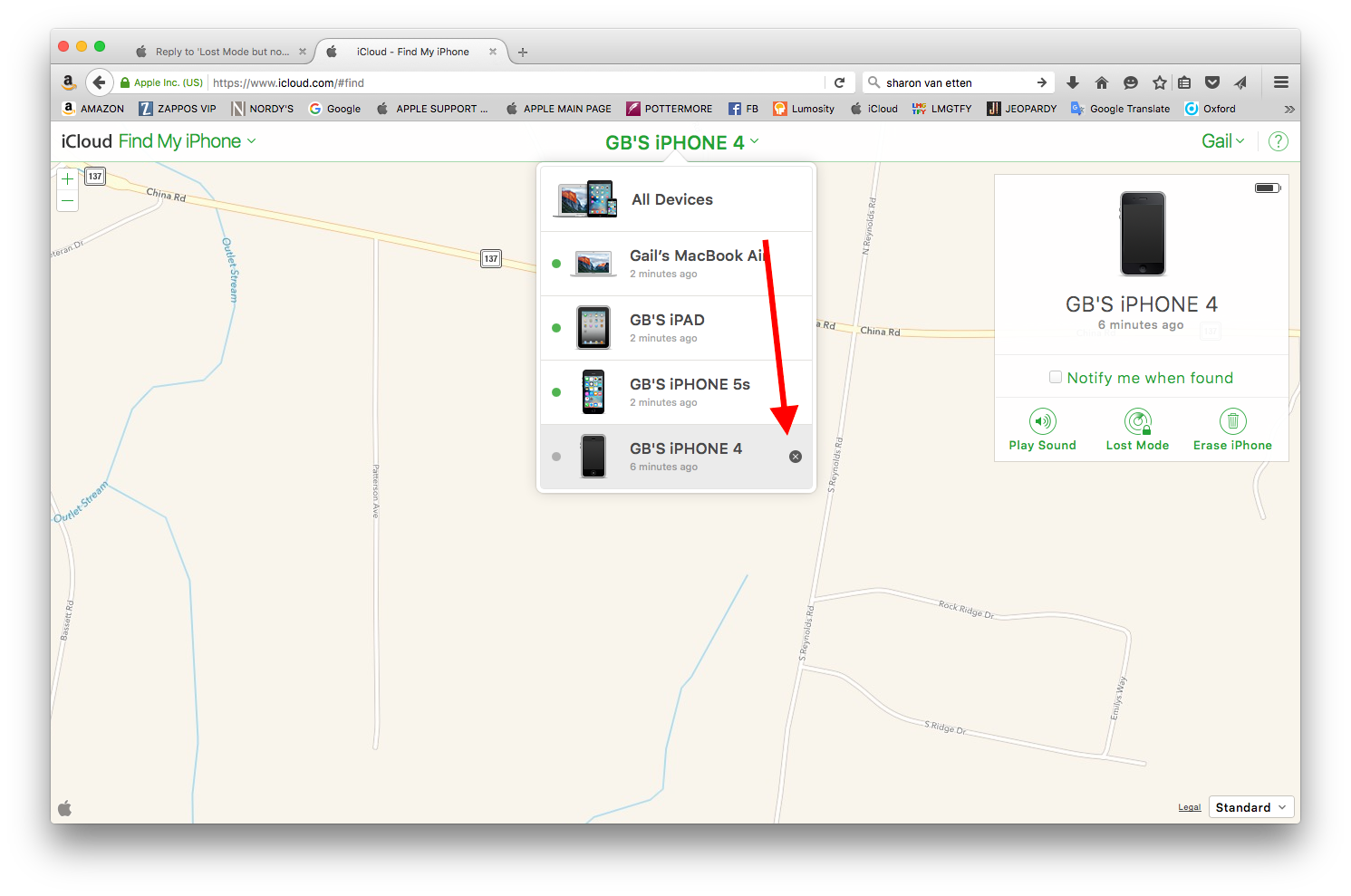
User uploaded file

It is now removed from my iCloud account:
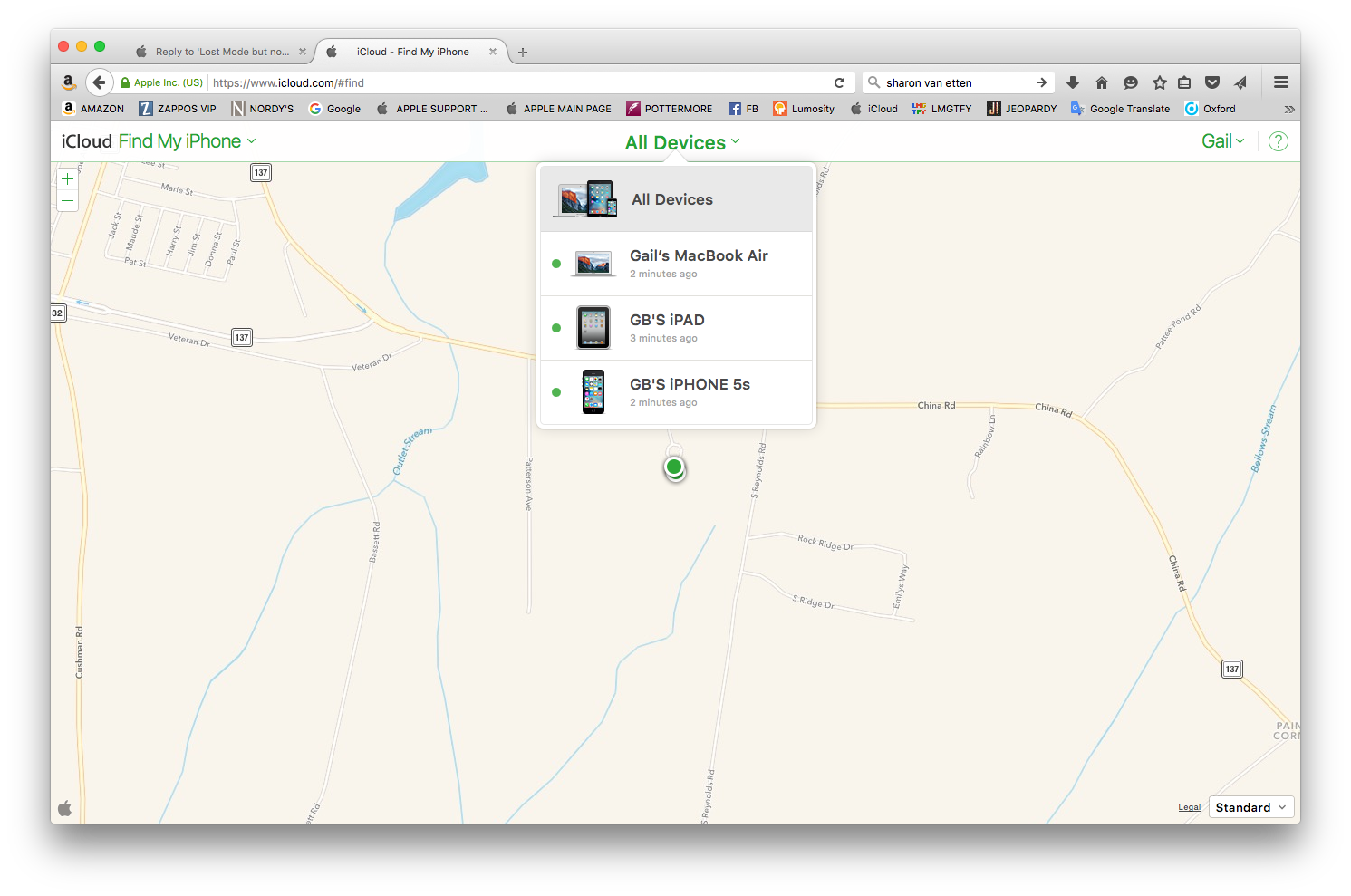
User uploaded file


So, I go to my iPhone as the new owner, and I try to erase it so I can then restore it or set it up as brand new. Here's what happens when I try to do that:
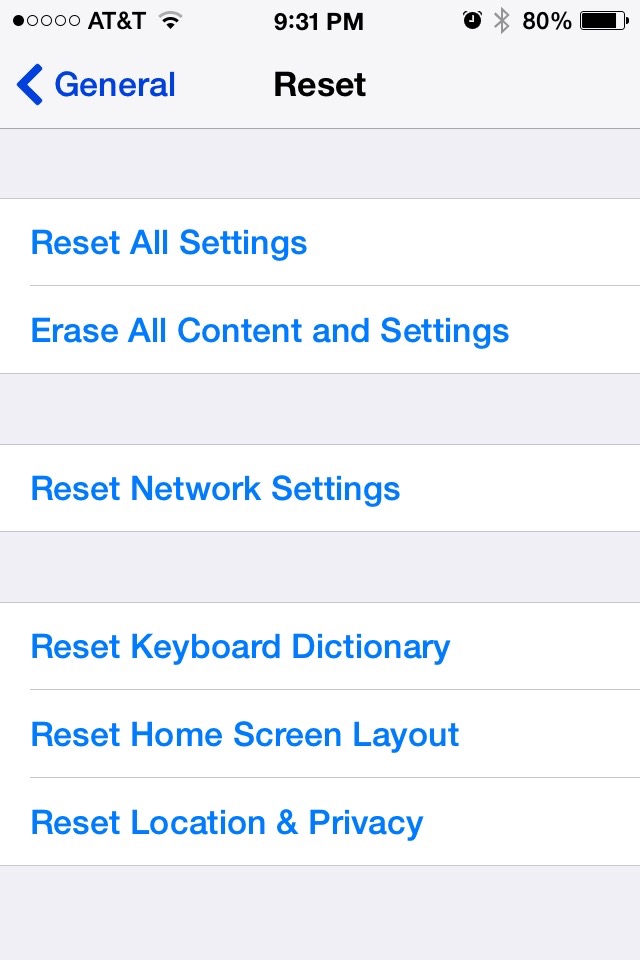
User uploaded file

I click on Erase All Content & Settings so I can set this up as Mary Appleseed's device. Gail has removed it from her iCloud account, and has told me I can now restore it as my own device. So, I click on Erase All Content & Settings, and I get this screen:
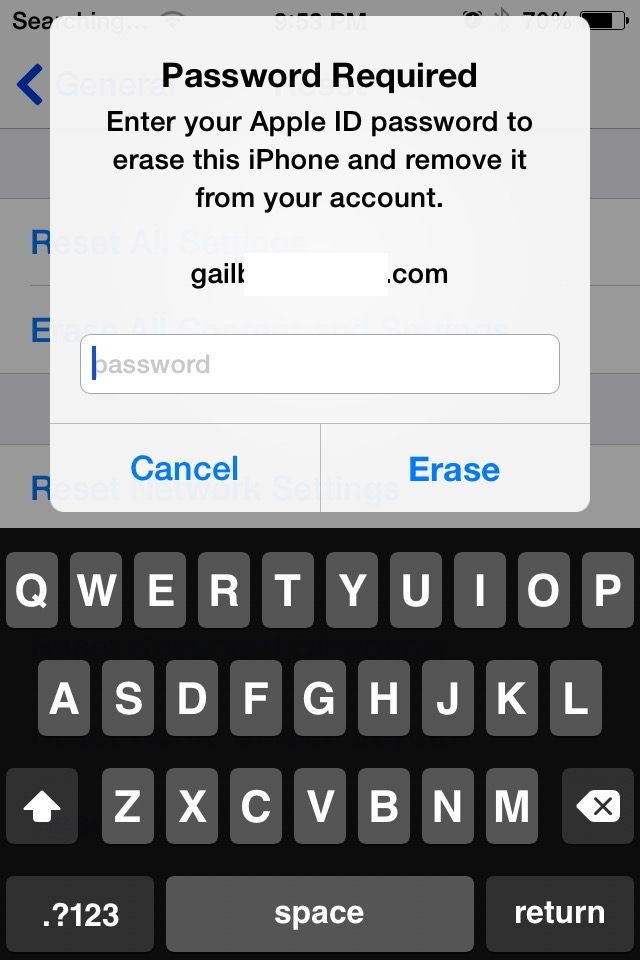
User uploaded file

Now what am I supposed to do? Gail removed the device from her iCloud account as is evidenced above. I go to the device, erase it, and then attempt to move forward so I can set up this device as my own device for Mary Appleseed. But, I can go no further until Gail removes the Activation Lock on the device.

Had Gail Erased the device before removing it from iCloud, I would be able to do exactly what I want to do - which is to set up my new phone. When my device went back online, and I contacted Gail and told her that it was asking for her Apple ID and Password, she checked her iCloud.com account again, and lo and behold, the iPhone 4 was showing up again:
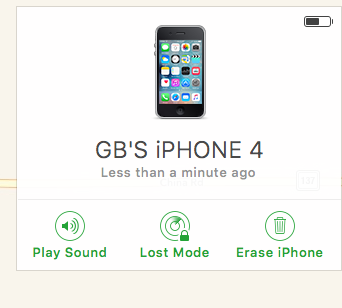
User uploaded file

So, now I can erase the device from my iCloud account (which will require me to type in my Apple ID and password in order for it to turn off Find My iPhone and the Activation Lock as a part of the erasure process). Once the erase is complete, the iPhone 4 will appear as Offline on my iCloud account again, at which point I can remove it, knowing it will not come back....ever....(unless someone signs my iCloud account on to that phone and turns on Find My iPhone (which is not likely).


2. You would get to the same activation screen because he actually didn't remove it (so, if by "remove" it here, you mean he didn't erase it, you would be absolutely correct) - he did it the second time you spoke to him (and if you mean he erased it at this point, that also would be correct)/

Your quote.

"7) While we were chatting on facebook about temporarily giving me his ID & pw he logged into icloud again, did something (we don't know what), and it started to work for me."

The part that is wrong with her version of events after removing from icloud she signs in to the 5s back with her apple id *** correct, because that is the only ID that the device will allow to be signed on at that time, because the Activation Lock is still Active, and until that has been turned off, only the person who put it on, or someone who knows that person's Apple ID and password, can sign in in order to remove it....

which automatically reactivates find my iphone and puts it back in to her icloud - no....the device showed up in iCloud as soon as the device was connected to Wifi. As soon as I selected a Wifi service - long before any signing in takes place.... .

If she were to restore her phone after it was removed she would never have to sign in. Can you clarify what you mean by this sentence? Restore the phone how? Doesn't one have to erase the phone in order to restore it?

Cheers,

GB

Jun 3, 2016 1:35 AM in response to eldavies

Here are some articles about "Lost Mode"

iCloud: Use Lost Mode - Apple Support


And:


How do you turn off or cancel Lost Mode?

You can turn off Lost Mode by entering the passcode on your device. You can also turn off Lost Mode on iCloud.com or from the Find My iPhone app.

copied from: If your iPhone, iPad, or iPod touch is lost or stolen - Apple Support


Or this one: How can I cancel / turn off Lost Mode on iPhone? | The iPhone FAQ

Jun 5, 2016 5:54 AM in response to gail from maine

gail from maine wrote:


I can tell you that my answer is not a theory, but a tested piece of information. I have tested this multiple times in various configurations. Primarily to test an Apple Support article that is confusing at best, possibly just not correct.


The device will reappear on the Find My iPhone app if it is still Activation Locked (i.e., still signed into Find My iPhone), as soon as the device connects to Wifi again.


Simply removing it from the Find My iPhone app without erasing the device first does not disengage the Activation Lock. The only way to remove the Activation Lock from an iPhone remotely is to erase it first (which, when you do that, asks for your Apple/iCloud ID and password). If you do not erase the device first, then simply removing it from your iCloud account does not remove the account from the device.


Cheers,


GB

You are mixing up things, removing account from the device in not necessary - removing from the server is. And that is what is done by removing from account in lost mode or not. Then device can be just restored. What device " "thinks" does not matter, just restore in recovery mode. So if IMEI is showing locked here my "theory" is correct.

https://www.icloud.com/activationlock/


If device shows unlocked on that website, just restore in recovery mode.

If you can't update or restore your iPhone, iPad, or iPod touch - Apple Support

Jun 3, 2016 12:37 AM in response to Ingo2711

Appreciate the quick reply. I was afraid there would be no other solution.


You'll notice that neither of those articles (which I'd already found) discusses the state of being in lost mode but not in iCloud. Nor do they remind users that they must remove lost mode before removing the device from the account. Nor does it appear that iCloud warns the user before removing the device from the account. Bad design through & through.


Honestly I wonder whether even having his Apple ID & pw will fix it, after all Apple doesn't even know it's his anymore since he removed the device. He seems nice, maybe he'll give me the pw. Yikes.

Jun 4, 2016 9:05 AM in response to eldavies

You'll notice that neither of those articles (which I'd already found) discusses the state of being in lost mode but not in iCloud. Nor do they remind users that they must remove lost mode before removing the device from the account. Nor does it appear that iCloud warns the user before removing the device from the account. Bad design through & through.


Honestly I wonder whether even having his Apple ID & pw will fix it, after all Apple doesn't even know it's his anymore since he removed the device. He seems nice, maybe he'll give me the pw. Yikes.


Really no difference whether the device is in lost mode or not. Lost mode is an effort to provide a point of contact to the "finder" The device was/is locked even without lost mode.


If he gave up on the device and removed it from his account, that was his choice and doesn't, IMO, show a poor design at all. The design is to render the device unless to anyone but the owner who put the activation lock on. That is what is happening.


If he knew his passcode, he could provide that to you and get you past Lost Mode, but you'd still be up against the activation lock.


So, having his ID and password and passcode would fix it. How likely is that?

Jun 4, 2016 12:16 PM in response to LACAllen

You misunderstood me. First off, the device had been reset, so no PIN. Turns out he lost it 18 months ago and thousands of miles from where either of us were now.


He was attempting to release the lost device so I could use it, and based on my reading I thought all he needed to do was remove the device from his iCloud account and told him to do that. Instead, the proper method is to take it out of Lost mode FIRST, THEN remove the device from iCloud which I didn't find documented anywhere.


There ended up being a happy end to the story, though I don't fully understand what happened. Unfortunately, we were communicating by text and I don't think English was his native language. He was about to give me his Apple ID & PW (which he was going to change afterwords), and then logged onto his iCloud & fixed the problem. It works now! I sent him a thanks by Paypal.


My theories vary as to what actually happened, not really sure. I'm tempted to experiment with putting the device in Lost mode & then removing it from iCloud, but am too afraid I'll be forever locked out of my own phone to risk it.

Jun 4, 2016 9:44 PM in response to eldavies

What probably happened is that he did remove the device from his iCloud account while it was still in Lost Mode. If you have a device that is still Activation Locked, and you remove it from your iCloud Account, it will no longer appear on that account until that device connects to Wifi again. At that point, it reappears on your iCloud Profile.


What he wanted to do was to take it out of Lost Mode, Erase it, and then remove it from his iCloud account.


A lot of people think that you just remove it and all is good. But again, once the Activation Locked device comes back online again, it will show up in the Find My iPhone app for the owner once again.


Cheers,


GB

Jun 4, 2016 9:20 PM in response to gail from maine

gail from maine wrote:


What probably happened is that he did remove the device from his iCloud account while it was still in Lost Mode. If you have a device that is still Activation Locked, and you remove it from your iCloud Account, it will no longer appear on that account until that device connects to Wifi again. At that point, it reappears on your iCloud Profile.


Wrong. Once removed it will not reappear. As far as I know and have verified at least two times removing device from the account in lost mode disables lock and lost mode, period. Lost mode or not lock is gone. So either guy just tells him that he removed it and screwing with OP. Or it is a wrong guy and wrong account.

This thread has been closed by the system or the community team. You may vote for any posts you find helpful, or search the Community for additional answers.

Lost Mode but not in iCloud

Welcome to Apple Support Community
A forum where Apple customers help each other with their products. Get started with your Apple Account.



