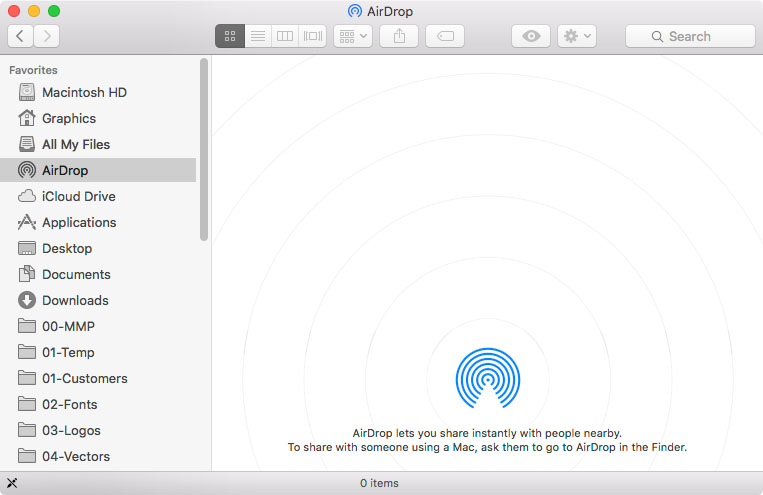
AirDrop "Allow me to be discovered by" not showing

I can open the airdrop folder but the options "Allow me to be discovered by" and "Don't see who you're looking for" are not showing. I tried scrolling down and resizing the window but the options aren't showing up.

User uploaded file

User uploaded file

I am not able to see or be seen by other devices. I have bluetooth and wifi turned on and the imac is compatible with airdrop (iMac 24-inch, Early 2009).


OS X El Capitan 10.11.5

iMac, OS X El Capitan (10.11.5)

Posted on Jul 20, 2016 3:07 PM

Reply
Question marked as Top-ranking reply

Posted on Apr 26, 2018 1:02 PM

Hi,


I've spent hours on finding a solution to this same problem. Here's how I fixed it after combing through hundreds of webpages of "fixes." Seems a PRAM reset does it:


Shut the laptop down not restart. press power and hold the following 4 keys Cmd+Opt+P+R and keep holding for 3 restarts which will happen as long as you keep the keys depressed. make sure it is 3 "ta-da's" and then let go and check Airdrop again once your laptop has started up.


Good luck!

34 replies

Apr 10, 2018 11:05 AM in response to Linc Davis

I too had the lack of choice for AirDrop connections on my wife's mid 2010 17" MacBook Pro as well. Neither recent laptops or iDevices worked. It has the latest 10.13.4 updates using combo updaters. When the last updater was applied, I noticed there was a firmware update applied. I then got my out early 2011 17" MacBook Pro that has all the combo 10.13.4 updates along with the firmware update. None of my iDevices or current laptops would connect to my 2011 MacBook Pro and it had the same lack of information below the AirDrop icon in the open program.


After turning off both computers, I restarted my wife's 2010 and turned AirDrop on for my her computer. I then restarted my 2011 and turned on AirDrop on mine and we had an Airdrop connection between these two elder statesmen of the Apple product line. So the older Bluetooth protocol can not be seen on the newer devices. Truly planned obsolete in a few years.

Apr 12, 2018 8:22 AM in response to mr_se30

Mr se30,


While I can't argue with Apple building in planned obsolescence into all of their products, in this case, this was a bluetooth technology that improved, not because of apple. Apple's first iteration if im not mistaken had something to do with their Bonjour communication. When Bluetooth got an update, apple was able to implement and improve thier AirPlay connection.


Apple should have called it AirPlay 2. so there was an identifier or something, but apple has never really been that bright when it comes to naming new versions of their products.


I hope that helps.


* I noticed i made a mistake in my previous post saying 2011 and newer, (should have said older)

Apr 24, 2018 4:29 PM in response to ErickRios

From lclev over at: http://www.mac-forums.com/macos-operating-system/317780-airdrop-discovered-optio ns.html

Okay reporting back. I did some research and according to Apple, air drop will not work between an iOS 8 device and a laptop earlier than 2012 even if it is running OS X 10.


In order to transfer files between a Mac and and an iPhone, iPad or iPod touch, your iOS device needs iOS 7 or later installed and your Mac needs to be a 2012 or later model.


You can transfer files between two Mac computers but you need one of the Mac models listed below and OS X Lion or later.


MacBook Pro (Late 2008 or newer)*

MacBook Air (Late 2010 or newer)

MacBook (Late 2008 or newer)*

iMac (Early 2009 or newer)

Mac Mini (Mid 2010 or newer)

Mac Pro (Early 2009 with AirPort Extreme card, or Mid 2010)

*The MacBook Pro (17-Inch Late 2008) and the white MacBook (Late 2008) do not support AirDrop.


bonds1972 - I did try it on my MB Pro early 2011 and I had the same screen you had show up when the only devices were iOS devices. When I tried it between my MB Pro 2011 and MB Air 2013 it worked but the 2011 took a while to see the 2013. I don't see this as being a good way to transfer files for the 2011.


Lisa

Update - I need to clarify what happens with air drop on an older computer.


In order to use it both have to have Finder open. AirDrop has to be selected on both. On my 2013 MB Air I have to select at the bottom "Don't see what your looking for?" A drop box appears with the selection" Search for an Older Mac" When I click on that they "see" each other. I open a second Finder window on both so I can drag and drop files. The files appear in my downloads folder.


Lisa

Jul 20, 2016 3:48 PM in response to ErickRios

AirDrop system requirements

To send items to an iPhone, iPad, or iPod touch, or to receive items from those devices, you need a 2012 or later Mac model with OS X Yosemite or later, excluding the Mac Pro (Mid 2012).

To send items to another Mac, you need:

  • MacBook Pro (Late 2008) or later, excluding the MacBook Pro (17-inch, Late 2008)
  • MacBook Air (Late 2010) or later
  • MacBook (Late 2008) or later, excluding the white MacBook (Late 2008)
  • iMac (Early 2009) or later
  • Mac Mini (Mid 2010) or later
  • Mac Pro (Early 2009 with AirPort Extreme card, or Mid 2010)

Learn how to identify your model of MacBook, MacBook Pro, MacBook Air, iMac, Mac mini, or Mac Pro.

This thread has been closed by the system or the community team. You may vote for any posts you find helpful, or search the Community for additional answers.

AirDrop "Allow me to be discovered by" not showing

Welcome to Apple Support Community
A forum where Apple customers help each other with their products. Get started with your Apple Account.