Why is iTunes so bad?

It has downloaded update after update over the past six months. This alone is very irritating.

I purchased an iPhone because Blackberry has stopped making phones with proper keyboards.

It took three tries to even connect the iPhone to iTunes.

Then it tried to synch my music collection.

It continually froze and hung up and had to restart the synch.

This took about three times longer than necessary.

Why can Apple not make a stable version of iTunes that actually works?

Desktop PC-OTHER, Windows 10, 4 GHz AMD FX Quad Core, 16 GB RAM

Posted on Mar 22, 2017 9:13 AM

Reply
30 replies

Sep 13, 2017 4:01 AM in response to Mindzeebeez

Apple hardware is great but the software is the worst I have ever used. Logic Pro is a nightmare and I now use Adobe for image / video editing. Regarding iTunes, it is the entire reason I am thinking of boycotting iphones all together. It changes everytime I use it. I've just spent 2 whole hours trying to upload an album because everytime I did, it appeared on my phone as 12 seperate songs (this is after running it through a tag cleaning app) After deleting and re-uploading four times, I restarted my computer and phone. Tried it again and it finally uploaded as one complete album. Unfortunately there was a song missing so I uploaded that, tagged it up etc, and it showed up as a seperate song. I deleted the whole lot and tried again, and hey presto, it went back to uploading as seperate songs. I got there in the end, by doing the same thing everytime. And everytime it would turn up different results. Unstable isn't the word. If Apple ever decide to sort out itunes, I may return, but for now, I'm heading towards a better brand. And I will do a youtube video demonstrating how utterly disgraceful itunes is before I throw my 5s at a brickwall in furious anger...

Mar 17, 2018 4:11 AM in response to Ben Seput

Ben Seput wrote:


Even just to answer this question, I had to verify my trust in my computer again, which I've done hundreds of times by now, to sign in to apple.com.

You should get to the bottom of that - why are you having to do this? I'm still on Windows 7, so my experience is not a direct comparison to yours, but if all Windows 10 users were having this issue, we'd know about it here in these discussions. I'm not aware that it's that big a problem. I suggest you start a new discussion on that topic.


Ben Seput wrote:


I'll tell you what, iTunes gets worse and worse over time.

It's certainly not improving, I'll give you that much. One of Apple's greatest failures is that features don't necessarily get removed completely, they simply get moved somewhere else - and consequently hidden, because Apple don't tell us where the feature has been moved to. It's frustrating trying to find them again.


However...

Ben Seput wrote:


Now it's this ridiculous system of playlists and limited categories that can't adapt to things being entered in different ways.

You don't have to create, have, or use any Playlists at all. None.


You can ignore the standard built-in Playlists should that be your choice.


Playlists are for your convenience. Personally I do use them, but not in the "modern way". This modern way is that many people seem to think that everything has to be in a Playlist and that a song cannot be played unless it is. (I've even come across one music programme in which, to play just one song, it has to be in a playlist, of that one song.) There is no such requirement in iTunes or on iPods and iPhones.


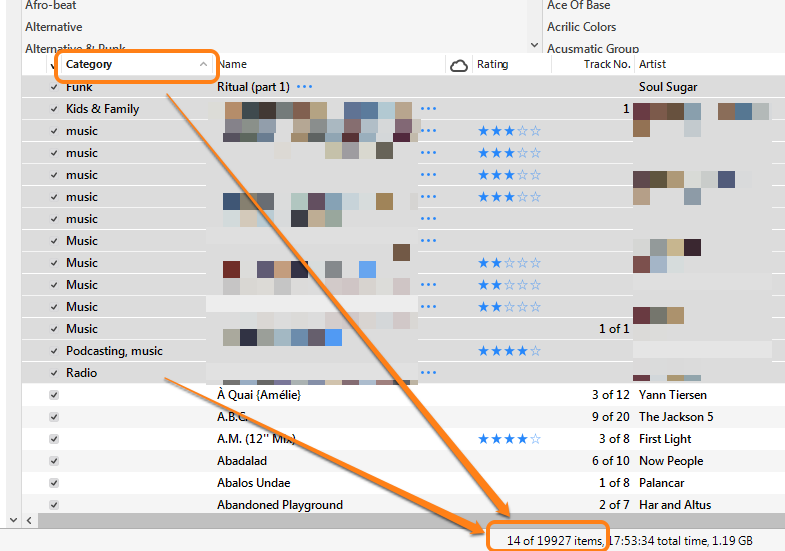
I'm not sure what you mean by "limited categories", iTunes doesn't use the term "categories", except as a field that the users cannot modify. Here are the 14 songs in my Library that use Category:
User uploaded file


Out of almost twenty thousand songs. (And most of those 14 are Podcasts that I've manipulated {adapted, to use your phrase} into my Songs Library.)


There are several flexible ways to "categorise" your music:

  • genre - you can change any song to a different genre and even add your own*
  • grouping - you can add your own word or phrase
  • comments - again, you can add whatever text you want

You can then use Playlists to further group songs together - so straight away, there's a use for Playlists.


* If you subscribe to Apple Music, that may change the genre back to the one originally allocated, but that's because the user is effectively playing someone else's music.


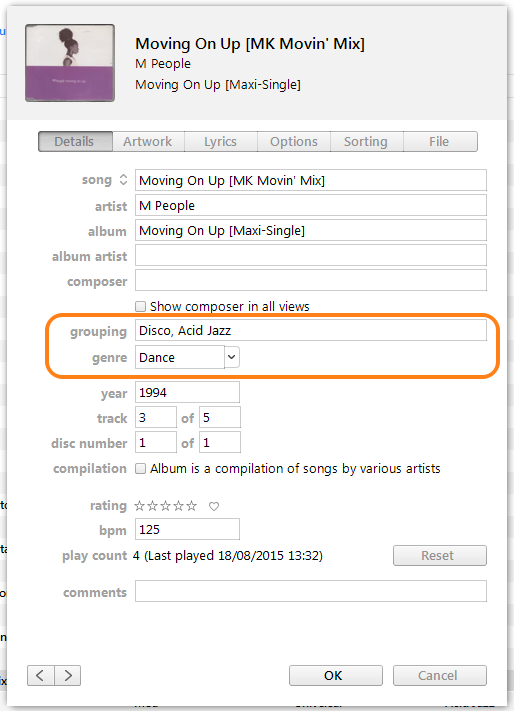
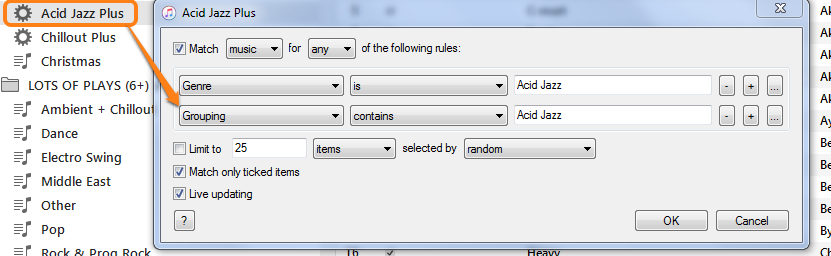
Back to my example; I have some songs that I would like to be allocated with a second genre, but it's not possible to allocate two genres to a song. To get round this limitation, I type the second genre into the comments field and then create a Smart Playlist that includes all of the first genre and any song with the second genre in the comments field.


For example, the song in this screenshot below:
User uploaded file

the song is listed as genre-is-Dance. But I also want it to be in the same list of songs as the Acid Jazz genre. Using my method means that in my Smart Playlist (named Acid Jazz Plus), all Acid Jazz songs and the song Movin' On Up are listed together. But Movin' On Up also appears in the Dance genre as well.


Instead of playing the genre = Acid Jazz (which has only Acid Jazz songs), I play the Playlist = Acid Jazz Plus, which includes Movin' On Up as well.


Here's the Smart Playlist's rules:
User uploaded file


Ben Seput wrote:


  1. I don't doubt that other platforms have their problems, but perhaps they've caught up as Apple's user interface quality has dropped so dramatically.
  2. All that said, can anyone suggest a music program that is still compatible with iphone?
  3. Or, in lieu of that, a decent combination of phone/platform? I know a lot of people have good things to say about android.
  1. You're correct, other platforms do have their own problems. I'm not convinced that anyone else has caught up.
  2. No, to add music to your iPhone, you need iTunes (or directly from the iTunes Store)
  3. You have answered your own question in point 1, above. (I have an Android device. My music is on my iPod, not the Android.)

I do use my Android device for all audio-only Podcast listening. Apple's Podcasts app is dreadful.


Mar 20, 2018 3:35 PM in response to E the P

Strange, then, that my iTunes library (media copied from CDs, digital downloads from Amazon, etc.) behaves pretty much as its always done, with none of the apparent issues reported on this thread. What's the difference, I wonder ... maybe, just maybe its related to the fact that I don't use iTunes in conjunction with an iPhone or any other iOS device. It seems to me that the finger-pointing may be in the wrong direction: iTunes continues to work just fine as a media organizer, but isn't fully integrated with iOS.

Sep 5, 2017 4:13 AM in response to Mindzeebeez

iTunes is the worst piece of software I have ever used - the search facility is infuriating. It keeps defaulting to my library when I am trying to search for apps, making everything a 4 click process to search the ****** site - so now I don't use it unless I have to. I hate it with a vengeance - it duplicates content everywhere, moves things about - I'm ending this rant now, but suffice it to say it is putting me off Apple completely.

Mar 16, 2018 3:06 PM in response to Mindzeebeez

Even just to answer this question, I had to verify my trust in my computer again, which I've done hundreds of times by now, to sign in to apple.com. I'm running windows 10 (kind of accidentally, I wish I'd left it at windows 7, but it's too late to revert now) on an i7 PC and to update itunes I have to go through an entire rigamarole of manually upgrading different files...so of course I skip a lot of updates in between because who has time for all that malarky?

I'll tell you what, iTunes gets worse and worse over time. It used to be pretty easy to see what was in your library and organize it how you wanted to. Now it's this ridiculous system of playlists and limited categories that can't adapt to things being entered in different ways. Like our society, it just continually slips deeper into the idiocracy.

I've been an apple user since the 90s, and I'm seriously considering jumping ship at this point. I don't doubt that other platforms have their problems, but perhaps they've caught up as Apple's user interface quality has dropped so dramatically.

All that said, can anyone suggest a music program that is still compatible with iphone? Or, in lieu of that, a decent combination of phone/platform? I know a lot of people have good things to say about android.

Mar 21, 2018 6:05 AM in response to hhgttg27

hhgttg27 wrote:


Strange, then, that my iTunes library (media copied from CDs, digital downloads from Amazon, etc.) behaves pretty much as its always done, with none of the apparent issues reported on this thread. What's the difference, I wonder ...

I wonder if problems arise when users buy music directly on their phone (so it's not in their Library when they Sync the phone with iTunes), rather than through iTunes on their computer, or/and they use Apple Music.


We've seen some confusion when users have things like Apple Music and songs in the cloud, and then wondering why those songs don't play unless they are connected to the internet. I'm sure you know the answer to this hhgttg27, but of course, if a song is in the cloud, or being streamed as Apple Music from revers, the it isn't on the iPod itself, so it will only work when connected to the internet.


I don't use Apple Music, or iCloud and my only iTunes Store purchases are through the iTunes programme on my computer. I do however, put my music onto an iPod Touch, but I too, have not had the issues reported here.

Sep 13, 2017 5:47 AM in response to hedwind

hedwind:

Although it may be too late to help you (as you're going elsewhere), I will mention that the cause of songs on albums being separated is usually because whoever tagged them (and it wasn't Apple) did a rubbish job!


If an album is a compilation - which is defined as an album with tracks by different artists, then the tagging information will need to have the following fields correctly completed:

  • (Once imported into iTunes, select all the songs on the album and select Edit/Get Info/Details)
  • the Album Artist field needs to have "Various Artists" in it
  • the Compilation flag needs to be ticked

User uploaded file


  • Note that the Artist field (different field to the "Album Artist") contains the word "mixed" because there are various artists names in it.
  • And needless to say, the Album Title needs to be exactly the same for each song.


Sometimes the tagging information has not be correctly completed, for a variety of reasons. When importing from CD, I always check the Compilation flag field before importing and the Album Artist after importing to make sure they are correct:


Import CD window:

User uploaded file


As an aside, I actually think iTunes is very good, I've been using it successfully for many years. What is rubbish is Apple's lamentable attempts to explain the frequent changes to us, the users. Perhaps the oddest thing they did a few years ago was hide the top bar menu - you know, the one with the Help on it.

User uploaded file


As you can see, they put it back.

Mar 22, 2017 6:20 PM in response to Mindzeebeez

I tried the following situation 9 hours from first trying to "sync".

Changed the name of one of the song greyed out on the computer.

Tried to copy files again.

No luck again.

Then I tried selecting all the music on the iPhone in blue, right click and deselecting it (removes all the ticks).

It begins "syncing" again.

when it has finished, I right click, control-A and select everything again. everything ticked.

then it stats "syncing" again.

This is much better. I have approx. 2,000 tracks and now only about 10% are greyed out.

It was 50% before.

Jan 28, 2018 5:33 AM in response to Mindzeebeez

Wait! There are yet too much steps to follow!!. Just an example (without any sync of anything): Add some music to itunes in a new playlist, then got to view, then select "view as songs" (yes, I wonder!) then select as you wish album or artist or whathever… Pure logic!. I don't want to tell you that you don't need to be the owner of the music because that is some legal matter for sony and Apple… hahahahaha. New ipods?

Mar 19, 2018 8:27 AM in response to the fiend

Thanks for your suggestions...after messing around with the view options I found that organizing by songs sorted by artist is fairly close to the old itunes layout. Now answer me this: can you manipulate the iphone/itunes layout so you can look at the songs in a list, and see the length of each song? It used to just be in line with each song. I've searched all through the phone settings, there are basically no view options there. Maybe you're right, I've just gotten sucked into the playlist scheme and I just need to engineer a different system for organizing it. I don't know why I have to repeatedly verify my phone to my computer.

Mar 19, 2018 1:00 PM in response to Ben Seput

Ben Seput wrote:


Now answer me this: can you manipulate the iphone/itunes layout so you can look at the songs in a list, and see the length of each song?

On the iPhone:

it's not possible (as far as I know) to see a list of songs with their individual playing times. Perhaps, if you have radio version, remix version and boringly-long versions of songs, the answer is to rename them by adding "radio version", "remix" or "tediously long version" to the title. 😁 (This is not that easy if using Apple Music. 😟)


In iTunes:

Ben Seput wrote:


...after messing around with the view options I found that organizing by songs sorted by artist is fairly close to the old itunes layout.

There have always been many ways to look at your Library and that's still the case today. As I don't know precisely how you were viewing your Library in the past, I'll mention my preferred view, which allows me easy access to a list, with individual song times (if you open the picture in a new window, it should be much larger and easier to see):

User uploaded file

In my view, I'm looking at the Songs View, with the Column Browser displayed (see screenshot below):

User uploaded file

  1. Songs view
  2. View (top bar menu)
  3. Column Browser (show)
  4. Select which columns (my choice of genres, artists and albums makes easy browsing, see later on). [By grouping compilations together, I can quickly jump to those various artists compilation albums as well.]
  5. The chosen columns (Albums is off-screen)


Here's a closer look at the section with the ringed column (Time) from the first screenshot:

User uploaded file


In the shot above (note that this is quicker to do, than to read. Once you have read the following, try this view for yourself and you will see how easy it is);

  • I'm in the Songs View (1st click)
  • All genres are selected, which means all artists are listed in the Artists column (that is, all artists with their own album)
  • (Notice the Compilations in the Artists column. Selecting Compilations would then show only compilation albums (various artist albums) in the Album column to its right. For now though...)
  • By selecting the artist Abjective (2nd click), only the three albums I have by that artist are listed in the Albums list
  • By selecting the album Into The Labyrinth (3rd click) the browser below the columns shows only that album
  • Notice the individual track times for each song. These columns can be added and moved left and right to give the precise view I have chosen
  • To add the Time column, right-click on the header bar (the column header) and choose Time from the context menu that appears

User uploaded file


Then simply left-click/drag the Time column to the position you want


The big advantage this view has over most other all other views is that it's an easy three clicks to narrow down the selection (check the bullet points above, it really is just 3 clicks - and that includes switching to the Songs view).

  • Not only that, but if you look carefully at the first screenshot, you may notice that the list of songs is in reverse Last Played order, not artist order. (I have a good reason for this view.)
  • My three clicks (or possibly two and a bit of scrolling) have excluded the recently played songs that I'm not currently interested in
  • If I wanted to see the times for the songs played recently, I don't even need to sub-select the artist

  • As an example of the difference between views, if I look at the Artists View instead and select the artist Abjective, only one album is listed; the Into The Labyrinth. The other two albums, Fields and Waves, are compilation albums, so the they do not appear under the Artist-is-Abjective list, because each album is various artists, not just Abjective.


    You should be able to create a simple and quick view for yourself by reading my suggestion and then modifying it to suit you.

    Mar 22, 2017 2:12 PM in response to Mindzeebeez

    Sorry to multiple post. I now have another terrible problem, iTunes finally stopped synching after about four hours of constant interruptions whilst the iPhone came disconnected and rebooted, and iTunes actually locked frozen once too! But horror of horrors I now have horrible greyed out tracks with dotted circles next to them. WTAF!! I do not want dotted circled and greyed out tracks, I actually want to play the music I have legally purchased on my legally purchased iPhone please! So looking on other Apple forum topics I have deleted all my music from my iPhone and tried to synch all over again. 6 hours later....

    It makes me wonder is Apple trying to tell me something? Like, I have crap taste in music, or what?!

    Or maybe its because I have a PC. Like, PCs are so less well built than Apples that they go down with a breath of wind outside. Or a neighbour coughing.

    This thread has been closed by the system or the community team. You may vote for any posts you find helpful, or search the Community for additional answers.

    Why is iTunes so bad?

    Welcome to Apple Support Community
    A forum where Apple customers help each other with their products. Get started with your Apple Account.

