
iTunes could not connect to this iPad. The value is missing.

For some reason, my wife's iPad has become disabled. When I connect via USB, I get a dialog asking if I want to allow the Mac to access the iPad. When I click yes, I get


"iTunes could not connect to this iPad. The value is missing."


I've tried rebooting the iPad, but I get the same sequence of messages.


Any ideas on what to do? Thanks.

iMac, Mac OS X (10.7.1)
Posted on Apr 28, 2017 5:54 PM

Reply
Question marked as Top-ranking reply

Posted on Mar 8, 2018 8:48 PM

https://www.tenorshare.com/itunes-tips/fix-itunes-could-not-connect-to-iphone-th e-value-is-missing.html

Restore iOS Device in DFU Mode

If iPhone won't connect to iTunes and says value is missing, you can put the device into DFU mode first. Here is what you need to do.

  • 1. Shut down your device completely and connect with a computer.
  • 2. Hold down the Power and Home button for about 10 seconds.
    On iPhone 7/8/8 Plus, replace the Home button with Volume Down button.
    On iPhone X, it’s Side button and Volume Down button.
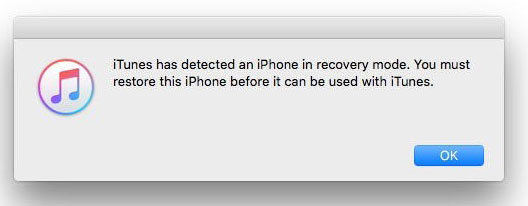
  • 3.Let go the Power button but still keep holding the other button for 3 seconds. If a message pops up saying iTunes has detect your device in recovery mode, which means you are in DFU mode now.

User uploaded file


When iTunes successfully recognize your iPhone or iPad, go ahead and continue what you need do in iTunes.

17 replies

This thread has been closed by the system or the community team. You may vote for any posts you find helpful, or search the Community for additional answers.

iTunes could not connect to this iPad. The value is missing.

Welcome to Apple Support Community
A forum where Apple customers help each other with their products. Get started with your Apple Account.