concerns re downloading Gimp to OS X

I wish to use a free photo manipulation program and want to know if Gimp is compatible with my OS X Serra(10.12.6). I have heard that I need to have XQuartz for it to work properly. What is that and is this true. Any other suggestions would be appreciated.

iMac, iOS 10.1

Posted on Nov 7, 2017 12:08 PM

Reply
37 replies

Nov 8, 2017 5:09 AM in response to Laflin

Laflin wrote:


Sorry to be an alarmist but I got another message just prior to downloading Gimp 2.8.18 which says this 'type of file can harm your computer'.


Just to be clear, does it resemble the following dialog?


User uploaded file


Be sure to use the authentic GIMP version obtained from https://www.gimp.org/. Don't obtain it from any source other than that one.


To open it you must follow the instructions under "How to open an app from a unidentified developer and exempt it from Gatekeeper" in OS X: About Gatekeeper - Apple Support.


If you want to discuss concerns about obtaining apps from identified developers vs. unidentified developers we could do that but it's a whole new subject. For this limited example, that version of GIMP is safe to use.

Nov 8, 2017 10:44 AM in response to Laflin

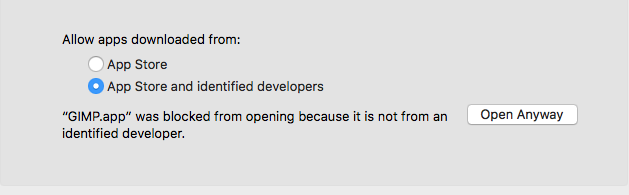
go to >System Preferences/Security & Privacy

click the general tab

click the radio button for Allow apps download from and click "Open Anyway"

this will remove the warning then install the software after hassling you about the fact it was dowloaded from the internet
User uploaded file

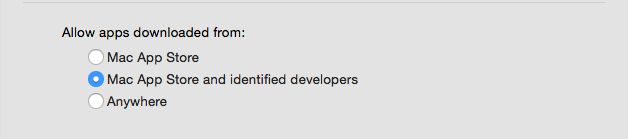
if you have OS 10.11 or earlier there will be an option to install software from anywhere
User uploaded file

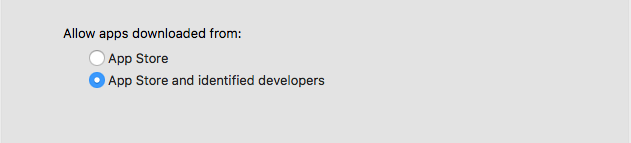
this was removed in OS 10.12 but Apple could only explain the exact reason
User uploaded file

if you need to remove this warning outside of this method you have one of three options:

1) ask Apple to make it go away (apple.com/feedback)


2) ask, demand or threaten the developers of GIMP to give up developing software on their terms and conform to whatever Apples dictates is required to allow them the grace of Gatekeeper not to go ballistic when you try to install software that millions of people have already used for years but that they can't bilk you for $$$ on the App Store for.


3) reverse engineer OS 10.12 or later, which is a violation of the OS X EULA and the terms of this forum.


Thanks for using the Apple Support Forums, this is a volunteer effort. Have a dabba-do day.

Nov 8, 2017 9:22 AM in response to Laflin

ignore the message. it's Apple saying the developers of this product never agreed to our terms and we wont recognize them until they conform. If you can get past that concept you can start using some really great software or you can continue to be fearful of a CYA tactic from Apple. Do you have a warning on your car visor about the Airbag potentially killing? Admittedly this is not the purpose of an airbag but it could happen, however has that warning caused you to hesitate driving or being a passenger in a motor vehicle or to have someone remove the airbags?


GIMP has been used by millions of people for years both amateur and professional who have Macs and/or Windows and/or Unix and many of those users have favorable things to say about it.


I wrote this, if you read it take it with a grain of salt but I have reported some serious bugs with Gatekeeper and Apple has responded on some of them and made fixes to others.

Anatomy of OS X's Gatekeeper and Phony (and legitimate) Installers


also FWIW I got this message trying to install OS X 10.13.1 update which I transferred from one mac to another over bluetooth. so Gatekeeper was now saying Apples own software was potentially dangerous because it could not identify the developer. Gatekeeper is a useful addition to OS X but it is not without it's flaws.

Nov 7, 2017 12:29 PM in response to Laflin

You heard wrong. GIMP has been a native OS X application for several years now. I have GIMP 2.8.22 running on High Sierra 10.13.1. Works like GIMP should, though initially it will take its sweet time reading in fonts and loading data files. Because it is not a Mac App Store application, once you have it installed into your /Applications folder, right-click on it and choose Open to get it one-time verified. Then it will work as a normal application via double-click.


The free Inkscape application, on the otherhand, still requires XQuartz.

Nov 8, 2017 2:24 AM in response to Laflin

From where do you try the download? Please never download from an aggregate site (like Softonic, CNET and so on).

Only from the developer sites.

Gimp is a very good software for photo editing (comparable to Adobe Photoshop), but has a "difficult" user interface.

https://www.gimp.org/

The easiest photo handling apps are "Luminar 2018" (available mid november) and "DxO Photolab" (both paid), with AI presets. Others are following fast now since Adobe switched everyting to cloud abos. Adobe is too expensive, only with cloud abos, a bit aged presets.

Nov 8, 2017 3:50 AM in response to Laflin

I just downloaded from the site I gave (not using the "torrent" but the direct download), and it downloaded correctly (gimp-2.8.22-x86_64.dmg) and installed correctly: double clicking the .dmg file, moving "Gimp" to the applications folder.

No such message here.

You probably have an antivirus app or another bad safety tool installed.

Please go to

etrecheck.com

read about the etrecheck app, download it, run it, it produces a anonymised list. Post that list here and we will probably see what is the cause of the remark that you get when trying to open Gimp.

Nov 8, 2017 4:52 AM in response to Laflin

Laflin wrote:

...' this type of file can harm your computer'. I don't feel comfortable with that so have not accepted it. What do you think?

the reason you are seeing this is the developer has not signed up and verified themselves with Apple. There may be legitimate reasons why, one is they do not feel comfortable accepting Apples terms to do so.

GIMP as a long history as a legitimate application, and the keyword in that warning is can harm. In recent months there have been compromises on 3rd party apple software that has been replaced with forged code and redistributed, however the two cases I've read about were for torrents which generally are used to distribute copyrighted information, its not out of the question a similar attack could happen with something that is willingly given away without the developers knowledge, but as for legitmate GIMP is legit, so is Blender, and Open Office, all of which are hugely popular free packages that substitute the cost of Photoshop, Maya and Microsoft Office respectively and all of which have developers who declined to submit to Apples developer policy regulation.

This thread has been closed by the system or the community team. You may vote for any posts you find helpful, or search the Community for additional answers.

concerns re downloading Gimp to OS X

Welcome to Apple Support Community
A forum where Apple customers help each other with their products. Get started with your Apple Account.



