cant access my music on iphone 7plus

I have purchased a new IPhone 7 Plus. I used the SIM card from my previous phone 5S to activate my new phone. It works fine, however, I can not access my itunes music library on the new phone.


I tried to sync my new phone in ITunes, but the music section is greyed out and won’t let me access my playlists or any music.


I have an Apple Music account and I was trying to access my music on this app on my phone but my playlists are empty.


Can anyone suggest what I can do to access my music? Thanks.

iPhone 7 Plus, iOS 11.2.5

Posted on Feb 7, 2018 12:43 PM

Reply
Question marked as Top-ranking reply

Posted on Feb 8, 2018 12:06 PM

Hey, diona54.

I appears that, after setting up your new iPhone 7 Plus, you're not able to play music from the Music application on your iPhone as your music doesn't appear. You've tried to sync your music through iTunes on your computer, but it's not being transferred. You're also a member of Apple Music and I'm happy to help.


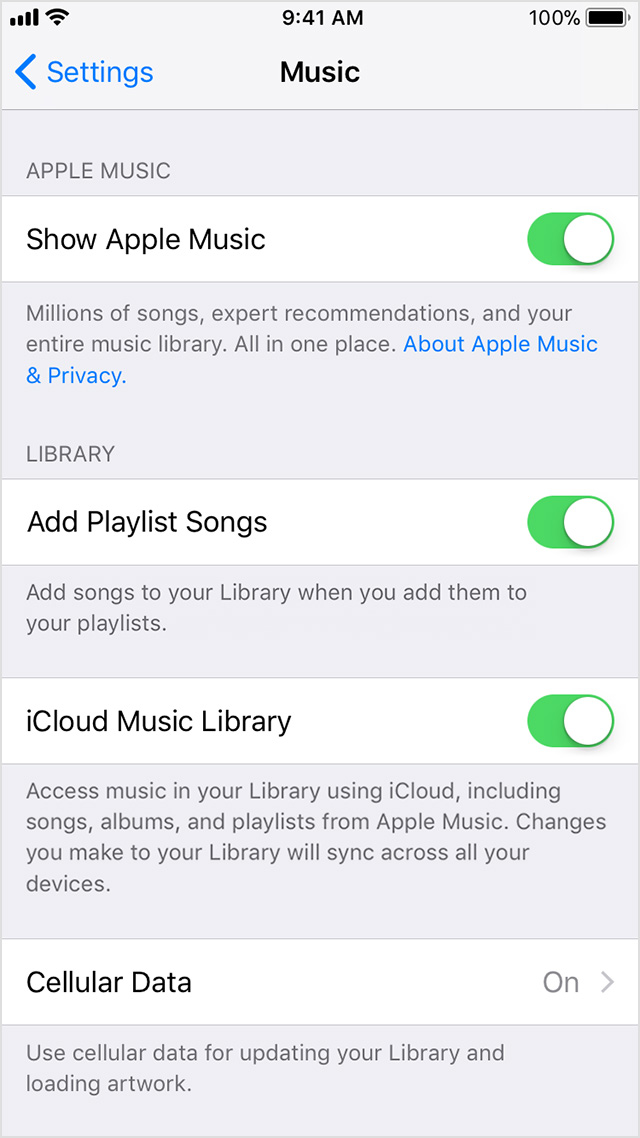
Turn on iCloud Music Library -- As a subscriber to Apple Music, iCloud Music Library will automatically sync your songs and playlists. Tap Settings > Music and make sure "Show Apple Music" and "iCloud Music Library" are turned on.

Turn on iCloud Music Library

Make sure that you're signed in to all of your devices with the Apple ID that you use for your Apple Music subscription. Then follow these steps to turn on iCloud Music Library.

On your iPhone, iPad, or iPod touch

  1. Go to Settings > Music, and tap iCloud Music Library to turn it on.
    User uploaded file
  2. If you already have music on your device, you're asked if you want to keep the music that's on your device.

If you choose Keep Music*, the music from your device adds to your iCloud Music Library.

If you choose Delete & Replace, the music on your device is replaced with the content from your iCloud Music Library.

Let me know how that goes.


Take care!

Similar questions

3 replies
Question marked as Top-ranking reply

Feb 8, 2018 12:06 PM in response to diona54

Hey, diona54.

I appears that, after setting up your new iPhone 7 Plus, you're not able to play music from the Music application on your iPhone as your music doesn't appear. You've tried to sync your music through iTunes on your computer, but it's not being transferred. You're also a member of Apple Music and I'm happy to help.


Turn on iCloud Music Library -- As a subscriber to Apple Music, iCloud Music Library will automatically sync your songs and playlists. Tap Settings > Music and make sure "Show Apple Music" and "iCloud Music Library" are turned on.

Turn on iCloud Music Library

Make sure that you're signed in to all of your devices with the Apple ID that you use for your Apple Music subscription. Then follow these steps to turn on iCloud Music Library.

On your iPhone, iPad, or iPod touch

  1. Go to Settings > Music, and tap iCloud Music Library to turn it on.

    User uploaded file
  2. If you already have music on your device, you're asked if you want to keep the music that's on your device.

If you choose Keep Music*, the music from your device adds to your iCloud Music Library.

If you choose Delete & Replace, the music on your device is replaced with the content from your iCloud Music Library.

Let me know how that goes.


Take care!

This thread has been closed by the system or the community team. You may vote for any posts you find helpful, or search the Community for additional answers.

cant access my music on iphone 7plus

Welcome to Apple Support Community
A forum where Apple customers help each other with their products. Get started with your Apple Account.