Hi dottie18,
I understand that you'd like to know more about what happens when you delete a photo from your iPhone that is using iCloud Photo Library. I'm happy to provide some help for this.
The following article explains that deleting it from one device will delete it from each device using iCloud Photo LIbrary:
Get help with your iCloud Photo Library - Apple Support
If you want to remove photos and videos from all your iOS devices, your Mac, and iCloud.com, you can delete them in the Photos app.
When you delete a photo or video from your Photos app, it also deletes from your iCloud Photo Library and iCloud storage. You can recover your photos and videos from the Recently Deleted album for 30 days.
If you wish to store your photos in iCloud Photo Library and save storage on your iPhone, I recommend checking out the option to optimize storage:
Manage your photo and video storage - Apple Support
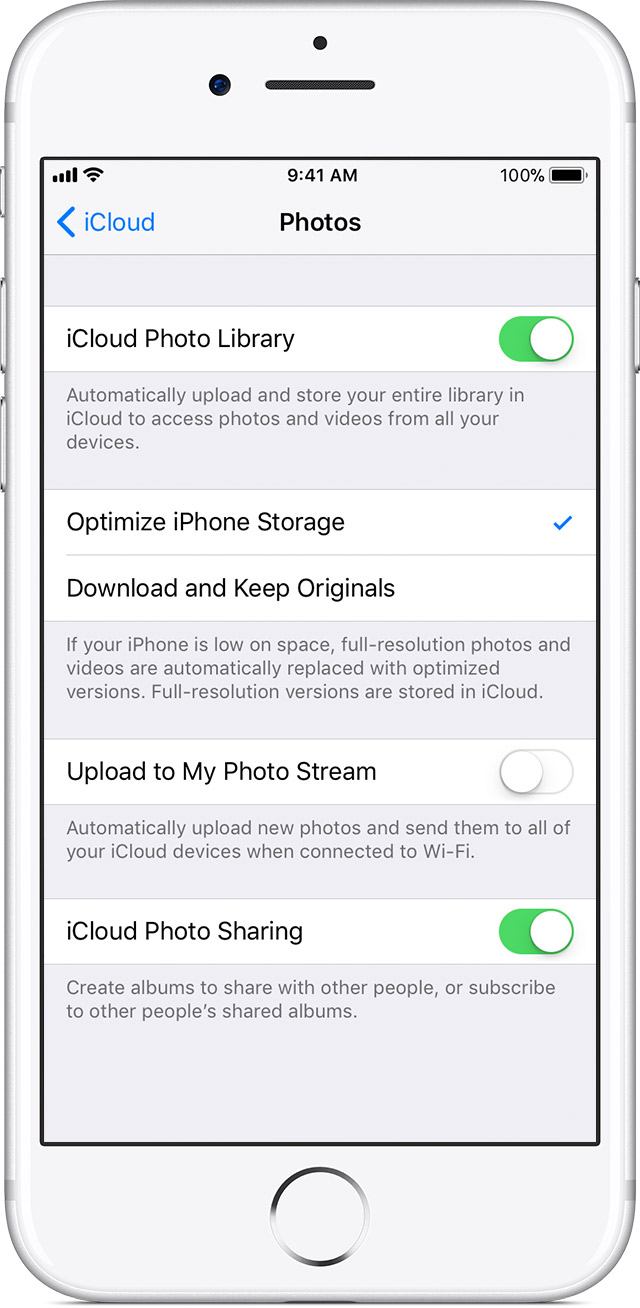
Your photos and videos are stored on your device in their original, high-resolution version. This means that they use a lot of space on your iPhone, iPad, and iPod touch. With iCloud Photo Library, you can make more space available on your device and have your entire collection, everywhere you go.
Get started with iCloud Photo Library:
- Tap Settings > [your name] > iCloud > Photos. If you're using iOS 10.2 or earlier, tap Settings > iCloud > Photos.
- Turn on iCloud Photo Library.
- Select Optimize iPhone Storage to make more space on your device.
With Optimize Storage, smaller, space-saving photos and videos are kept on your device while all of your original, full-resolution versions are stored in iCloud. And as long as you have enough space in iCloud, you can store as many photos and videos as you want.
Thanks for using the Apple Support Communities. Cheers!



