Left and right airpoda not sync

First my left airpod have a troble, and then i replace. And apple send me replacement of Left and Right airpods. I am trying to pair my AirPods to my iPhone but I am having trouble. They are definitely charged but when they are in the case the right light is flashing amber. When I open the case and hold them by my phone, trying to pair them normally, the animation does not show up. I saw recommendations to try to pair them one at a time. When I take out one of the airpods the light is a solid green and I can pair it easily to my phone. However, then when I put the second airpod in the case the light begins to flash amber again. I left them together in the case, like many people said, for a while but the problem was not solved. Then I unpaired that AirPod and did the other one first and the same result happened. When i try to pair one airpods, it work, the second one work 2, but in my iphone x, the airpods detect 2 different airpods. Why?

Posted on Mar 7, 2018 9:34 AM

Reply

Similar questions

1 reply

Mar 8, 2018 9:21 AM in response to andeanarendra

Hello andeanarendra,

Thank you for using Apple Support Communities.

I see that you are having issues setting up your AirPods and syncing with your iPhone. I would recommend following the following steps to resolve the issue:

If you can't set up your AirPods

If you don't see the setup animation when you try to set up your AirPods with your iPhone, follow these steps. After each step, try to set up your AirPods again.

  1. Make sure that your AirPods are charged.
  2. Close the lid, wait 15 seconds, then open the lid. The status light should flash white.
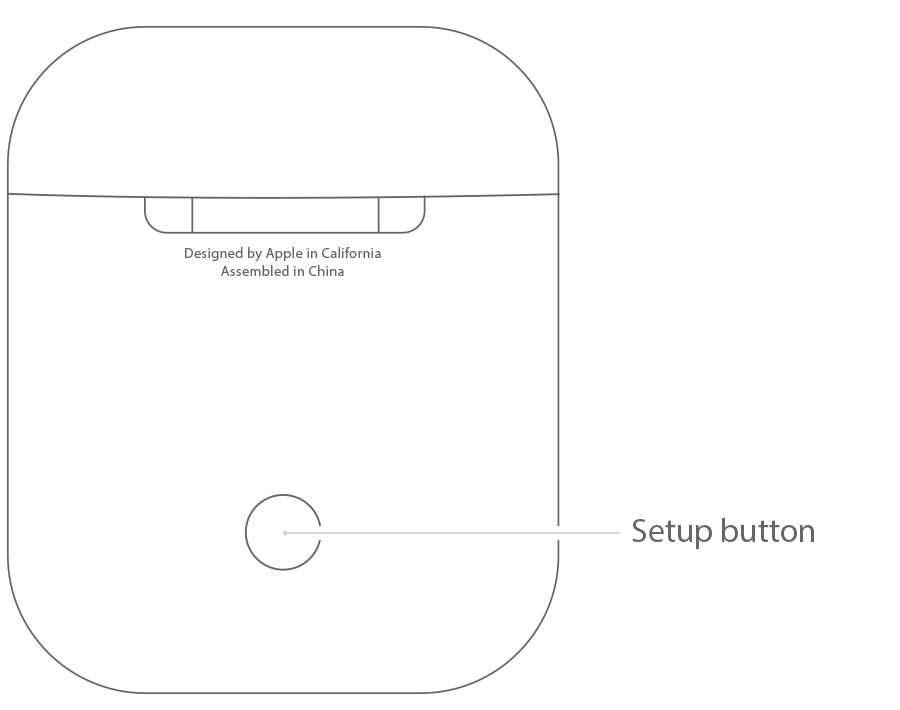
  3. If the status light doesn't flash white, press and hold the setup button on the back of the case until you see the status light flash white.
  4. Still can't set up your AirPods? Press and hold the setup button for at least 15 seconds, until you see the status light flash amber a few times and then flash white.

User uploaded file

Use your AirPods


If that doesn't resolve the issue, you may need to contact Apple Support .

Best regards.

This thread has been closed by the system or the community team. You may vote for any posts you find helpful, or search the Community for additional answers.

Left and right airpoda not sync

Welcome to Apple Support Community
A forum where Apple customers help each other with their products. Get started with your Apple Account.