iPad Randomly changes screen colours

My iPad's screen colours randomly become darkened with a saturated colour. Sometimes it turns back to normal, but mostly it remains orangey saturated. I am currently on an iPad Air 2 16GB with the latest software 11.2.6, and I've been using it for about 3 and a half years. The problem is that it doesnt seem to be in the settings, as the colours still persist, even though I've restored it. Everything works fine, the iPad is super fast and remains in peak condition.

iPad 2 Wi-Fi, iOS 11.2.6, Saturated Screen Colours

Posted on Mar 23, 2018 6:15 PM

Reply
Question marked as Top-ranking reply

Posted on Mar 26, 2018 2:53 PM

Hey Ray,


It sounds like you’re having an issue where the colors on your iPad appear saturated. I’m sure you’re eager to have your iPad display working properly, so I’ll be happy to look into this with you.


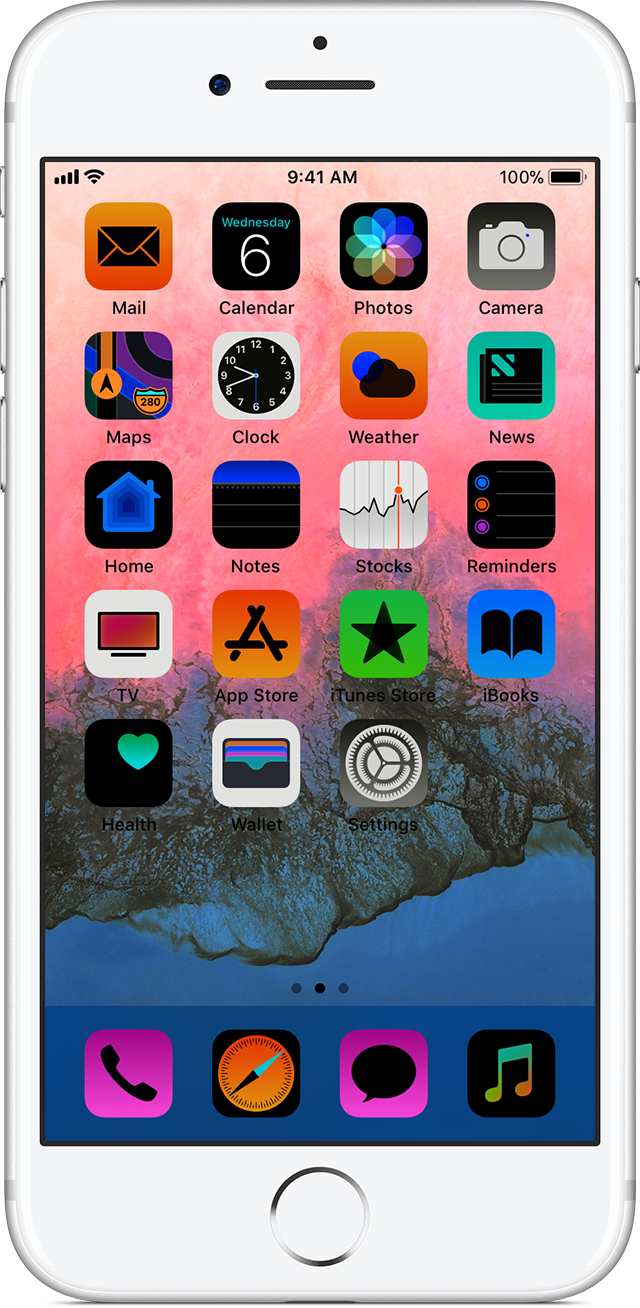
Do the colors on your display resemble the screenshot from our article Get help with the display on your iPhone, iPad, or iPod touch - Apple Support?

If the colors on your display appear distorted

If the colors on your display seem distorted, you might need to adjust the color filters. Learn how to use Display Accommodations on your iPhone, iPad, or iPod touch.

User uploaded file


If so, go to Settings > General > Accessibility > Display Accommodations and select Color Filters. Be sure to turn this “Off” and then see if the colors appear normally on your iPad again. These steps can be found in our article: Use Display Accommodations on your iPhone, iPad, and iPod touch - Apple Support


If that didn’t resolve the display issue, let us know if after you restored the iPad if you restored from a backup or if it was set up as a new device.


Take care!

Similar questions

1 reply
Question marked as Top-ranking reply

Mar 26, 2018 2:53 PM in response to rayfromkmart

Hey Ray,


It sounds like you’re having an issue where the colors on your iPad appear saturated. I’m sure you’re eager to have your iPad display working properly, so I’ll be happy to look into this with you.


Do the colors on your display resemble the screenshot from our article Get help with the display on your iPhone, iPad, or iPod touch - Apple Support?

If the colors on your display appear distorted

If the colors on your display seem distorted, you might need to adjust the color filters. Learn how to use Display Accommodations on your iPhone, iPad, or iPod touch.

User uploaded file


If so, go to Settings > General > Accessibility > Display Accommodations and select Color Filters. Be sure to turn this “Off” and then see if the colors appear normally on your iPad again. These steps can be found in our article: Use Display Accommodations on your iPhone, iPad, and iPod touch - Apple Support


If that didn’t resolve the display issue, let us know if after you restored the iPad if you restored from a backup or if it was set up as a new device.


Take care!

This thread has been closed by the system or the community team. You may vote for any posts you find helpful, or search the Community for additional answers.

iPad Randomly changes screen colours

Welcome to Apple Support Community
A forum where Apple customers help each other with their products. Get started with your Apple Account.