Music not playing on Apple Watch

I listen to music on my Apple Watch regularly, I know how to add and remove music, etc. Yesterday in the middle of a song my apple watch stopped playing and has not been able to start playing again since. The same music works when I play it through the apple music app on my iphone. I press play and it looks like its going to play and then it just doesn't. Please help!! I use this feature daily and this is driving me nuts. Thanks!

Apple Watch Series 3

Posted on Apr 11, 2018 8:29 AM

Reply
Question marked as Top-ranking reply

Posted on Jul 9, 2018 1:42 PM

I uninstalled the "watch app" from my phone and reinstalled it. My watch has been playing music flawlessly every day for over 2 weeks now!

NOTE: When uninstalling the watch app from your phone, you will have to unpair your watch first... so make sure it is backed up. Obviously, you'll have to re-pair your watch. Curious to know if this helps anyone else out.

94 replies
Question marked as Top-ranking reply

Jul 9, 2018 1:42 PM in response to djohariah

I uninstalled the "watch app" from my phone and reinstalled it. My watch has been playing music flawlessly every day for over 2 weeks now!

NOTE: When uninstalling the watch app from your phone, you will have to unpair your watch first... so make sure it is backed up. Obviously, you'll have to re-pair your watch. Curious to know if this helps anyone else out.

Jul 15, 2018 9:52 AM in response to djohariah

So I've had this problem like everyone else and none of the updates changed anything for me. So I decided to troubleshoot myself and I think I may have figured it out. The problem lies with the interface on the watch to play the music you want. It is true that you must have the music synced to your watch that you want to listen to when you are out of range of your phone. I thought I already had this arrangement, but apparently I did not. So in the iPhone Watch app I deleted all synced music on my watch first. I actually had an issue where a Jay-Z album still remained on my watch even after I removed it from the iPhone watch app, so I ended up having to unpair the watch, restart both devices, and repair the watch to clear ALL music from my watch. Once that was complete, I added only a couple of albums and songs to my watch. To my surprise, the process of adding the music to my watch took alot longer than I had given it in the past which leads me to believe the songs never truly migrated to my watch. I know the watch must be on charge for this transfer to take place, and maybe it happened when I was sleeping... I dunno. But the process to transfer the 2 complete albums (Jay-Z and Lil Dicky) and a few stray songs to my watch took over an hour. Once the songs were on my watch, I tested everything out and it's now been 3 weeks and I've had no issues playing music directly off of my watch with my iPhone nowhere near me. It doesn't pause or anything.


So with all of that said, I think my problem was with one (or more) of a couple of things. First, the Jay-Z album would never remove from my watch until I unpaired/repaired the phone with a clean slate, so that album may have been causing syncing problems. Second, I'm not sure the syncing process placing music from my phone to my watch was working properly. Again, that could have been because of the hung Jay-Z album, but complete removal and re-installation of the songs was needed. Last and probably more important than I realized, the interface on the watch of selecting music you want to listen to independently on your watch is kind of confusing. When you select the Apple Music app on your watch it gives you the options "On iPhone", "Now Playing", "Library", and then all of the album covers as you flip through them. The option "Library" and then all of the album covers represent the music on your watch only. If you've been listening to music from your phone at any point (remember - you watch controls the music from your phone as you listen), the "Now Playing" option on your watch will include music sourced from the phone. So if you use the "Now Playing" option on your watch afterwards, some of the music in that list is still sourced from the phone and when it gets to that specific music, the watch will realize it is not synced and stop playing as so many have experienced. The way to prevent this and what has worked for me is when I am going for a run or a workout, I select the option "Library" which is specific to only the music on my watch and then play music from within that folder.


Like I said, I've had no issues in 3 weeks and I probably stream music from my watch 3-4 times a week with my phone nowhere near me. So it appears the watch interface to play music is what needs to be reworked. The "Now Playing" option is also pulling music previously played from the phone in addition to music stored on the watch and when out of range of each other, the watch will not play the music at all or stop playing the music altogether. Perhaps Apple will work on this in the future, but in the meantime hopefully this helps some of you like it has me. Cheers!

Apr 12, 2018 5:34 AM in response to djohariah

Good morning djohariah!


It sounds like you were previously able to play music on your Apple Watch, but all of a sudden you’re not able to play music anymore. I’ll be happy to look into this with you and figure out what might be going on.


First, have you tried restarting the Apple Watch? If not try that now: How to restart your Apple Watch - Apple Support


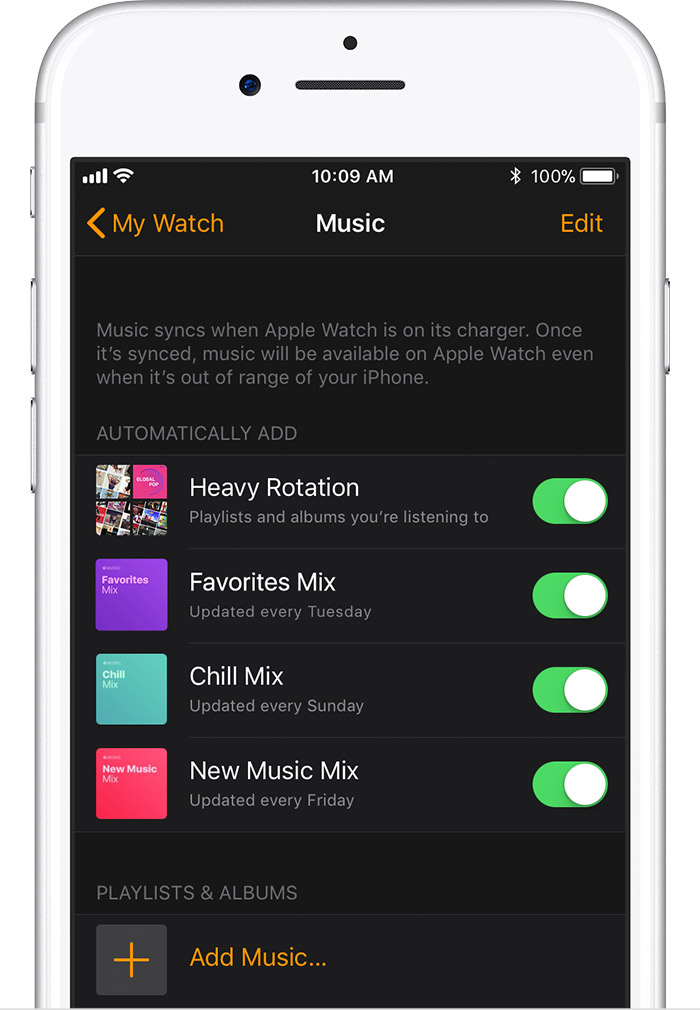
If you’re still not able to play your music, try removing a song and resyncing it to the Apple Watch, or simply add a new song not on the Apple Watch and see if it plays. Be sure Bluetooth is toggled on. Here’s the steps:

Remove music from your Apple Watch

  1. On your iPhone, open the Apple Watch app, then tap the My Watch tab at the bottom of the screen.
  2. Scroll to Music and tap it, then tap Edit in the upper-right corner. You'll only see Edit if you have music synced to your watch.
  3. Under Playlists & Albums, tap User uploaded file next to any music that you want to remove, then tap Delete.

Sync albums and playlists to your Apple Watch

You can add specific albums and playlists to your Apple Watch by syncing them. After you sync, you can play the music on your Apple Watch without your iPhone.

  1. Set your Apple Watch on its charger and make sure that the device is charging.
  2. On your iPhone, go to Settings > Bluetooth. Make sure Bluetooth is turned on.
  3. On your iPhone, open the Apple Watch app, then tap the My Watch tab.
  4. Tap Music > User uploaded file Add Music.
    User uploaded file
  5. Choose the music that you want to sync.

Listen to music on your Apple Watch - Apple Support

Did that work for you? If not, let us know a little more about what happens when you try to play the song. Do you get the Now Playing screen, but then it just disappears? Do you get any sound at all before it stops playing?


Take care!

Jun 10, 2018 7:54 AM in response to allisonfromrincon

I had the same issues described in this thread with my Apple Series 3 LTE watch. The issue seemed to resolve itself completely for the past week immediately after i disabled all the "automatically add" music features from the apple watch app on the iPhone. I left the playlists i had added myself prior to noticing the issue and erased the music that was automatically added to the phone and it has worked perfectly for 4 runs each approximately 25-30 minutes.

May 8, 2018 12:40 PM in response to sheekg

Here’s an update on my end. I tried multiple things the other day which included listening to radio and listening to songs> shuffle all. When I listened to radio and my library, the problem didn’t happen even after the problem just happened right before while listening to my playlist. I’ve only spent a short time testing it but I didn’t see the issue happen. With that said, i deleted the playlist and created a new one from scratch. I tested this playlist last night for about 30mins and it didn’t happen. I’ll keep monitoring this but at the moment it appears that the problem is due to an issue with my specific playlist. I’ll write an update if the problem comes back

May 31, 2018 12:42 PM in response to djohariah

Fortunately, mine has been working very consistently for the last week or so. Of course, now that I've written that, it will probably stop working.


This release was a minor one and was never supposed to include a fix for this. Hopefully it will appear in the next one, or maybe a hot fix for this issue specifically will be released (that would be nice).


Every Apple rep I've spoken to thinks it's a software issue, so I'm not sure why that's not communicated company-wide. Unless there is some hardware issue going on with your watch, attempting to repair it won't fix this if it's indeed an OS issue.


Again, if you haven't already done so, let Apple know what's going on here: Feedback - Apple Watch - Apple

Jul 6, 2018 2:23 PM in response to Jorvex

Hey everyone. I have a possible fix. It’s working for me so far today. In your cellular settings on the iPhone, turn on WiFi calling. I was in Verizon and the they were trying to sell me a watch and I told them I already had it and then explained why I wasn’t happy with it. The guy was like oh well let me check a few of your setting on your phone. So he was like well you need to have WiFi calling on and that should work. So I did that. It SEEMS to be playing normally. But I’m not getting my hopes up as it usually seems to work normally for a little bit and then starts acting up again after every trouble shooting tip I have tried.

May 14, 2018 3:02 PM in response to djohariah

I'm with you! I find it frustrating that the very "simple" features that Apple are marketing as a selling feature are great one month and then after an update don't work. Just at random. I'm frustrated as I use this feature constantly and at speed while on my bicycle training. This afternoon it got dangerous on the bike as I kept trying to keep hitting play and it would just automatically pause / stop playing. I pulled over, paused my workout... turned off apple watch 3 LTE, turned it back on it still did it, reset device still not working and now back home and trying to unpair / repair.


Come on Apple.... it's like "photos" on the Mac, voicemail on the iPhone, and contact list creation glitches...


I still love them though...

Jul 6, 2018 7:45 PM in response to deggie

Thanks for the link, I guess I just thought they might view these forms at least semi regularly.


So I'm not "Mr IT guy" or anything, so I don't know if it works this way or not, but what if in that feedback form, everyone here on this discussion submitted their own separate complaint, but with the same "title?"


For example, maybe if everyone here would title their feedback "Apple Watch Music Issues," and they saw an abundance of feedback submitted with the same title, maybe they would take a little more notice, as all these requests would be identical and possibly get their attention a little more?


I don't know, but it is super frustrating. The only workaround I've found so far is to skip ahead two songs, then skip right back to the song that wouldn't play, only now it will. Until it gets interrupted by a phone call or if I pause the song - that seems to reset the whole thing. And any temporary "fix" only lasts at most two songs.

This thread has been closed by the system or the community team. You may vote for any posts you find helpful, or search the Community for additional answers.

Music not playing on Apple Watch

Welcome to Apple Support Community
A forum where Apple customers help each other with their products. Get started with your Apple Account.