
An error occurred while connecting to the AirPlay device “Apple TV”. An unknown error occurred (5104).

I am getting the following error message when i am trying to play a rental video on my MacBook air. I AM NOT TRYING TO USE AIRPLAY or APPLE TV


An error occurred while connecting to the AirPlay device “Apple TV”. An unknown error occurred (5104).
Posted on May 24, 2018 1:42 AM

Reply
1 reply

May 24, 2018 4:41 PM in response to Win D'cruz

Greetings Win D'cruz,

Thanks for using the Apple Support Communities! I understand you're trying to watch an iTunes rental. However, you receive an error message which mentions an error occurred while connecting with AirPlay to an Apple TV when you select to play the video.

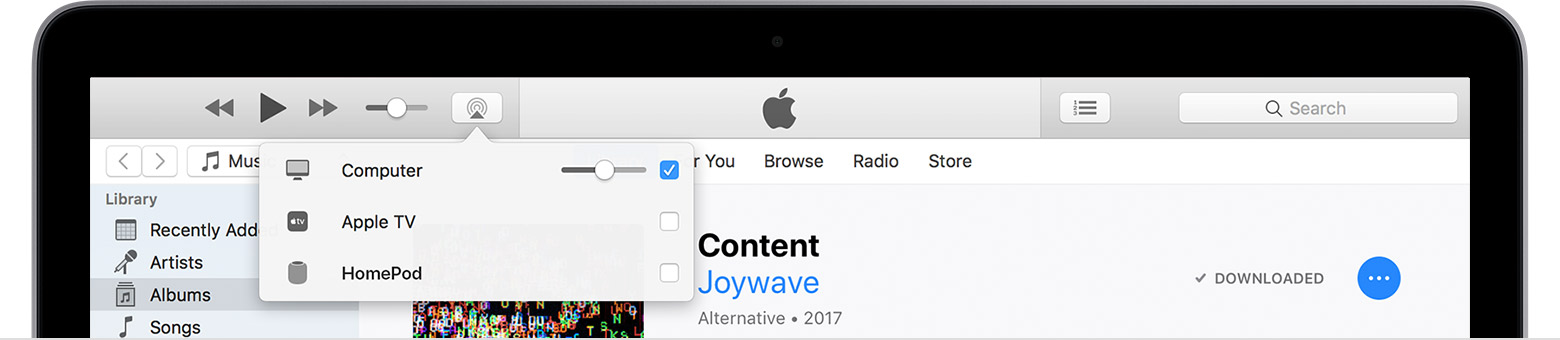
Since you're receiving an AirPlay alert, I first suggest checking your AirPlay settings. You may see the AirPlay option within iTunes or in the menu bar of your MacBook Air. See the following picture for where to disable AirPlay within iTunes, which may be attempting to connect with an Apple TV:

User uploaded file

You may also see the AirPlay icon in the menu bar of your MacBook Air, which appears as: User uploaded file From there, you can disconnect from any Apple TV which may be connected.

After verifying the issue isn't related to AirPlay settings, I suggest following the troubleshooting suggestions for when an error occurs in iTunes: If you see an error in iTunes on your Mac or PC

If the issue persists, I suggest contacting Apple for further assistance: Contact Support or iTunes Store - Contact Us

Let me know how the provided steps work out for you.

Kind regards.

This thread has been closed by the system or the community team. You may vote for any posts you find helpful, or search the Community for additional answers.

An error occurred while connecting to the AirPlay device “Apple TV”. An unknown error occurred (5104).

Welcome to Apple Support Community
A forum where Apple customers help each other with their products. Get started with your Apple Account.