Find My iPhone - location not shared

Hi. I have Find My iPhone set up on various devices, which have always worked fine. I recently bought my daughter an iPhone 4 and this is showing up in the app, but it states ‘not sharing location’. As far as I can see, all the settings on her phone are set to share location; I have tried switching them (and the phone) on and off, but no change. I have also read all the relevant threads I can find here. Starting to tear my hair out!

iPhone 4, iOS 7.1.2

Posted on Jun 6, 2018 3:12 AM

Reply
Question marked as Top-ranking reply

Posted on Jun 7, 2018 1:55 PM

Hello RickSax,

Thank you for using Apple Support Communities! I understand that you are not seeing a location for your daughter's iPhone 4 using Find My iPhone. I would be happy to help provide some troubleshooting steps for this behavior.

If you are currently using Family Sharing, let's start by checking the location sharing settings following the steps here:

Share your location with your family - Apple Support

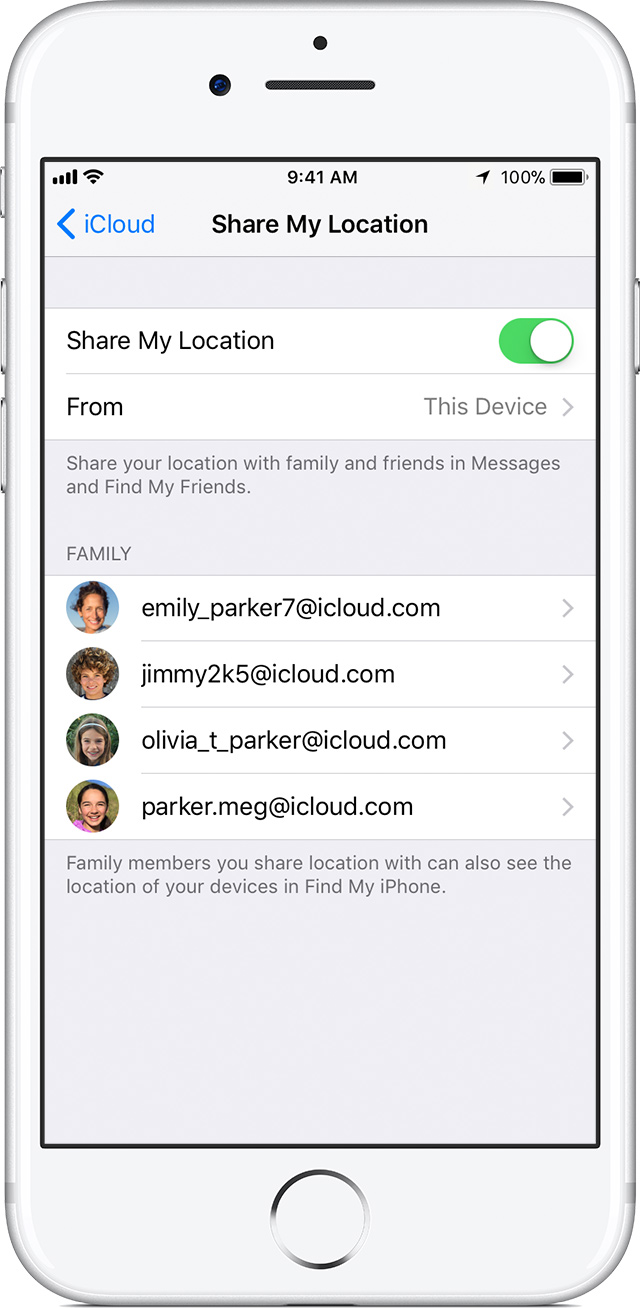
When Share My Location has been set up, you should see the device reflected in Settings > iCloud as shown in this section:

User uploaded file

Choose when to share

Family Sharing lets you decide whether or not you share your location with your family.

To see if you're sharing, follow these steps:

  1. Go to your location sharing settings.
    • If you're using iOS 11 or later, tap Settings > [your name] > Family Sharing.
    • If you're using iOS 10.3, tap Settings > [your name] > iCloud.
    • If you're using iOS 10.2 or earlier, go to Settings > iCloud.
  2. Tap Share My Location.
  3. If you want to choose a family member to share your location with, tap their name.

To stop sharing your location, turn off Share My Location. This hides your location from all of your family members and your approved friends. And when you're ready to share your location again, you can turn it back on at any time.


On the iPhone 4 go to Settings > Privacy > Location Service and also confirm Location Services has been turned on. From Settings > Privacy > Location Services > System Services, confirm that Share My Location has been enabled. The iPhone 4 will also need to be connected to a data network, such as 3G or Wi-Fi.

If you are not using Family Sharing to share the location of the iPhone 4, follow the steps below to share the location using Find My Friends:

Find My Friends: Share your location

Keep us posted with what happens from here.

Cheers!
1 reply
Question marked as Top-ranking reply

Jun 7, 2018 1:55 PM in response to RickSax

Hello RickSax,

Thank you for using Apple Support Communities! I understand that you are not seeing a location for your daughter's iPhone 4 using Find My iPhone. I would be happy to help provide some troubleshooting steps for this behavior.

If you are currently using Family Sharing, let's start by checking the location sharing settings following the steps here:

Share your location with your family - Apple Support

When Share My Location has been set up, you should see the device reflected in Settings > iCloud as shown in this section:

User uploaded file

Choose when to share

Family Sharing lets you decide whether or not you share your location with your family.

To see if you're sharing, follow these steps:

  1. Go to your location sharing settings.
    • If you're using iOS 11 or later, tap Settings > [your name] > Family Sharing.
    • If you're using iOS 10.3, tap Settings > [your name] > iCloud.
    • If you're using iOS 10.2 or earlier, go to Settings > iCloud.
  2. Tap Share My Location.
  3. If you want to choose a family member to share your location with, tap their name.

To stop sharing your location, turn off Share My Location. This hides your location from all of your family members and your approved friends. And when you're ready to share your location again, you can turn it back on at any time.


On the iPhone 4 go to Settings > Privacy > Location Service and also confirm Location Services has been turned on. From Settings > Privacy > Location Services > System Services, confirm that Share My Location has been enabled. The iPhone 4 will also need to be connected to a data network, such as 3G or Wi-Fi.

If you are not using Family Sharing to share the location of the iPhone 4, follow the steps below to share the location using Find My Friends:

Find My Friends: Share your location

Keep us posted with what happens from here.

Cheers!

This thread has been closed by the system or the community team. You may vote for any posts you find helpful, or search the Community for additional answers.

Find My iPhone - location not shared

Welcome to Apple Support Community
A forum where Apple customers help each other with their products. Get started with your Apple Account.