Hello and welcome to Apple Support Communities, sdchrgrboy.
If I understand your post correctly, your Apple TV which is not connected to Wi-Fi is not able to detect your computer. I'd like to help.
Your Apple TV needs to be connected to Wi-Fi. This guide will tell you more:
With Apple TV, you can mirror the entire display of your Mac to your TV or use your TV as a separate display.
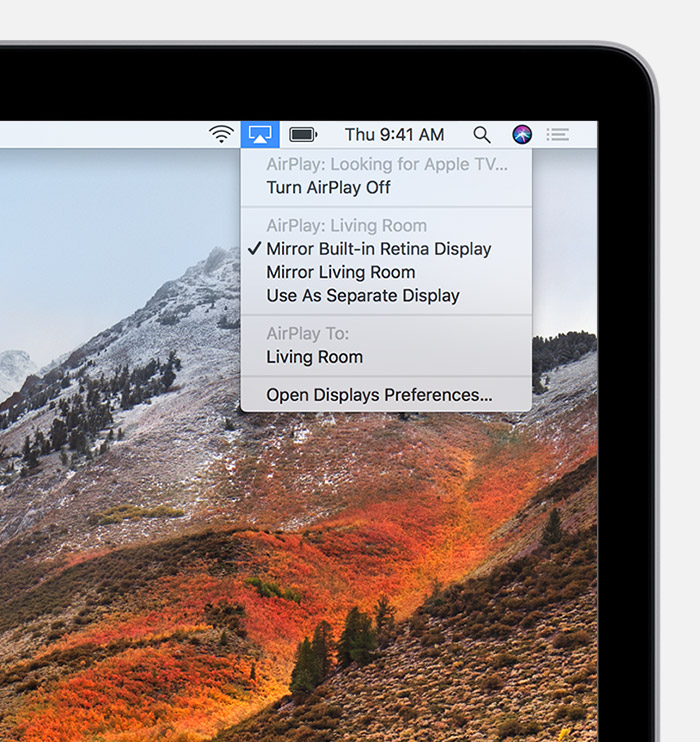
- On your Mac, click
 in the menu bar at the top of your screen.
- Choose your Apple TV. If you don’t see your Apple TV, make sure that your Mac is connected to the same Wi-Fi network as your Apple TV. Need help?
- If an AirPlay passcode appears on your TV screen, enter the passcode on your Mac.
To change the size of your desktop mirrored on your TV, click  in the menu bar. Then select Mirror Built-in Display to match the size of your desktop or Mirror Apple TV to match the size of your TV.
AirPlay also lets you use your TV as a separate display for your Mac. Just click in the menu bar, then select Use As Separate Display.
To stop mirroring or using your TV as a separate display, click in the menu bar, then choose Turn AirPlay Off. Or press the Menu button on your Apple TV remote.
Learn more about mirroring or extending the display of your Mac.
See the full article here:
How to AirPlay video and mirror your device's screen to Apple TV
Let us know if that resolves this issue for you.
Thanks for using the Apple Support Communities. Take care.



