I have the iPhone 6s (MKRY2LL/A, A1688), and I’m comparing it to another iPhone 6s (MKTD2LL/A, A1688). My MKRY2LL has a “cooler” screen, and the UI seems not smooth and jittery. Can someone tell me what the issue is and how to fix it?

UI not smooth on my iPhone 6s

Posted on Jul 19, 2018 6:25 AM

Reply
Question marked as Top-ranking reply

Posted on Jul 20, 2018 9:22 AM

Hi ​tomahtashi,

Thanks for reaching out in Apple Support Communities. I understand that you're seeing a difference in screen color and you're experiencing some latency from the display on your iPhone 6s. I can understand reaching out for assistance with this; I'm happy to help. Regarding the difference in color tone, I'd recommend checking out the following articles to adjust your display settings:

Adjust the brightness on your iPhone, iPad, or iPod touch

Use Night Shift on your iPhone, iPad, and iPod touch

Regarding the latency you're expereincing, there could be several factors contributing to this. I'd recommend that you start by checking your storage and battery health as these can affect the overall performance of your iPhone. Use this guide to check and optimize your storage: How to check the storage on your iPhone, iPad, and iPod touch

The information below will help you to check your battery health and maximize your battery performance:

How to maximize battery performance

“Battery life” is the amount of time a device runs before it needs to be recharged. “Battery lifespan” is the amount of time a battery lasts until it needs to be replaced. One factor affecting battery life and lifespan is the mix of things you do with your device. No matter how you use it, there are ways to help. A battery’s lifespan is related to its “chemical age,” which is more than just the passage of time. It includes different factors, such as the number of charge cycles and how it was cared for. Follow these tips to maximize battery performance and help extend battery lifespan. For example, keep iPhone half-charged when it’s stored for the long term. Also avoid charging or leaving iPhone in hot environments, including direct sun exposure, for extended periods of time.

User uploaded file

User uploaded file

Battery Health (Beta)

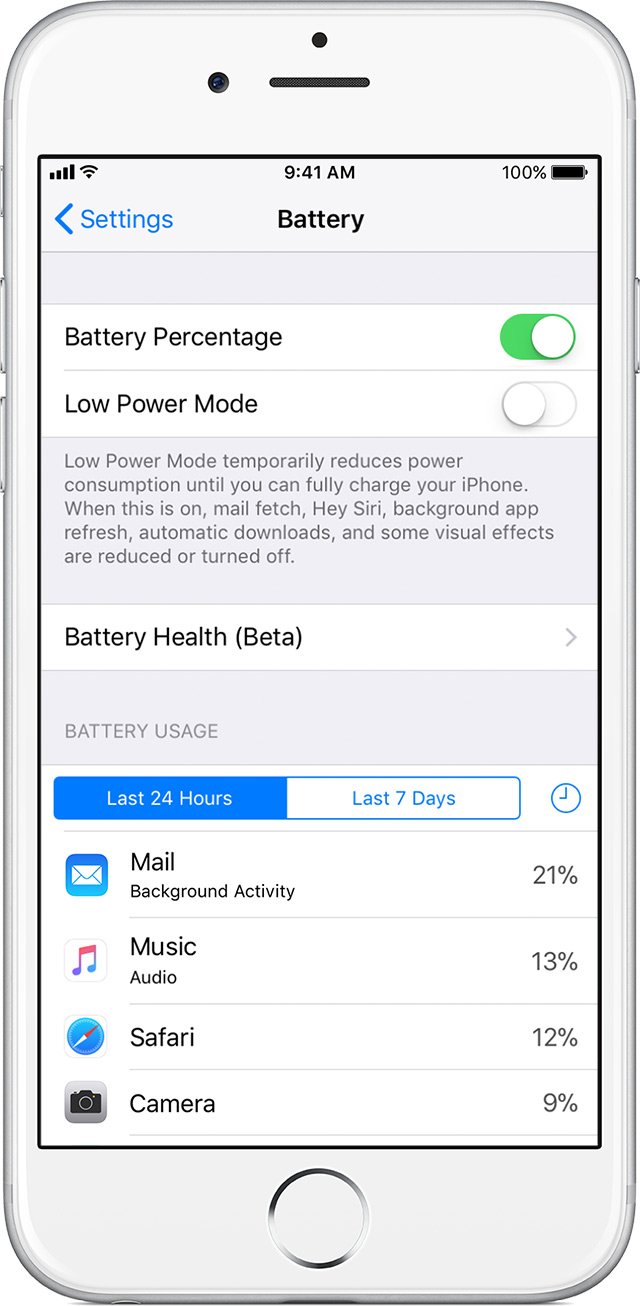
For iPhone 6 and later, iOS 11.3 adds new features to show battery health and recommend if a battery needs to be replaced. These can be found in Settings > Battery > Battery Health (Beta).

Additionally, users can see if the performance management feature that dynamically manages maximum performance to prevent unexpected shutdowns is on and can choose to turn it off. This feature is enabled only after an unexpected shutdown first occurs on a device with a battery that has diminished ability to deliver maximum instantaneous power. This feature applies to iPhone 6, iPhone 6 Plus, iPhone 6s, iPhone 6s Plus, iPhone SE, iPhone 7, and iPhone 7 Plus.

(Note: Devices updating to iOS 11.3 will initially have performance management disabled; it will be reenabled if the device subsequently experiences an unexpected shutdown.)

All iPhone models include fundamental performance management to ensure that the battery and overall system operates as designed and internal components are protected. This includes behavior in hot or cold temperatures, as well as internal voltage management. This type of performance management is required for safety and expected function, and cannot be turned off.

User uploaded file

User uploaded file

Your battery's maximum capacity

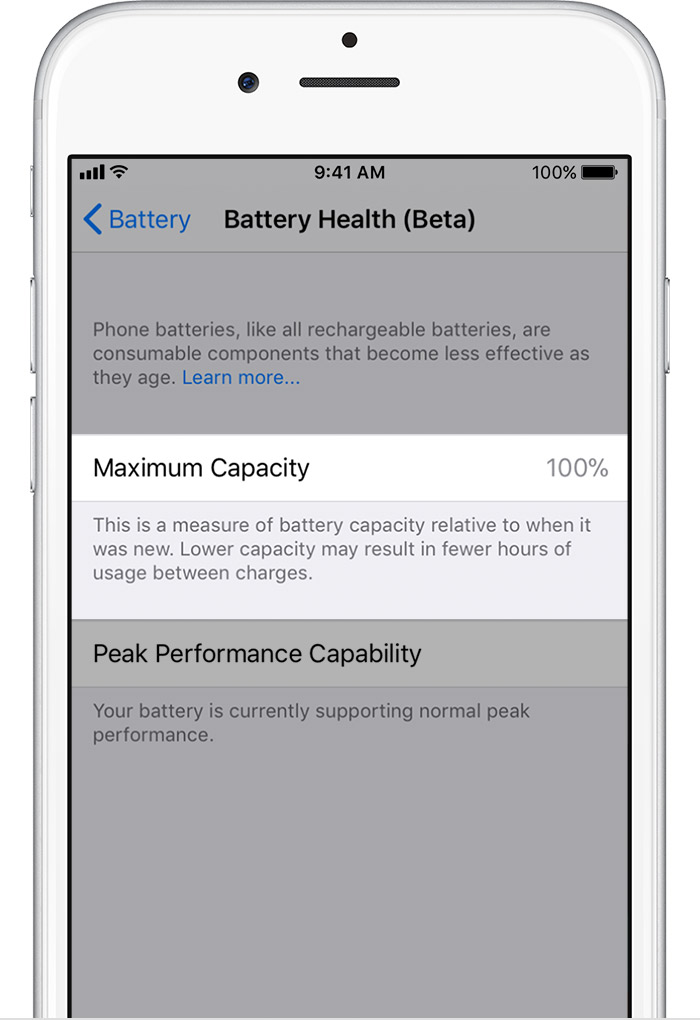
The Battery Health screen includes information on maximum battery capacity and peak performance capability.

Maximum battery capacity measures the device battery capacity relative to when it was new. Batteries will start at 100% when first activated and will have lower capacity as the battery chemically ages which may result in fewer hours of usage between charges.

A normal battery is designed to retain up to 80% of its original capacity at 500 complete charge cycles when operating under normal conditions. The one-year warranty includes service coverage for a defective battery. If it is out of warranty, Apple offers battery service for a charge. Learn more about charge cycles.


User uploaded file

As your battery health degrades, so can its ability to deliver peak performance. The Battery Health screen includes a section for Peak Performance Capability where the following messages may appear.

User uploaded file

User uploaded file

Performance is normal

When the battery condition can support normal peak performance and does not have the performance management features applied, you'll see this message:

Your battery is currently supporting normal peak performance.

User uploaded file

User uploaded file

Performance management applied

When the performance management features have been applied, you'll see this message:

This iPhone has experienced an unexpected shutdown because the battery was unable to deliver the necessary peak power. Performance management has been applied to help prevent this from happening again. Disable…

Note that if you disable performance management, you can’t turn it back on. It will be turned on again automatically if an unexpected shutdown occurs. The option to disable will also be available.
User uploaded file

User uploaded file

Battery health unknown

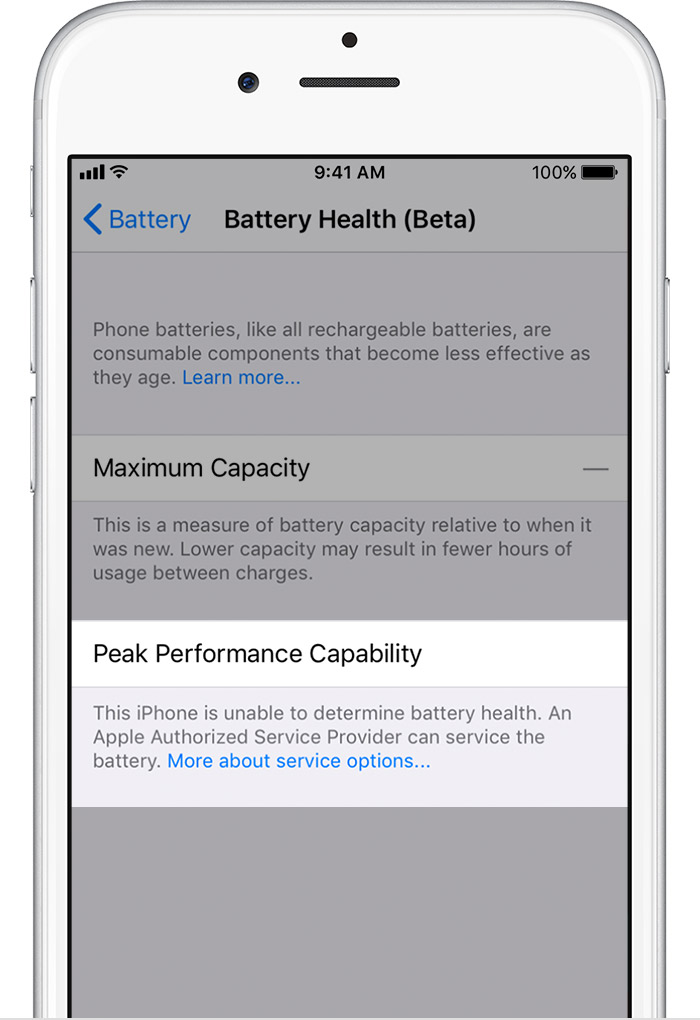
If iOS is unable to determine the device battery health, you'll see this message:

This iPhone is unable to determine battery health. An Apple Authorized Service Provider can service the battery. More about service options…

This may be due to having an improperly installed battery or an unknown battery part.
User uploaded file

User uploaded file

Performance management turned off

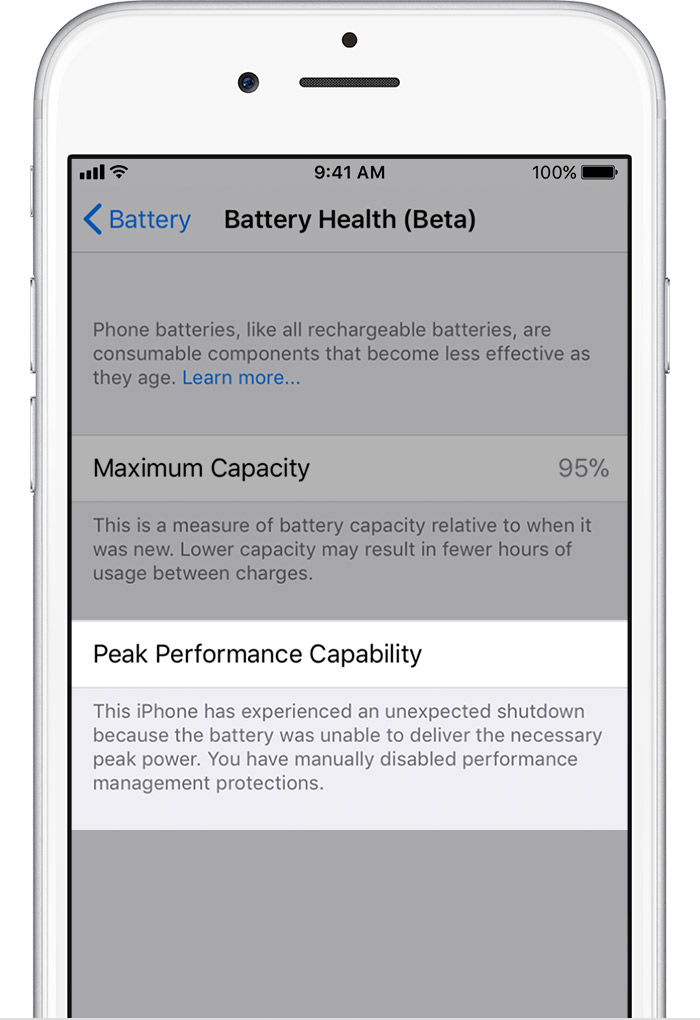
If you disable the applied performance management feature, you'll see this message:

This iPhone has experienced an unexpected shutdown because the battery was unable to deliver the necessary peak power. You have manually disabled performance management protections.

If the device experiences another unexpected shutdown, the performance management features will be re-applied. The option to disable will also be available.
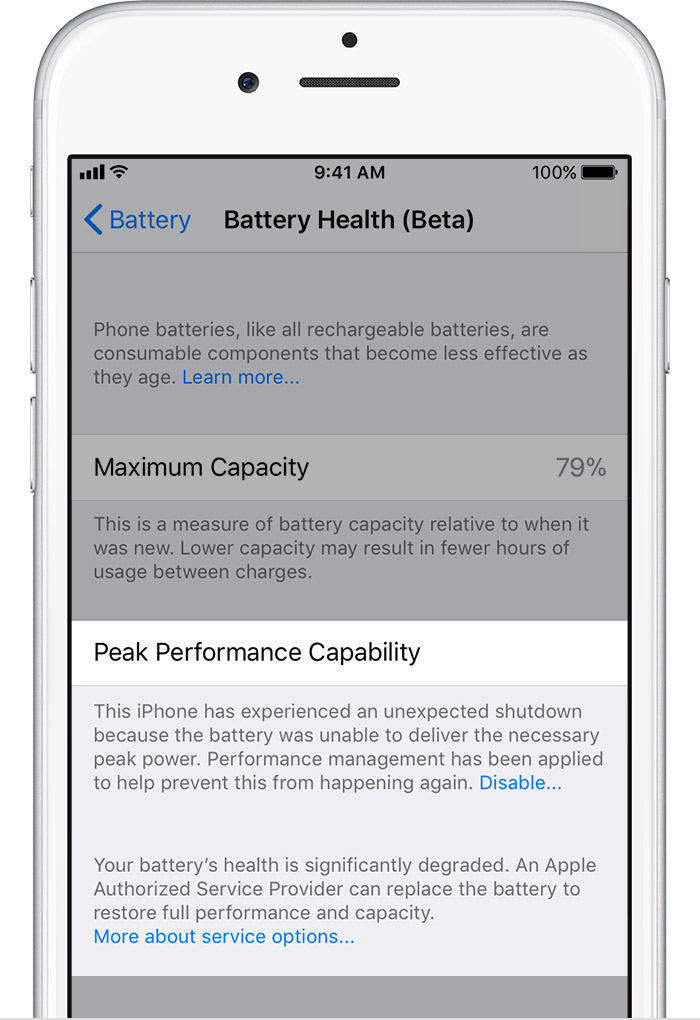
User uploaded file

User uploaded file

Battery health degraded

If battery health has degraded significantly, the below message will also appear:

Your battery’s health is significantly degraded. An Apple Authorized Service Provider can replace the battery to restore full performance and capacity. More about service options…

This message does not indicate a safety issue. Your battery can still be used. However, you may be experiencing more noticeable battery and performance issues. A new replacement battery will improve your experience.

Getting further assistance

If your device performance has been impacted by an aged battery and you would like to get help with a battery replacement, contact Apple Support for service options.


iPhone Battery and Performance

If you find that your battery is in good health and you have available storage, can you give me a few more details about the "jittery" interface you see? Does this happen only with certain apps or features?


​Best Regards.
2 replies
Question marked as Top-ranking reply

Jul 20, 2018 9:22 AM in response to tomahtashi

Hi ​tomahtashi,

Thanks for reaching out in Apple Support Communities. I understand that you're seeing a difference in screen color and you're experiencing some latency from the display on your iPhone 6s. I can understand reaching out for assistance with this; I'm happy to help. Regarding the difference in color tone, I'd recommend checking out the following articles to adjust your display settings:

Adjust the brightness on your iPhone, iPad, or iPod touch

Use Night Shift on your iPhone, iPad, and iPod touch

Regarding the latency you're expereincing, there could be several factors contributing to this. I'd recommend that you start by checking your storage and battery health as these can affect the overall performance of your iPhone. Use this guide to check and optimize your storage: How to check the storage on your iPhone, iPad, and iPod touch

The information below will help you to check your battery health and maximize your battery performance:

How to maximize battery performance

“Battery life” is the amount of time a device runs before it needs to be recharged. “Battery lifespan” is the amount of time a battery lasts until it needs to be replaced. One factor affecting battery life and lifespan is the mix of things you do with your device. No matter how you use it, there are ways to help. A battery’s lifespan is related to its “chemical age,” which is more than just the passage of time. It includes different factors, such as the number of charge cycles and how it was cared for. Follow these tips to maximize battery performance and help extend battery lifespan. For example, keep iPhone half-charged when it’s stored for the long term. Also avoid charging or leaving iPhone in hot environments, including direct sun exposure, for extended periods of time.

User uploaded file

User uploaded file

Battery Health (Beta)

For iPhone 6 and later, iOS 11.3 adds new features to show battery health and recommend if a battery needs to be replaced. These can be found in Settings > Battery > Battery Health (Beta).

Additionally, users can see if the performance management feature that dynamically manages maximum performance to prevent unexpected shutdowns is on and can choose to turn it off. This feature is enabled only after an unexpected shutdown first occurs on a device with a battery that has diminished ability to deliver maximum instantaneous power. This feature applies to iPhone 6, iPhone 6 Plus, iPhone 6s, iPhone 6s Plus, iPhone SE, iPhone 7, and iPhone 7 Plus.

(Note: Devices updating to iOS 11.3 will initially have performance management disabled; it will be reenabled if the device subsequently experiences an unexpected shutdown.)

All iPhone models include fundamental performance management to ensure that the battery and overall system operates as designed and internal components are protected. This includes behavior in hot or cold temperatures, as well as internal voltage management. This type of performance management is required for safety and expected function, and cannot be turned off.

User uploaded file

User uploaded file

Your battery's maximum capacity

The Battery Health screen includes information on maximum battery capacity and peak performance capability.

Maximum battery capacity measures the device battery capacity relative to when it was new. Batteries will start at 100% when first activated and will have lower capacity as the battery chemically ages which may result in fewer hours of usage between charges.

A normal battery is designed to retain up to 80% of its original capacity at 500 complete charge cycles when operating under normal conditions. The one-year warranty includes service coverage for a defective battery. If it is out of warranty, Apple offers battery service for a charge. Learn more about charge cycles.


User uploaded file

As your battery health degrades, so can its ability to deliver peak performance. The Battery Health screen includes a section for Peak Performance Capability where the following messages may appear.

User uploaded file

User uploaded file

Performance is normal

When the battery condition can support normal peak performance and does not have the performance management features applied, you'll see this message:

Your battery is currently supporting normal peak performance.

User uploaded file

User uploaded file

Performance management applied

When the performance management features have been applied, you'll see this message:

This iPhone has experienced an unexpected shutdown because the battery was unable to deliver the necessary peak power. Performance management has been applied to help prevent this from happening again. Disable…

Note that if you disable performance management, you can’t turn it back on. It will be turned on again automatically if an unexpected shutdown occurs. The option to disable will also be available.

User uploaded file

User uploaded file

Battery health unknown

If iOS is unable to determine the device battery health, you'll see this message:

This iPhone is unable to determine battery health. An Apple Authorized Service Provider can service the battery. More about service options…

This may be due to having an improperly installed battery or an unknown battery part.

User uploaded file

User uploaded file

Performance management turned off

If you disable the applied performance management feature, you'll see this message:

This iPhone has experienced an unexpected shutdown because the battery was unable to deliver the necessary peak power. You have manually disabled performance management protections.

If the device experiences another unexpected shutdown, the performance management features will be re-applied. The option to disable will also be available.

User uploaded file

User uploaded file

Battery health degraded

If battery health has degraded significantly, the below message will also appear:

Your battery’s health is significantly degraded. An Apple Authorized Service Provider can replace the battery to restore full performance and capacity. More about service options…

This message does not indicate a safety issue. Your battery can still be used. However, you may be experiencing more noticeable battery and performance issues. A new replacement battery will improve your experience.

Getting further assistance

If your device performance has been impacted by an aged battery and you would like to get help with a battery replacement, contact Apple Support for service options.

iPhone Battery and Performance

If you find that your battery is in good health and you have available storage, can you give me a few more details about the "jittery" interface you see? Does this happen only with certain apps or features?


​Best Regards.

Jul 22, 2018 6:34 AM in response to chris_g1

Chris, thank you for the information. However, I do not think any of those issues/solutions is applicable here. I have already gone through those steps prior to posting this, and I have visited Best Buy's Geek Squad. Geek Squad ran some diagnostics, and have determined there are no software issue, and that it most likely would be a hardware issue (difference in screen panel). I will be taking the iPhone in question to a local Apple Store so that they will look it over.

This thread has been closed by the system or the community team. You may vote for any posts you find helpful, or search the Community for additional answers.

I have the iPhone 6s (MKRY2LL/A, A1688), and I’m comparing it to another iPhone 6s (MKTD2LL/A, A1688). My MKRY2LL has a “cooler” screen, and the UI seems not smooth and jittery. Can someone tell me what the issue is and how to fix it?

Welcome to Apple Support Community
A forum where Apple customers help each other with their products. Get started with your Apple Account.