Complete my album feature not showing my complete purchase

I recently bought a good number of full albums on my iPhone. After synching it to my Mac, the option to "complete my album" pops up and says i haven't purchased the complete album. However, the full album is downloaded to my phone. I've updated all software and tried synching my phone multiple times. Not really sure what to do next.

iPhone 7, iOS 11.4.1, Mac book Pro with recent update

Posted on Aug 5, 2018 12:52 PM

Reply
Question marked as Top-ranking reply

Posted on Aug 6, 2018 2:06 PM

Hi ​notuck1,

Thanks for reaching out in Apple Support Communities. I understand that you've recently purchased some albums from the iTunes Store on your iPhone, but when you're connected to iTunes on your Mac you're being asked to complete albums that you've purchased. I also see that you've updated your software and checked the content on your iPhone; I appreciate you including those steps and I'm happy to help. First, check that you're signed in to the iTunes Store with the same Apple ID you're using with your iPhone. If you're already signed in, check your purchase history to see if the albums are showing there. You can see if you're signed in and view your account using the steps below:

  1. Open iTunes. If you're not signed in, sign in with your Apple ID.
    If you use Family Sharing, you'll see in your purchase history what you bought using your Apple ID, but you won't see what other family members bought. To see what other family members bought, sign in with their Apple ID.
  2. From the menu bar at the top of your computer screen or at the top of the iTunes window, choose Account > View My Account.
    User uploaded file
  3. Sign in with your Apple ID, then click View Account.
  4. On the Account Information page, scroll down to Purchase History. To the right of Most Recent Purchase, click See All. It might take a moment for your Purchase History to appear.

    User uploaded file

Purchases are grouped by the date that they were charged to the payment method that you have on file. You might see a Pending section at the top of your history; these items haven't yet charged to your account. By default, only the last 90 days show up in your purchase history. To change the range, click Last 90 Days at the top of the screen, then select the range that you want to view.

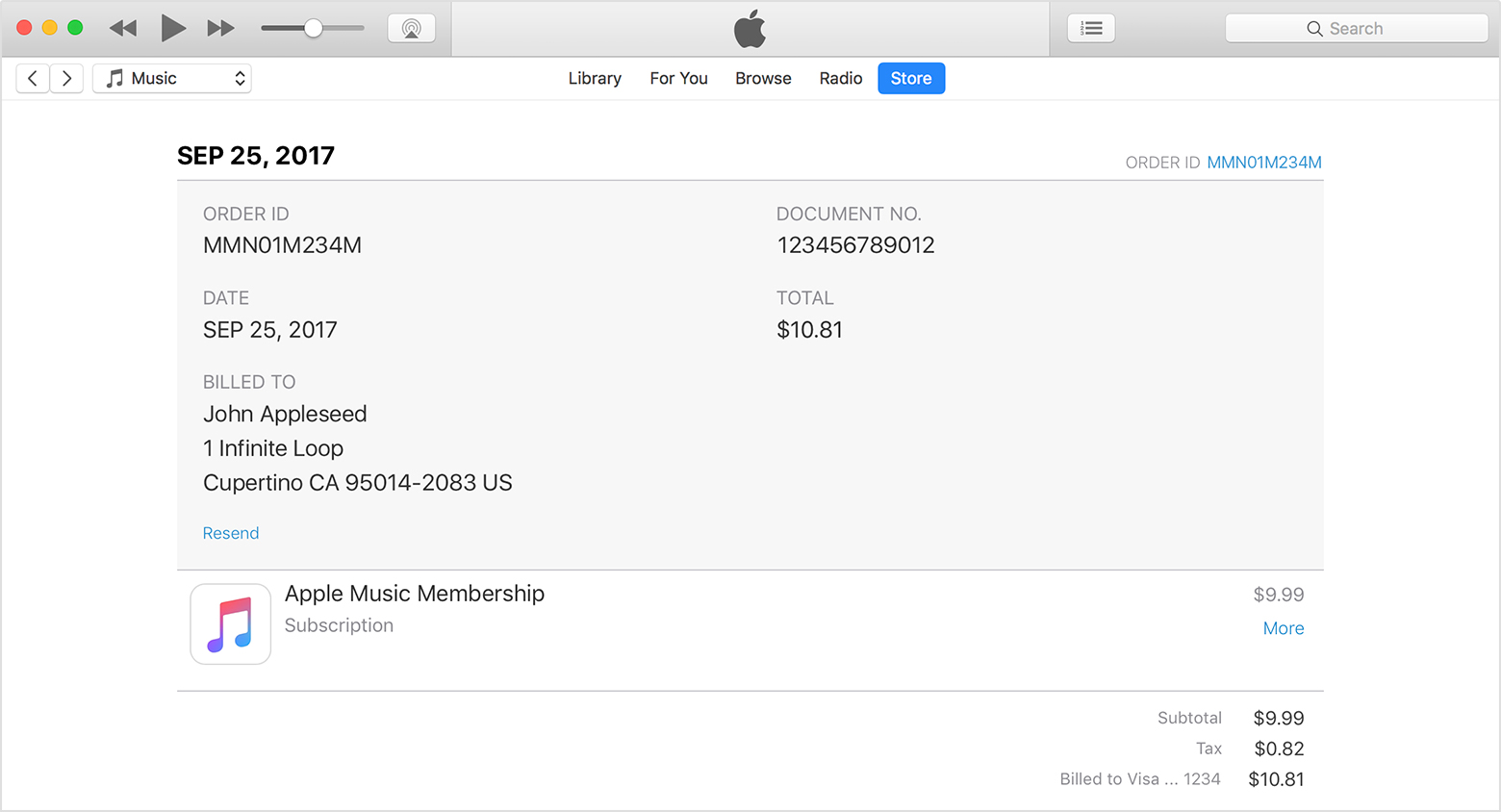
Click the Order ID number to the right of the order date to see the details of an invoice, including the billing date. If the total charge was more than zero, you can tap Resend at the bottom of the invoice details section to get a new email receipt.
User uploaded file

Click More under the price of the item to see the date that you purchased or downloaded the item, which might be different than the date that you were charged, and the name of the device that you used to purchase it. If you need help with billing for a single item in your purchase history, such as an accidental or duplicate purchase, click "Report a Problem."

See your purchase history in the App Store or iTunes Store

If you find the albums you're looking for, click the cloud icon in the upper-right corner and the content should download to your iTunes library.

More about redownloading purchases

  • If you don't see items in your purchase history on other Apple IDs, check to see if the purchases are hidden. If your purchases are hidden, you might not see them even after you follow the steps in this article. Learn how to unhide purchases.
  • If you see items in your purchase history, but you can't redownload them, report a problem.
  • If your download was interrupted, learn how to resume the download.
  • If you see a message that says, "This device is associated with another Apple ID. You cannot associate this device with another Apple ID for [number] days," you might need to wait to redownload your purchases. Learn more about associated devices.
Redownload apps, music, movies, TV shows, and books from the iTunes Store, iBooks Store, and App Store

If you're not seeing your purchases at all, and you've verified you're signed in with the Apple ID used to purchase them, reach out to Apple for further assistance here: Contact Apple Support


​Best Regards.
1 reply
Question marked as Top-ranking reply

Aug 6, 2018 2:06 PM in response to notuck1

Hi ​notuck1,

Thanks for reaching out in Apple Support Communities. I understand that you've recently purchased some albums from the iTunes Store on your iPhone, but when you're connected to iTunes on your Mac you're being asked to complete albums that you've purchased. I also see that you've updated your software and checked the content on your iPhone; I appreciate you including those steps and I'm happy to help. First, check that you're signed in to the iTunes Store with the same Apple ID you're using with your iPhone. If you're already signed in, check your purchase history to see if the albums are showing there. You can see if you're signed in and view your account using the steps below:

  1. Open iTunes. If you're not signed in, sign in with your Apple ID.
    If you use Family Sharing, you'll see in your purchase history what you bought using your Apple ID, but you won't see what other family members bought. To see what other family members bought, sign in with their Apple ID.
  2. From the menu bar at the top of your computer screen or at the top of the iTunes window, choose Account > View My Account.
    User uploaded file
  3. Sign in with your Apple ID, then click View Account.
  4. On the Account Information page, scroll down to Purchase History. To the right of Most Recent Purchase, click See All. It might take a moment for your Purchase History to appear.
    User uploaded file

Purchases are grouped by the date that they were charged to the payment method that you have on file. You might see a Pending section at the top of your history; these items haven't yet charged to your account. By default, only the last 90 days show up in your purchase history. To change the range, click Last 90 Days at the top of the screen, then select the range that you want to view.

Click the Order ID number to the right of the order date to see the details of an invoice, including the billing date. If the total charge was more than zero, you can tap Resend at the bottom of the invoice details section to get a new email receipt.

User uploaded file

Click More under the price of the item to see the date that you purchased or downloaded the item, which might be different than the date that you were charged, and the name of the device that you used to purchase it. If you need help with billing for a single item in your purchase history, such as an accidental or duplicate purchase, click "Report a Problem."

See your purchase history in the App Store or iTunes Store

If you find the albums you're looking for, click the cloud icon in the upper-right corner and the content should download to your iTunes library.

More about redownloading purchases

  • If you don't see items in your purchase history on other Apple IDs, check to see if the purchases are hidden. If your purchases are hidden, you might not see them even after you follow the steps in this article. Learn how to unhide purchases.
  • If you see items in your purchase history, but you can't redownload them, report a problem.
  • If your download was interrupted, learn how to resume the download.
  • If you see a message that says, "This device is associated with another Apple ID. You cannot associate this device with another Apple ID for [number] days," you might need to wait to redownload your purchases. Learn more about associated devices.
Redownload apps, music, movies, TV shows, and books from the iTunes Store, iBooks Store, and App Store

If you're not seeing your purchases at all, and you've verified you're signed in with the Apple ID used to purchase them, reach out to Apple for further assistance here: Contact Apple Support


​Best Regards.

This thread has been closed by the system or the community team. You may vote for any posts you find helpful, or search the Community for additional answers.

Complete my album feature not showing my complete purchase

Welcome to Apple Support Community
A forum where Apple customers help each other with their products. Get started with your Apple Account.

