Hi Darlinangel,
Thank you for contacting Apple Support Communities. Based on what you stated, it seems like you are able to connect to other Bluetooth devices, but they are not playing sound. It may be that you just need to switch to that device. You can do that through the Control Center.
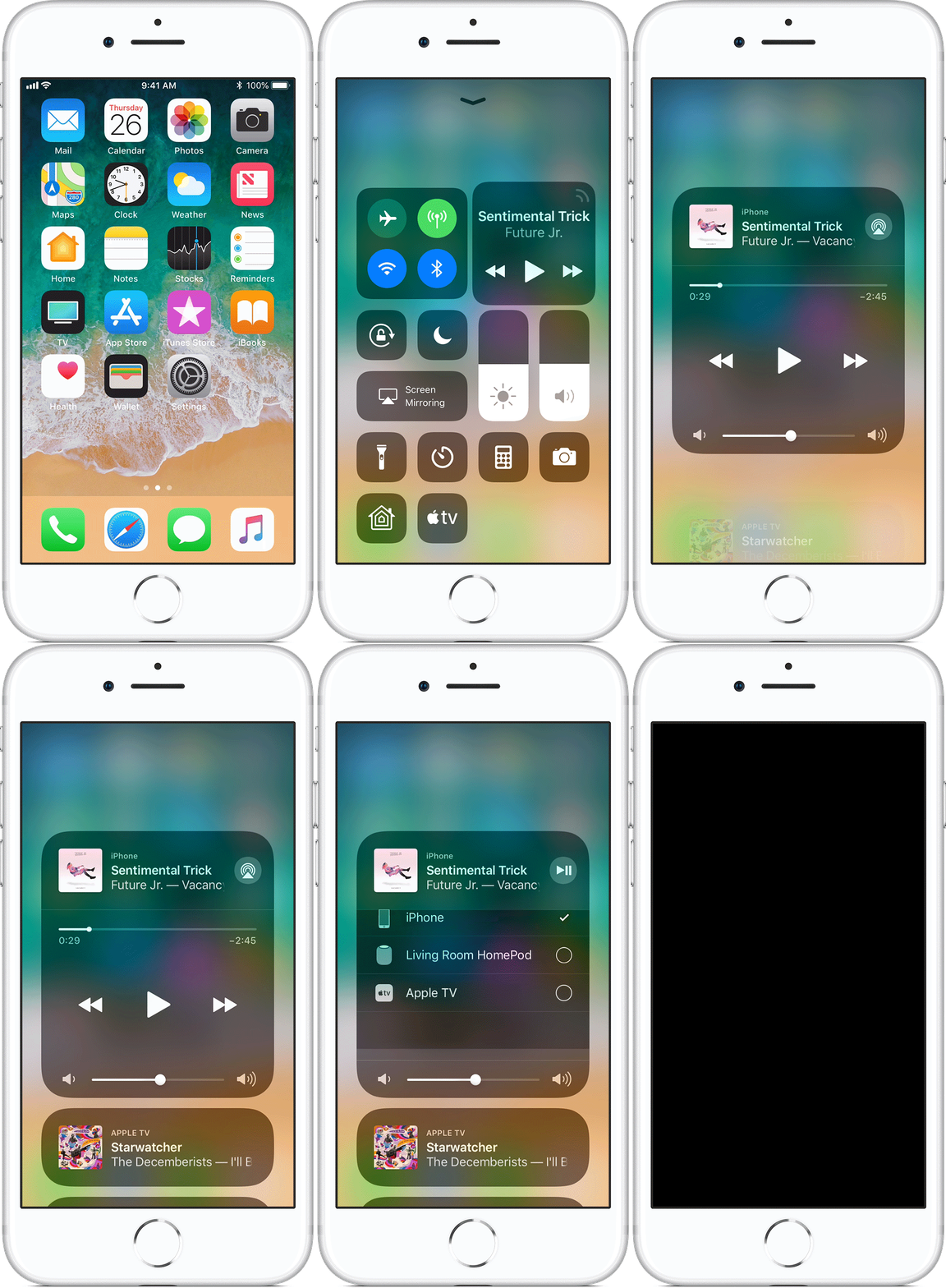
To switch the audio on your device from Control Center:
- Swipe up from the bottom edge of any screen on your device to open Control Center. On iPhone X, swipe down from the upper-right corner of the screen.
- Touch and hold the audio card in the upper-right corner, then tap
 to see a list of devices that you can connect to.
- Tap the speakers, headphones, or accessory that you want to use.
Under the list of devices that you can connect to, you might see additional cards to control Apple Music playback on nearby devices.
Tap a card to control what’s playing and queue up songs to play next using your iOS device.
To switch back to controlling audio playback on your iOS device, just open Control Center and tap the card at the top.
Switch the audio on your iPhone, iPad, or iPod touch
Cheers.


