Greetings, CowboyTJ.
I see that you're trying to sign into iCloud on your iPad, but you've run into a snag. It requires a verification code, but you can't locate where to get one. I'm happy to help.
Get a verification code and sign in with two-factor authentication
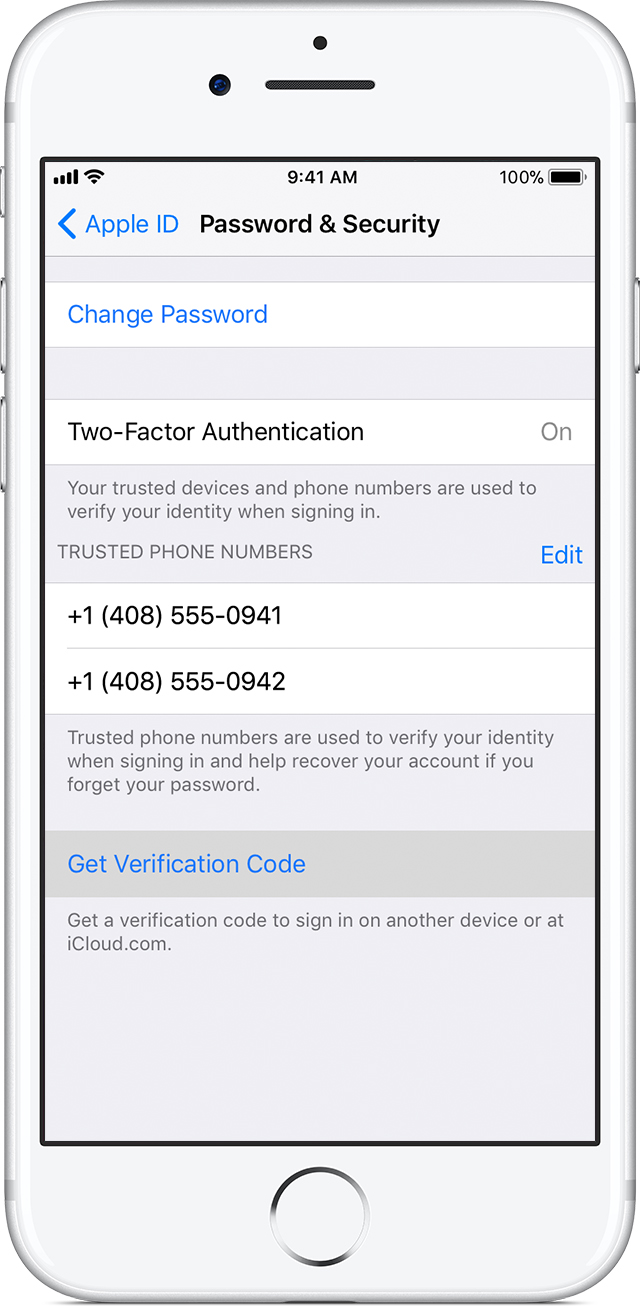
If you can’t receive a verification code on your trusted devices automatically, you can get one from Settings, even if your device is offline.
From your iPhone, iPad, or iPod touch:
In iOS 10.3 or later:
- Go to Settings > [your name].
- Tap Password & Security > Get Verification Code.
In iOS 10.3 or later, if your device is offline:
- Go to Settings > [your name].
- Tap Password & Security.
- A message says "Account Details Unavailable." Tap Get Verification Code.
In iOS 10.2 or earlier:
- Go to Settings > iCloud.
- Tap your Apple ID username.
- If your device is offline, tap Get Verification Code. If your device is online, tap Password & Security > Get Verification Code.
From your Mac:
- Go to Apple Menu > System Preferences > iCloud.
- Click Account Details.
- If your device is offline, click Get Verification Code. If your device is online, click Security > Get Verification Code.
Take care!


