
Camera jumps
Camera clicks and jumps around. Unable to use.
iPhone 6s Plus, iOS 12
Camera clicks and jumps around. Unable to use.
iPhone 6s Plus, iOS 12
If the camera on your iPhone, iPad, or iPod touch isn't workingRemove any case, film, or attachment
A case or film might block the camera or flash and affect performance. A metallic or magnetic case or camera attachment might interfere with optical stabilization. Test the camera without any of these to find out if they're causing the issue.
If you still have issues with the focus on your camera, contact Apple Support.
Clean the camera lens
If your photos are blurred, out of focus, or have dark spots, make sure that the camera lens is clean. If you need to clean the lens, use a microfiber cloth. If you see dirt or debris inside the lens, or the camera lens appears to be misaligned or blocked, take your device to an Apple Retail Store or Authorized Service Provider for more help.
Restart and test with different apps
If you see a closed lens or black screen when you open the Camera app, restart your device. Then test your camera using the Camera app and and another app that uses the camera.
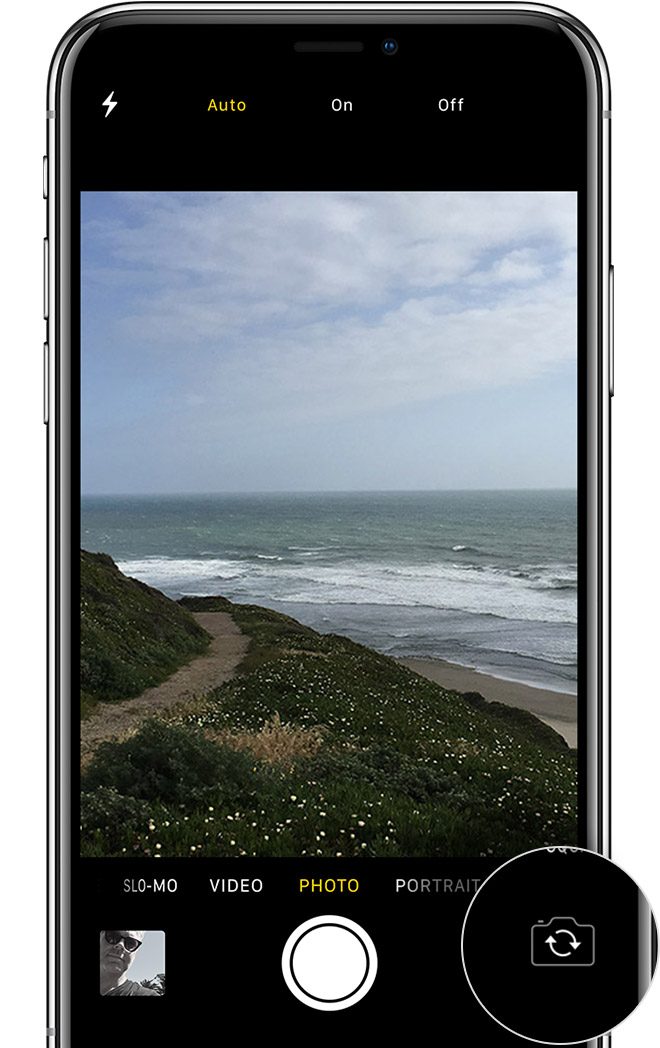
If your device has a front and rear camera, check to see if only one or both aren't responding. To switch cameras, tap the button in the bottom-right corner of the screen.*
Get more help
If your camera still isn't working, take your device to an Apple Retail Store or Authorized Service Provider for more help.
If the camera on your iPhone, iPad, or iPod touch isn't workingRemove any case, film, or attachment
A case or film might block the camera or flash and affect performance. A metallic or magnetic case or camera attachment might interfere with optical stabilization. Test the camera without any of these to find out if they're causing the issue.
If you still have issues with the focus on your camera, contact Apple Support.
Clean the camera lens
If your photos are blurred, out of focus, or have dark spots, make sure that the camera lens is clean. If you need to clean the lens, use a microfiber cloth. If you see dirt or debris inside the lens, or the camera lens appears to be misaligned or blocked, take your device to an Apple Retail Store or Authorized Service Provider for more help.
Restart and test with different apps
If you see a closed lens or black screen when you open the Camera app, restart your device. Then test your camera using the Camera app and and another app that uses the camera.
If your device has a front and rear camera, check to see if only one or both aren't responding. To switch cameras, tap the button in the bottom-right corner of the screen.*
Get more help
If your camera still isn't working, take your device to an Apple Retail Store or Authorized Service Provider for more help.
Camera jumps

