Black screen on iPad Mini 2 after iOS 12 Upgrade

Hi,


My iPad Mini 2 was working beautifully on iOS 11.etc but it automatically updated to iOS 12 during the night.


The problem I have now, is it starts up fine but as soon as I click the standby button or close the cover on my iPad to lock it, the screen goes black and never comes back.


The only way way to get the iPad to come back is through a hard reboot.


This is totally ***** as I have hard rebooted my iPad 5 times already this morning and it was totally fine before the update.


The battery is is full and this happens on power and disconnected from power as well.


Please help.


Thanks

Grant

Posted on Sep 20, 2018 12:58 AM

Reply
Question marked as Top-ranking reply

Posted on Sep 20, 2018 7:23 PM

Hi ​Editwhiz,

Thanks for reaching out in Apple Support Communities. I understand that after installing iOS 12 you're unable to wake your iPad after locking the screen. I can see why you'd reach out for assistance with this; I'd like to help. Based on the behavior you're describing, I'd recommend that you first create a backup: How to back up your iPhone, iPad, and iPod touch


Then use these steps to reinstall the iOS software to your iPad; this process will erase the software currently installed and replace it with a fresh copy. Be sure to closely follow step four during this process in order to prevent data loss:
  1. Make sure that you're using the latest version of iTunes.
  2. If iTunes is already open, close it. Connect your device to your computer and open iTunes. If you don't have a computer, borrow one from a friend or go to an Apple Retail Store or Apple Authorized Service Provider for help.
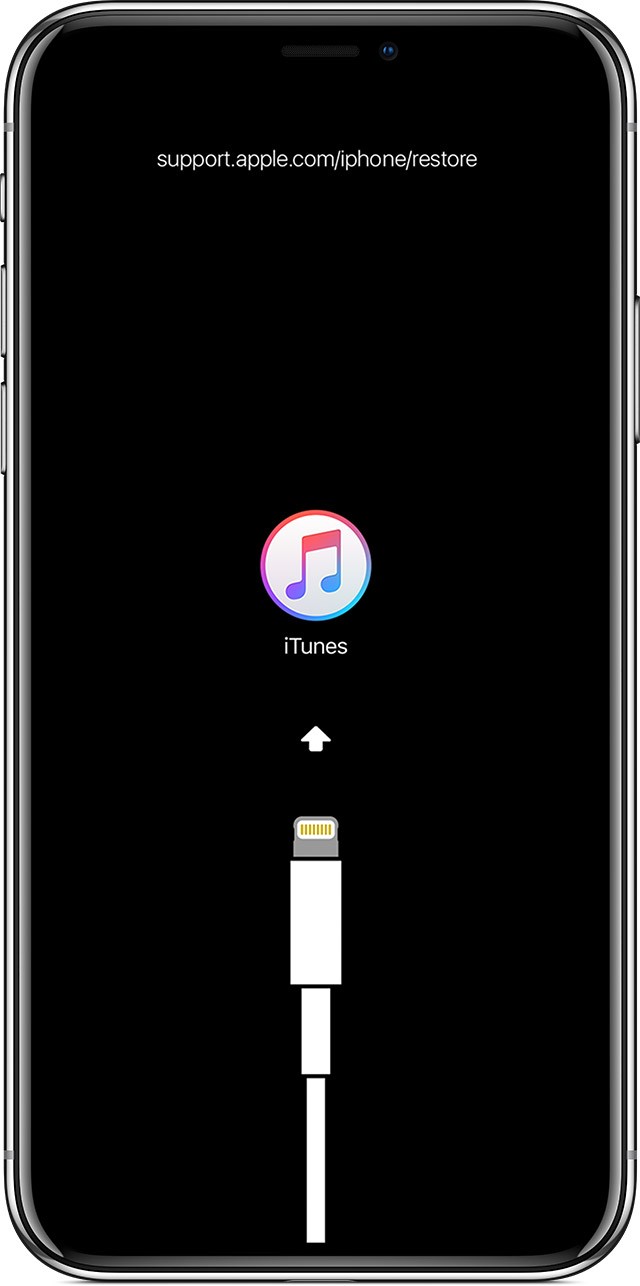
  3. While your device is connected, force restart it with these steps, but don't release the buttons when you see the Apple logo, wait until the connect to iTunes screen appears:
    • On iPhone 8 and later: Press and quickly release the Volume Up button. Press and quickly release the Volume Down button. Then, press and hold the Side button until you see the connect to iTunes screen.
    • On an iPhone 7 or iPhone 7 Plus: Press and hold the Side and Volume Down buttons at the same time. Keep holding them until you see connect to iTunes screen.
    • On an iPhone 6s and earlier, iPad, or iPod touch: Press and hold both the Home and the Top (or Side) buttons at the same time. Keep holding them until you see the connect to iTunes screen.
      User uploaded file
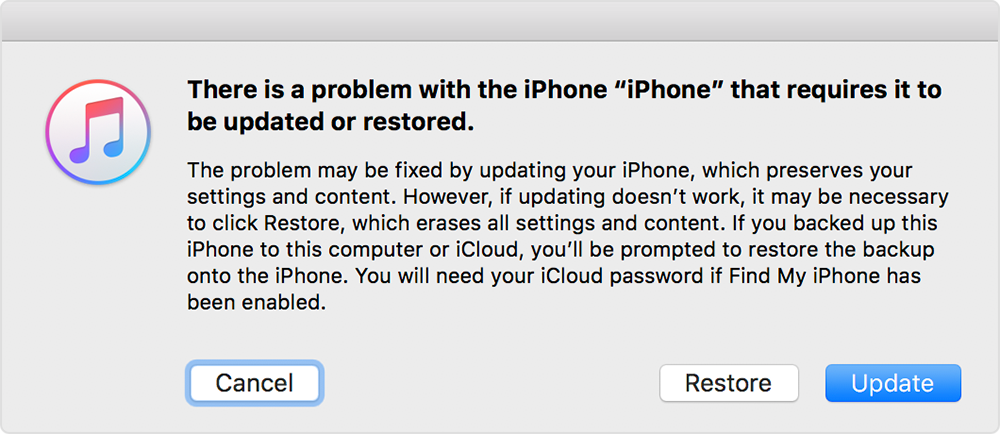
  4. When you see the option to Restore or Update, choose Update. iTunes will try to reinstall iOS without erasing your data. Wait while iTunes downloads the software for your device. If the download takes more than 15 minutes and your device exits the connect to iTunes screen, let the download finish, then repeat step 3.
    User uploaded file
  5. After the Update or Restore completes, set up your device.
If you can't update or restore your iPhone, iPad, or iPod touch

Let me know what you find.


Best Regards.
85 replies

Nov 30, 2018 8:33 AM in response to Editwhiz

After submitting analytic logs from my iPad to capture the problem as it occurs, I've had fairly regular calls from Apple support for the past week to follow up. They assure me that their engineers are working on identifying the root cause. This is encouraging, but they have yet to mention any proposed solutions or suggest an ETA. Looks like slow and steady, and a concerted effort from all of us on both sides of the pond, is the only way to effectively deal with this.


I have been pleasantly surprised at the level of attention from Apple, considering my iPad has been out of warranty for several years and never had an extended warranty. Perhaps they see that I own several Apple products and that makes some kind of difference. I'm not sure. Yeah, I drank the Apple Kool-Aid a long time ago, but it has lately started to leave a bit of a sour aftertaste.


In the meantime, I bought a new iPad mini 4 for a killer Black Friday deal at Best Buy for just $249. As would be expected, it's lighter, thinner, faster and the screen is much crisper. It arrived with iOS 11.3 installed. I was reticent to upgrade, considering the way it killed my iPad mini 2. But since 11.3 was the version that killed the iPhone screens, drained the batteries, and overheated the device, I figured it was a crap shoot either way. So I went ahead and upgraded it to 12.1. So far, it's been working fine. But a customer should never have to make these kind of irreversible decisions due to expired firmware signatures. I hope Apple's cars don't have this kind of upgrade method.


TECH NOTE: If you have to run Analytics (Preferences > Privacy > Analytics) to send logs to Apple, you of course have to be online to do it. But it apparently has to be either a direct cellular or WiFi connection - it won't send if your iPad is tethered directly to your iPhone hotspot via WiFi or Bluetooth. But you CAN tether your iPhone to your laptop and then share the Internet connection from the iPhone to the laptop WiFi, then connect the iPad to the shared laptop WiFi. Then it will work. They didn't tell me that - had to figure it out for myself. Such fun! In case you're wondering why I wouldn't just use regular house WiFi, I work on the road 24/7. My WiFi IS my iPhone.


}:@(

Dec 11, 2018 9:31 AM in response to nth2k

You might not like the answer. But I promise I will provide full details as soon as I receive and test my fully functional iPad at no cost. (Man, that sounds like a sales pitch, but it's not, I assure you.)

The iPad is on a FedEx truck at this moment and I should have it tomorrow for testing. I apologize for these teasing messages. I feel I have to give any Apple folks that may be reading this thread a chance to respond.

Dec 12, 2018 6:02 PM in response to sarossell

UPDATE: The two phone numbers I provided in my previous post are Apple voicemail system numbers. You have to know the extension of the person you want to contact. That's not very helpful. I'm not comfortable giving out specific extensions without permission or foreknowledge. So, I will contact the two Tech Supervisors I was in contact with that helped me with this and try to get them to reach out to everyone on this thread.

Feb 3, 2019 3:42 AM in response to Editwhiz

Still having this problem on updating a mini 2 on the 03.02.2019 - 2 months after this post. SORT THIS OUT APPLE!!! I am amazed that this issue has no official reply, other than this one in NOV.

Have updated iTunes/ windows/ disabled antivirus on temp basis and getting error 2009 on attempting upgrade on iTunes. I have tried to update on different computers and now have a wasted an entire weekend trying to sort this out. Ipad now stuck on recovery mode everytime I try to start it up.


Feb 11, 2019 3:46 PM in response to apslats75

Hi apslats75,


Great news that you got your mini 2 finally fixed. This means there's Hope after all and that there's a fix without hopelessly waiting for Apple to come up with a bug fix. :)


So the tech guy just basically updated or restored using a Mac? Was there any particular procedure he did cause I think a couple of people here already did that if I'm not mistaken? Anyways, will try the "restore using a Mac" option now. Nothing to lose anyways. Hope it works. I can't update since it's already sporting the latest 12.1.4 version.


Will update here soon. Cheers!


P.s. I can't go through the route of having tech support do it for me cause I live here in the Philippines and I am highly doubtful I could get the same after sales support you have.


Mar 4, 2019 3:35 PM in response to Editwhiz

Same problem here..... After update to ios12 recieved black screen. Rolled back to ios 11.... When it was possible... Decide to try again maybe issue got solved. Same ... But this time no possible to roll back to ios 11..... iPad Mini 2 cellular.

5 months already this issue and still no solution.... i Love Apple....

Around two years ago screen got broken and i replaced it not in apple center, because we dont have official apple centers in my place. Maybe this cause a problem? On ios 11 was OK. but on ios 12 some kind of lock?????

This thread has been closed by the system or the community team. You may vote for any posts you find helpful, or search the Community for additional answers.

Black screen on iPad Mini 2 after iOS 12 Upgrade

Welcome to Apple Support Community
A forum where Apple customers help each other with their products. Get started with your Apple Account.