Mixed up iMessage recipients

It doesn't matter which one of us (my wife or I) our son iMessages it goes to whichever one of us sent a message to him most recently!


My wife and I have always had the same iCloud account so that all our photos combine but i've set up my wife separately since the new iOS in the hope that it would fix this new bigger problem.


Seems enough people have this problem so hopefully the 'bug' will be rectified soon or we'll be given the work around! For the time being we're using WhatsApp...


I'd also love to be able to combine our photos into the one main stream without having to drag them all into a family album manually too.

iPhone X, iOS 12

Posted on Sep 23, 2018 5:03 AM

Reply
Question marked as Top-ranking reply

Posted on Sep 24, 2018 7:27 AM

not helpful at all but thanks for trying.

in fact i used the chat and your colleague was v helpful and solved the problem without being at all patronising


i have a degree in engineering and about 2 dozen apple products, this issue isn't complicated or confusing but due to a bug whereby the fix is to restart iMessage by turning it off, rebooting and then turn on again


no need to reply to this message

Similar questions

25 replies
Question marked as Top-ranking reply

Sep 24, 2018 7:27 AM in response to Joseph_S.

not helpful at all but thanks for trying.

in fact i used the chat and your colleague was v helpful and solved the problem without being at all patronising


i have a degree in engineering and about 2 dozen apple products, this issue isn't complicated or confusing but due to a bug whereby the fix is to restart iMessage by turning it off, rebooting and then turn on again


no need to reply to this message

Sep 25, 2018 9:36 AM in response to JasonFranks

I've resolved the issue by finding the faulty iMessage conversation on two of my five iPhones. You must delete your messaging conversation on any devices which have this glitched chat that's recipient name keeps changing.


Once you remove the chat, start a new conversation with each of the individual people whose messages were getting mixed up. Messages will once again be separated by phone number. Strangely the glitch does not impact group chats, but only individual chats with phone numbers and emails that are linked to the same Apple ID.

Sep 25, 2018 7:35 AM in response to dani4576

dani4576 wrote:


I have the same issue. I updated to iOS 12, and everyone else on my iTunes/iCloud account in my family is being grouped into a single chat in Messages.

Well there's your problem right there... stop sharing an account. Everyone needs their own account. As far as iCloud is concerned, you are all 'one person' if you're sharing an account.


- I will not accept any "fix" which involves creating new Apple ID's for everyone. I understand that it is strongly recommended, but I know a glitch when I see it, and I know there must be a way for separate phones with separate phone numbers to receive messages separately, despite being on a shared account.

It is not just "strongly recommended". This is not a "glitch". The "glitch" is expecting it to behave in a way different from how it was designed to behave.


You can reject reality if you want, but so long as you insist on sharing an account, you will not solve your problem and will more than likely experience other "glitches" related to insisting on defying logic.

Oct 4, 2018 7:58 AM in response to KiltedTim

KiltedTim wrote:


Whatever. When you discover the other problems you're having, cross contamination of data, etc. don't come complaining about how you never had this problem before and you don't want to use separate IDs. As long as you insist on doing it that way, you will have problems.

Some individuals are determined to ignore Apple's instructions. They seem to think that they know better than those that designed the iPhone.

Oct 4, 2018 6:35 AM in response to JasonFranks

Contrary to KiltedTim's opinion, this issue is real and is not a result of user error. It has now been reported on by Mashable and is apparently widespread.


I tried the fixes mentioned in this thread, but they were only temporary, at best. Has anyone else who has commented on this thread noticed that what they thought was a fix ultimately wasn't?


For me, it appears that my wife's and my daughter's messages/accounts have been somehow merged by iOS12, such that I can send them both separate texts and they stay separate for a little while, but eventually they end up merged together in one thread with the last person to reply's name at the top.


This is very frustrating and needs to be fixed. Most consider it a bug because things worked correctly for YEARS and only went haywire after I updated to iOS12. The Mashable article suggested that this might actually be a new "feature" that was undisclosed by Apple before debuting iOS12. I sincerely hope developers were not that shortsighted as to think this was a desirable feature. People are complaining because it's annoying and counterproductive. Plus, why would you hide it? So, at best, it's a new "feature" that needs to be either removed or an option provided to reverse its effects and turn it off. At worst, it's a bug that needs to be fixed ASAP. What a mess.

Sep 24, 2018 7:21 AM in response to JasonFranks

Hello and welcome to Apple Support Communities, Jason!

I understand you've noticed that iMessages from your son go to whomever recently messaged him. I can understand how this may be confusing, especially when trying to communicate clearly. I'd be happy to provide information that may help you out.

Have a look at this article: How to forward SMS/MMS texts on your iPhone

How to forward SMS/MMS texts on your iPhone

SMS/MMS are texts that you can send to other cell phones or an iPhone.

Set up text forwarding

You can forward texts from your iPhone to your iPad, iPod touch, or Mac. Here's how:

  1. On all your iOS devices, go to Settings > Messages. On your Mac, go to Messages > Preferences, then click iMessage. Make sure that you sign in to iMessage with the same Apple ID on all your devices.
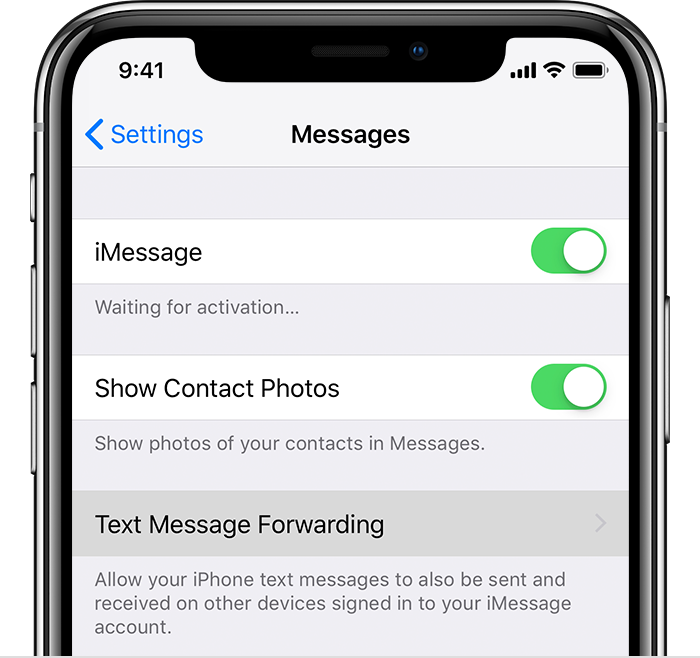
  2. On your iPhone, go to Settings > Messages, then tap Text Message Forwarding.
    User uploaded file
  3. Choose which devices can send and receive text messages from your iPhone.

As long as your iPhone is turned on and connected to Wi-Fi or a cellular network, new SMS/MMS texts that appear in green text bubbles can be sent and received on the devices that you added.

iCloud now keeps your entire messages history updated and available on all your devices—even when you set up a new device. Learn how to keep all your messages in iCloud.

One of your devices may have this setting enabled.

Also, make sure in Settings > Messages > Send & Receive, you and your wife have different accounts.

Thank you for using Apple Support Communities.
Have a great day!

Sep 25, 2018 7:26 AM in response to JasonFranks

I have the same issue. I updated to iOS 12, and everyone else on my iTunes/iCloud account in my family is being grouped into a single chat in Messages. So if I send "X" to my brother, "Y" to my father, and "Z" to my mother, all I will see is my mother's conversation at the top of my list in the main menu of Messages, and opening the conversation will reveal my last three texts being X, Y, and Z.


*An interesting fact to note is that my brother has not updated and is still running iOS 11.4. And yet, his messages are also being mixed with everyone else on the account.


- I have turned off iMessage completely and rebooted my iPhone. The issue persists.

- Send & Receive settings display just one phone number for each iPhone checked off.

- I do not have Family Sharing enabled (and I don't intend to do so in order to avoid this glitch).

- The Text Message Forwarding toggle is not present in my Settings app.

- Messages is turned off in iCloud settings on all devices.

- The person on iOS 11.4 has not had his conversations merged, but his messages are merged with other conversations on all iOS 12 devices.

- I will not accept any "fix" which involves creating new Apple ID's for everyone. I understand that it is strongly recommended, but I know a glitch when I see it, and I know there must be a way for separate phones with separate phone numbers to receive messages separately, despite being on a shared account.

Sep 26, 2018 4:12 PM in response to KiltedTim

I'm having this same problem and it just cropped up in the past week.


My wife, father-in-law, mother-in-law, and I are all signed into the same iCloud account. It's worked very, very well for years.


Now when I send a message to my wife, it looks like it went to my father-in-law.


My wife and I are on iOS 12. I'm unsure if my in-laws have upgraded yet.


I don't mind getting them separate Apple IDs, but using the same Apple ID has worked well for years. I believe this is likely a bug in the cloud.

Sep 25, 2018 7:52 AM in response to KiltedTim

This type of issue has arisen many times in years past. I understand the hazards that come with sharing an account, and I don't feel entitled to have everything start working as soon as I install an update, but I've always found a way to make the devices operate distinctly as PHONES, whereas I love them being as interconnected as possible as iOS devices.


Hypothetically if these were all my iPhones, it shouldn't be necessary that I make separate iTunes accounts for myself if I wanted to have to separate phone numbers on two separate devices (a pretty reasonable demand).


The fact that this issue is persisting after disabling iMessage likely means that this glitch goes beyond any sort of links between my Apple ID and phone number. My demand for a shared iTunes account may be unconventional, but it is a high priority for me for reasons I wish not to disclose. If Apple can't keep its hands off my SMS (which I doubt is the case), I will have to resort to a 3rd party messaging app to alleviate this.

Sep 27, 2018 2:51 AM in response to KiltedTim

Then how did it work so well for so many years prior to this point? My wife and I have used the same Apple ID since the day the iPhone 3G became available. Something had to have changed.


I should note that these messages are still separated correctly on my MacBook Pro.


I'll give them their own Apple IDs and put them in the family, as you suggested, but I hate to see the photo situation change. I really liked it when all of our images automatically went into a common pool.

This thread has been closed by the system or the community team. You may vote for any posts you find helpful, or search the Community for additional answers.

Mixed up iMessage recipients

Welcome to Apple Support Community
A forum where Apple customers help each other with their products. Get started with your Apple Account.