I have lost numerous audiobooks after the newest update? How can I get them back?

I have an IPad Air which I have recently updated to IOS 12.0. At that time, I noticed that numerous audiobooks were no long visual in my library. How can I get them back? I have my recipes for the purchases.

iPad 2, iOS 7.0.4

Posted on Sep 29, 2018 4:43 AM

Reply
Question marked as Top-ranking reply

Posted on Sep 30, 2018 11:24 AM

Hello Alloyd1,

Thank you for using Apple Support Communities! I understand that certain audiobooks are no longer showing in the Apple Books Library on your iPad. You've come to the right place for help.

Let's start by confirming if you can see and redownload the missing audiobooks from My Purchases:

Redownload apps, music, movies, TV shows, and books from the App Store, iTunes Store, and Apple Books - Apple Support

Specifically, follow the steps in this section:

Redownload books or audiobooks

You can redownload books in Apple Books on an iPhone, iPad, iPod touch, or Mac. You can redownload audiobooks in Apple Books on an iPhone, iPad, or iPod touch; or in iTunes on a Mac or PC.

On an iPhone, iPad, or iPod touch

  1. Open the Apple Books app.
  2. Tap User uploaded file or your photo in the upper-right corner of the screen.
  3. Depending on what you want to redownload, tap Books or Audiobooks under My Purchases.
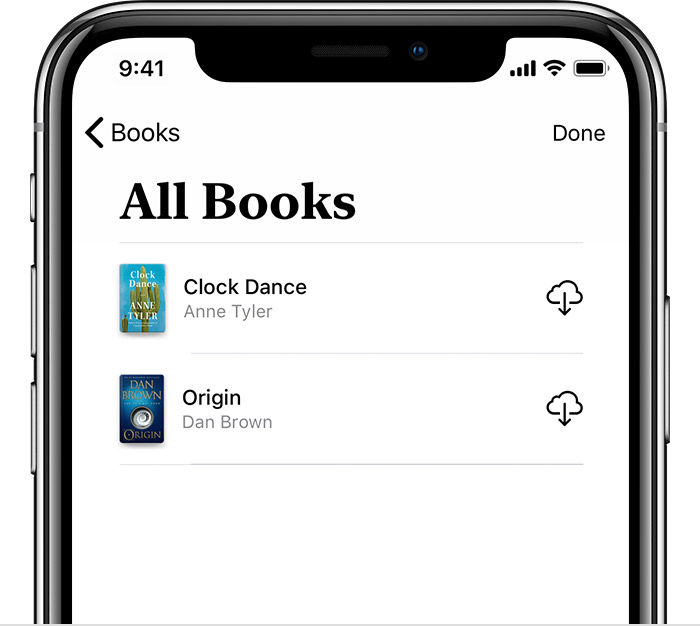
  4. Tap "Not on this [device]," then tap All Books or All Audiobooks.
  5. Find the book or audiobook that you want to download, then tap User uploaded file . The item downloads to your device. Don't see the item that you purchased?
    User uploaded file

If the audiobooks do not appear under My Purchases, and they are not hidden, can you confirm if these were purchased from Apple Books or another source?

Cheers!
32 replies
Question marked as Top-ranking reply

Sep 30, 2018 11:24 AM in response to Alloyd1

Hello Alloyd1,

Thank you for using Apple Support Communities! I understand that certain audiobooks are no longer showing in the Apple Books Library on your iPad. You've come to the right place for help.

Let's start by confirming if you can see and redownload the missing audiobooks from My Purchases:

Redownload apps, music, movies, TV shows, and books from the App Store, iTunes Store, and Apple Books - Apple Support

Specifically, follow the steps in this section:

Redownload books or audiobooks

You can redownload books in Apple Books on an iPhone, iPad, iPod touch, or Mac. You can redownload audiobooks in Apple Books on an iPhone, iPad, or iPod touch; or in iTunes on a Mac or PC.

On an iPhone, iPad, or iPod touch

  1. Open the Apple Books app.
  2. Tap User uploaded file or your photo in the upper-right corner of the screen.
  3. Depending on what you want to redownload, tap Books or Audiobooks under My Purchases.
  4. Tap "Not on this [device]," then tap All Books or All Audiobooks.
  5. Find the book or audiobook that you want to download, then tap User uploaded file . The item downloads to your device. Don't see the item that you purchased?
    User uploaded file

If the audiobooks do not appear under My Purchases, and they are not hidden, can you confirm if these were purchased from Apple Books or another source?

Cheers!

Dec 16, 2018 3:02 PM in response to Alloyd1

Similar problem experienced after updating my wife's iPhone to iOS 12.1.1. She's listens to audiobooks that she syncs from iTunes on her iMac. She's been following the same routine from early days with her iPods ... manually select audiobooks she wants to listen to, sync to her phone, listen to books, rinse, repeat. After updating to 12.1.1, on multiple instances she has finished listening to all tracks of an audio book and she goes back to her library [on her iPhone] to start a new book and all other books are gone. When she physically connects her iPhone to her iMac to re-sync with iTunes, all the missing audiobooks show as still selected in her iTunes:iPhone Sync Audiobooks list. look at "On My Device:Audiobook", all the expected books are shown as present on the device. But they're definitely not available from the iBooks.app on the iPhone. She tries to sync, and none of those books re-appear on her iPhone.


The only way we've been able to resync audiobooks is to disabled 'Sync Audiobooks' in iTunes, sync to clear audiobook selections entirely from the iPhone, re-enable 'Sync Audiobooks' and then sync again. All the selected audiobooks then show up back on her iPhone ... only to disappear again after she completes listening to an audiobook.


As noted above, she's never had this problem syncing and listening to audiobooks since first starting with iPods. This problem just started after upgrading her iPhone to 12.1.1. Her iPhone was previously running iOS 12.1.0.


[ reported as radar bug #46764078 ]

Dec 18, 2018 1:46 PM in response to Alloyd1

Try searching the search bar when you drag down. I put a ton of lectures on my iphone X and Books and Music tell me they down exist. If I search for them, then they show up in search results. Click them to play and got to "Reading Now". Add it to a collection and then it will show up in the Audiobooks help.


Not saying this is acceptable, but its the only way I've found to access material thats outside the apple stores - a problem that keeps getting worse.

Jan 3, 2019 1:39 AM in response to John Galloway

More problems:

Yesterday I try to put back one audiobook with iTune and this time it didn't show up on Book at all. Tried a coulpe of time to re-sync, still not there, I did try another Audio app (but not Audible) without success. The funny part is that they show up on "On My Device" and I can even play them from iTune. So iTune can play audiobooks from my iPhone, but not my iPhone. Yes it's 2019, technology is going forward, or is it?

Workaround:

I changed the status of the audiobook to music (via get info with a right click on the book) and synced it as a music album and it worked, so now I'm using the music player to listen to my audiobooks. It's better than nothing.


My kids are using an other brand of telephone (you can guess which one) with another OS that start with andr.... They laugh at me and ask me why I'm still using an iPhone. I have no answer to that.

Jan 24, 2019 9:16 PM in response to gtispindle

I don't know if this will be helpful to others but I had the same problem - deleted an audiobook after finishing and everything disappeared but was still taking up space...


After much trial and error, I deleted the Audible app and all of my books immediately reappeared in iBooks!


As I am not an Audible member, it is no loss to me, (I had downloaded it to try and never got around to it) but some of you may not have that as an option.


Just thought I would share :o)

Jan 14, 2019 6:42 AM in response to mastmann

I got exactly the same issue as mastmann ... using iPhone SE, latest iOS.

As soon as I delete a private (from free sources, not purchased) audiobook file, all others get deleted as well.

Only completely un-syncing / deleting all audiobooks off the iPhone & re-syncing brings them back again.


I am already looking into other audiobook-players like "bound" or "cloudbeats" ... but I would prefer Apple's own app to "just work ... out of the box" ... guess those times are passed and gone now.


Jan 2, 2019 5:21 AM in response to devonhub

I have exactly the same problem and the worse part is that all these books that are disappearing are still in memory in the Iphone but cannot be deleted. If you look at Iphone Storage they appear as "Other". It's a nightmare, we can only have one book at the time. How can Apple make such an incredible bug and do nothing about it.

I'm very very angry at Apple right now!

Jan 2, 2019 5:57 AM in response to devonhub

I’m in the same boat as your wife. Just finished a book only to discover my whole library is gone. Pulling down to search finds the audiobooks that were once there, but clicking on them just brings up my empty library. Very annoying.


I suppose this won’t get fixed until the next update(s). Hopefully anyways.


Were you able to find a fix? Or, is only putting one audiobook on my phone at a time the stop-gap for now?

This thread has been closed by the system or the community team. You may vote for any posts you find helpful, or search the Community for additional answers.

I have lost numerous audiobooks after the newest update? How can I get them back?

Welcome to Apple Support Community
A forum where Apple customers help each other with their products. Get started with your Apple Account.