iPhone won’t leave “Drafts” folder unchecked

Since updating to IOS 12, My iPhone 7 keeps having the drafts folder and a second inbox show up, I uncheck and then it comes back again. Have talked to other that are seeing the same issue. Sometimes I can delete, sometimes I cannot it stays greyed out. Very annoying, this has only started since the update.


User uploaded fileUser uploaded file

iPhone 7, iOS 12

Posted on Oct 1, 2018 7:20 AM

Reply
6 replies

Oct 2, 2018 6:42 AM in response to Lundemd

Greetings, Lundemd.


I see that you're having an issue with the Mail application on your iPhone 7 since upgrading to iOS 12. You're seeing multiple instances of the Drafts mailbox, and I'm happy to help.


Use mailboxes to organize emails on your iPhone, iPad, and iPod touch -- First, sign into the account through a browser on your Mac or PC and see which mailboxes have been created for both accounts. If the mailboxes you're seeing are only on tour iPhone, review the information and follow the steps provided in this section of the article:

Manage your mailboxes

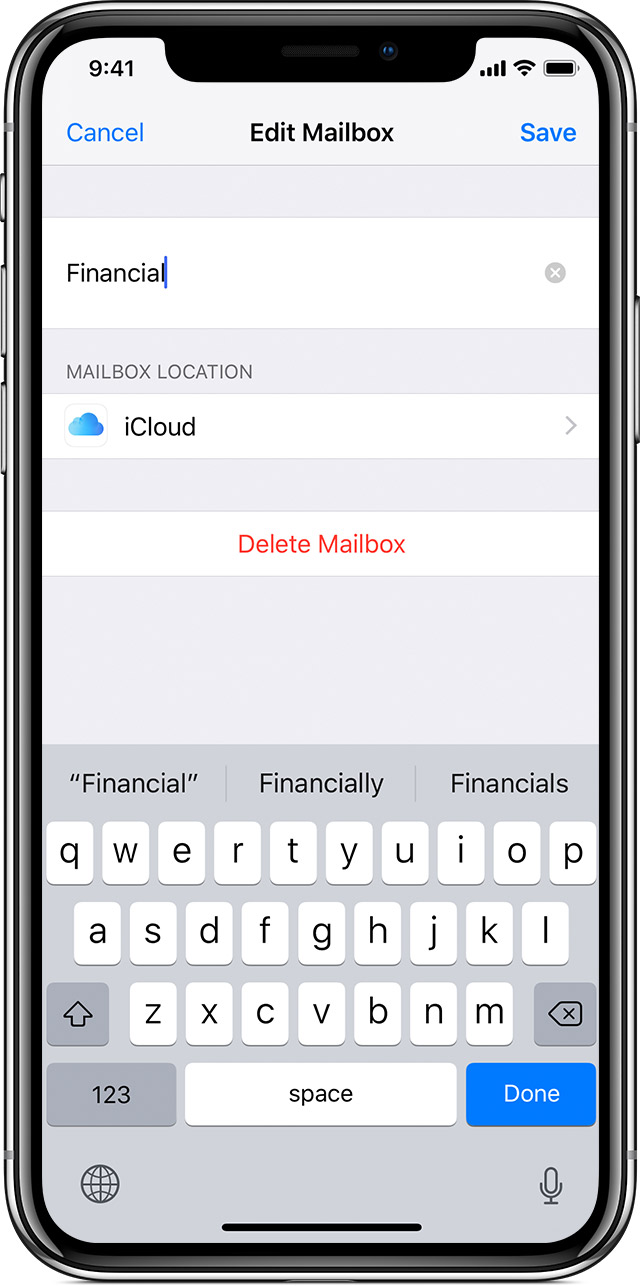
Delete a custom mailbox

When you delete a custom mailbox, it permanently deletes all of the emails inside of the mailbox and from your account. Before you delete a mailbox, you can move the emails to another mailbox.

To delete a mailbox:

  1. Go to your Mailboxes list and tap Edit in the upper-right corner.
  2. Tap the mailbox you want to delete.
  3. Tap Delete Mailbox.
  4. Tap Delete, then tap Done.
    User uploaded file

You can only delete custom mailboxes.


Let me know how that goes, and take care!

Oct 2, 2018 10:42 AM in response to Lundemd

Thank you for getting back to us with that information, Lundemd. It's appreciated. I'd like for you to make sure that the accounts have been set up correctly.


Set up Exchange ActiveSync on your iPhone, iPad, or iPod touch -- Review this article and compare it to your email settings. If everything appears to be correct, I advise contacting your Exchange administrator for further help.


Enjoy your day!

Oct 2, 2018 9:54 AM in response to i_rina

It is not a custom mailbox, it only happens on the phone and it is always the drafts for my Exchange account. Most of the time it is greyed out so I can not check or uncheck it to remove it from showing up. Something a second exchange inbox shows up as well. I can from time to time close out of the app, go back in then uncheck them from showing up. But they will come back with in the next few times I open the mail app again.

Oct 2, 2018 11:29 AM in response to pedro d

So, My phone has been set up and running for about 2 years, same Exchange account with no changes. Email works great on iPad (not upgraded to 12). Works great on my MacBook. Works on my windows laptop. The only place this happens is on my iPhone, and only after I updated to IOS12..worked on every other IOS i had on this phone. I don't think Exchange is the issue.

This thread has been closed by the system or the community team. You may vote for any posts you find helpful, or search the Community for additional answers.

iPhone won’t leave “Drafts” folder unchecked

Welcome to Apple Support Community
A forum where Apple customers help each other with their products. Get started with your Apple Account.