disable sync over the air with icloud HELP!

How do I disable this feature. I want to sync my contacts and calendars manually. I cannot seem to find where to change this setting. It works fine on the old IPad but not the IPhone 6. I just updated to version 12

iPhone 6, iOS 12

Posted on Oct 2, 2018 5:47 PM

Reply
Question marked as Top-ranking reply

Posted on Oct 3, 2018 5:57 PM

Hello judyjht,


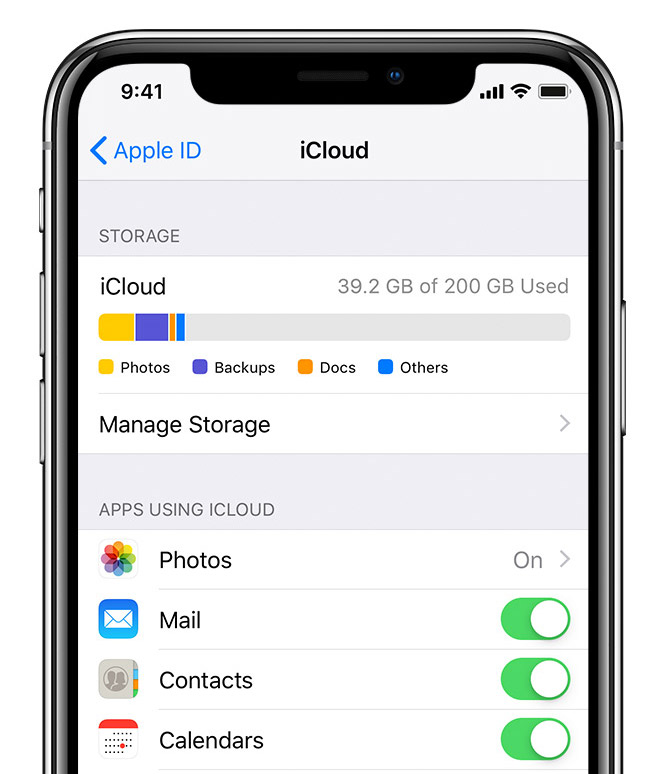
Thanks for replying back. To get it to stop syncing with iCloud, turn off those options in Settings > [Your name] > iCloud; for both Contacts and Calendars, this information will only be able to sync manually, rather than through iCloud.


This article talks about this and has a screenshot to help: Set up iCloud on your iPhone, iPad, or iPod touch - Apple Support

User uploaded file


If you wanted to check why it may not be syncing, this article has troubleshooting to help you check, and states: Get help using iCloud Contacts, Calendars, or Reminders - Apple Support


Learn what to do if you need help. For example, the changes that you made on one device didn't appear on all of your devices.


Thanks and have a wonderful day.
3 replies
Question marked as Top-ranking reply

Oct 3, 2018 5:57 PM in response to judyjht

Hello judyjht,


Thanks for replying back. To get it to stop syncing with iCloud, turn off those options in Settings > [Your name] > iCloud; for both Contacts and Calendars, this information will only be able to sync manually, rather than through iCloud.


This article talks about this and has a screenshot to help: Set up iCloud on your iPhone, iPad, or iPod touch - Apple Support

User uploaded file


If you wanted to check why it may not be syncing, this article has troubleshooting to help you check, and states: Get help using iCloud Contacts, Calendars, or Reminders - Apple Support


Learn what to do if you need help. For example, the changes that you made on one device didn't appear on all of your devices.


Thanks and have a wonderful day.

Oct 3, 2018 4:29 PM in response to judyjht

Hello judyjht,


Thanks for asking the Apple Support Communities for help managing your iCloud data manually. If you turn off those options in Settings > [Your name] > iCloud; for both Contacts and Calendars, this information will only be able to sync manually, rather than through iCloud.


This article talks about this and has a screenshot to help: Set up iCloud on your iPhone, iPad, or iPod touch - Apple Support

User uploaded file


Then you can use iTunes or however else you were syncing. This article is for iTunes: Sync your iPhone, iPad, or iPod using iTunes on your computer - Apple Support


Thanks and have a wonderful day.

Oct 3, 2018 5:30 PM in response to judyjht

Thanks for the reply. The only reason I want to do it manually is because it says it does it but the Calandar never updates so I miss appointments that are on my iPhone 6 but don't sync to the PC. I would love to have it sync from the pc to the iPhone & Ipad and the other way around but it never does. Maybe I should go to the Apple Store . Thoughts?? Thanks for the reply.

This thread has been closed by the system or the community team. You may vote for any posts you find helpful, or search the Community for additional answers.

disable sync over the air with icloud HELP!

Welcome to Apple Support Community
A forum where Apple customers help each other with their products. Get started with your Apple Account.