Apple watch ringing in silent mode

Followed the below steps and still cant make my watch to stop ringing.


  1. Launch the Apple Watch app on your iPhone.
  2. Tap Phone.
  3. Tap Custom.
  4. In the Ringtone section, move both sliders to off/white (if you only want to turn off the ringtone, but still want vibrations when calls come in leave the Haptic slider on).

Is there anything am missing ?

iPhone XS, iOS 12

Posted on Oct 16, 2018 9:56 AM

Reply
Question marked as Top-ranking reply

Posted on Oct 17, 2018 1:14 PM

Hello and welcome to Apple Support Communities, saveen23!

I understand you want to mute the notification sounds on your Apple Watch. I'd be happy to provide information to help you out.

Use the steps here to mute your notifications: Change the audio and notification settings on your Apple Watch

Mute your Apple Watch

  1. Touch and hold the bottom of the watch face. Wait for Control Center to show, then swipe up.
  2. Tap User uploaded file. This turns on Silent Mode. You can still receive haptic notifications.
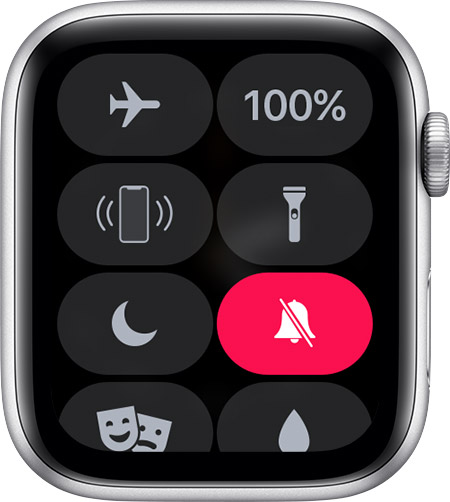
    User uploaded file

To silence an alert or notification as it sounds, rest your palm on the display for at least three seconds or until you feel a tap. If it doesn't work, see if the Cover to Mute setting is on: On your iPhone, open the Apple Watch app, go to the My Watch tab, then tap Sounds & Haptics.


Thank you for using Apple Support Communities.
Have a great day!

Similar questions

1 reply
Question marked as Top-ranking reply

Oct 17, 2018 1:14 PM in response to saveen23

Hello and welcome to Apple Support Communities, saveen23!

I understand you want to mute the notification sounds on your Apple Watch. I'd be happy to provide information to help you out.

Use the steps here to mute your notifications: Change the audio and notification settings on your Apple Watch

Mute your Apple Watch

  1. Touch and hold the bottom of the watch face. Wait for Control Center to show, then swipe up.
  2. Tap User uploaded file. This turns on Silent Mode. You can still receive haptic notifications.
    User uploaded file

To silence an alert or notification as it sounds, rest your palm on the display for at least three seconds or until you feel a tap. If it doesn't work, see if the Cover to Mute setting is on: On your iPhone, open the Apple Watch app, go to the My Watch tab, then tap Sounds & Haptics.


Thank you for using Apple Support Communities.
Have a great day!

This thread has been closed by the system or the community team. You may vote for any posts you find helpful, or search the Community for additional answers.

Apple watch ringing in silent mode

Welcome to Apple Support Community
A forum where Apple customers help each other with their products. Get started with your Apple Account.