ios 12 split screen not working

Split screen via dock not working on IOS 12 on my iPad Pro.

It worked on IOS 11.


when I try to flick up from screen bottom either nothing at all happens OR the dock appears, but the app I was using on screen closes. Very annoying/frustrating!


i’ve tried the standard suggested solutions, to no avail: shutting down the iPad; fully restarting it; resetting it. The split screen won’t work! Note: I can swipe down to show Control Center.


Anyone know how to fix this?

iPad Pro Wi-Fi, iOS 12.0.1

Posted on Oct 19, 2018 5:27 PM

Reply
4 replies

Oct 20, 2018 2:26 PM in response to Jerome4501

Good afternoon Jerome4501,

Welcome to the Apple Support Communities!

I understand you are trying to use Split View on your iPad Pro with iOS 12.
The first step is to make sure the Multitasking steps are still enabled in the Settings app after the iOS upgrade.
Tap Settings > General > Multitasking & Dock. Choose "Allow Multiple Apps"
Then follow the instructions below with slower, more deliberate movements than you usually do for accessing Control Center or Notifications. Try doing this with two Apple apps first to confirm the feature is working, as the Split View feature may not be available in some third party apps.
Use Multitasking on your iPad

You can use Split View with iPad Pro, iPad (5th generation and later), iPad Air 2, or iPad mini 4.

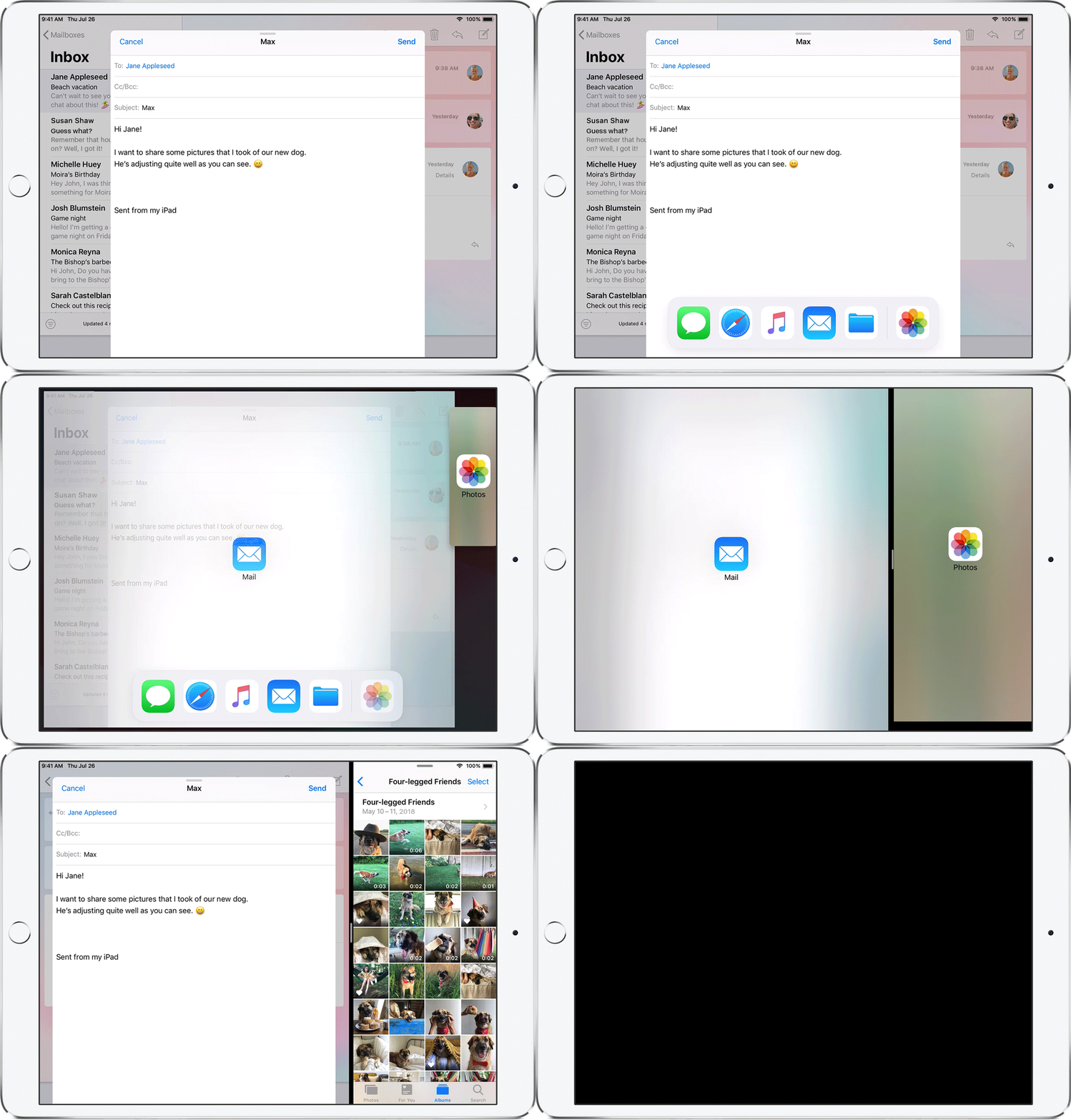
Use two apps at the same time with Split View

User uploaded file

With Split View, you can use two apps at the same time. For example, you can view photos while you compose an email. Or look at a location in Maps while you search for vacation ideas in Safari.

How to use Split View:

  1. Open an app.
  2. Swipe up from the bottom of the screen to open the Dock.
  3. On the Dock, touch and hold the second app that you want to open, then drag it off the dock.
  4. When the app opens in Slide Over, drag User uploaded file down.

How to adjust Split View:

  • To give the apps equal space on the screen, drag the app divider to the center of the screen.
  • To turn a Split View into a Slide Over, swipe down from the top of the app.
  • To close Split View, drag the app divider over the app that you want to close.

Learn how to use Split View in Safari to see two websites at the same time on your iPad.


Take care.

Oct 20, 2018 2:31 PM in response to Jerome4501

Jerome4501 wrote:


Split screen via dock not working on IOS 12 on my iPad Pro.

It worked on IOS 11.


when I try to flick up from screen bottom either nothing at all happens OR the dock appears, but the app I was using on screen closes. Very annoying/frustrating!

Don't flick up. Swipe up a little more slowly and deliberately as suggested by becky_s22.It takes a different touch now than it did in iOS 11. To get to the app switcher, swipe up slowly to the middle of the screen and then let go and the app previews should appear.

This thread has been closed by the system or the community team. You may vote for any posts you find helpful, or search the Community for additional answers.

ios 12 split screen not working

Welcome to Apple Support Community
A forum where Apple customers help each other with their products. Get started with your Apple Account.