Metro-PCS T Mobile Visual Voicemail Not Working

I have a brand new iPhone XR in whI hope the Visual Voicemail is not working. I read through the previous Q&A and I still have a few questions. I’ve tried most of the troubleshooting steps previously listed. I read something online but I can’t seem to find that article again but it read something like Visual Voicemail can only be set for the first time inside the Metro T-Mobile store connected to their WiFi. So I’m thinking a couple of things. First off, I’m going to the Metro PCS / T Mobile store first thing in the morning. Second, I think I need to Erase and Reset Networking Settings (I will back up everything first of course). Third, do I need to start with a new SIM card? when I bought my iPhone XR at the Apple Store just this past Sunday. We took out the sim card from my iPhone X and placed it into the XR. Could that be the issue? Forth, I’m thinking to go ahead and start with a new SIM card, erase and reset network settings, connect to the WiFi inside the store and then trying to setup Visual Voicemail. But I wanted to get the  Community‘s insight. Thanks a bunch!!!

iPad 2 Wi-Fi, iOS 8

Posted on Nov 22, 2018 10:31 PM

Reply
1 reply

Nov 24, 2018 11:59 AM in response to KenDeWade

Hi KenDeWade,

Congratulations on your new iPhone! I understand you're having trouble setting up and using Visual Voicemail on your iPhone. I know Visual Voicemail is an important feature to use; I'd like to help. While I don't believe it is necessary for you to acquire a new SIM card, I would recommend using the steps below, which include resetting Network Settings and potentially contacting your carrier, to troubleshoot Visual Voicemail:

Get help with Visual Voicemail

If you can't set up Visual Voicemail, contact your carrier to make sure that your plan supports the feature.

If you need help, try these steps. Check your Visual Voicemail after each step:

  1. Try to call someone to check your cellular network connection.
  2. Make sure that you set up your voicemail. To check, dial your phone number from your iPhone.
  3. Call your iPhone from another phone and try to leave yourself a voicemail.
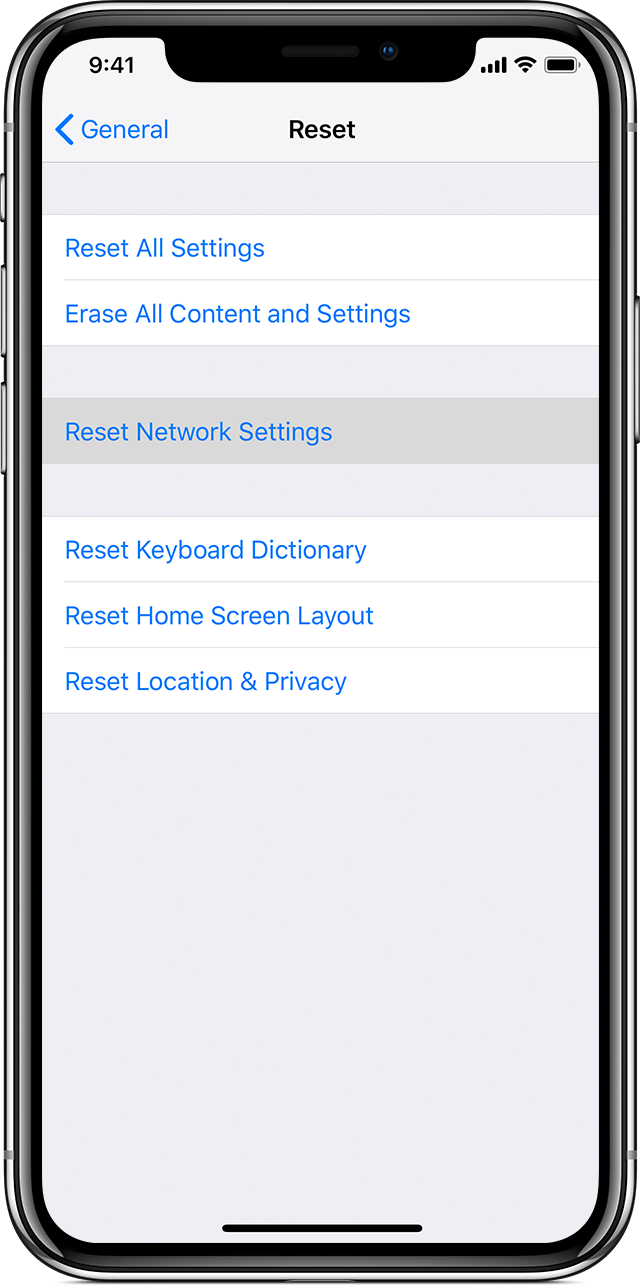
  4. Go to Settings > General > Reset and tap Reset Network Settings.
    User uploaded file


Set up Visual Voicemail on your iPhone


Best Regards.

This thread has been closed by the system or the community team. You may vote for any posts you find helpful, or search the Community for additional answers.

Metro-PCS T Mobile Visual Voicemail Not Working

Welcome to Apple Support Community
A forum where Apple customers help each other with their products. Get started with your Apple Account.