iCloud email address

I follow the onscreen instructions on my iMac to create an iCloud email address. one of two things happens. After I hit OK on the Create address pop-up:


1) I get the message "This address is already in use"

or

2) The original box comes back with the choice of OK or Cancel. If I press OK then then pop-up appears. When I press Create the previous box returns.


Can anyone tell me how I can actually create a meaningful iCloud email address please?

iMac 21.5", 10.14

Posted on Feb 12, 2019 9:50 AM

Reply

Similar questions

4 replies

Feb 13, 2019 2:26 PM in response to volvoxc70

Hello volvoxc70, 


Glad to see you have reached out to the Apple Support Communities. I can see you’re trying to set up an iCloud email address. Based on the message you’re seeing,“ This address is already in use,” sounds like you may already have an Apple ID which ends with @mac.com or @me.com.  Check out this site for more information: iCloud: Set up an iCloud Mail email address.


Cheers!

Feb 15, 2019 3:14 AM in response to tygb

Thank you for your very detailed and thorough response. Although it is very helpful I am now terrified!


This is horrendously complicated. Very prone to error.

I use a gmail address as an apple Id. for all the apple kit in the household, my wife and myself, MACs, phones iPads.. This is a business gmail where the domain registration ends in three weeks time.

I thought, we need new email addresses so let's get iCloud ones. I thought I could still use the gmail apple id even though the domain will exist no longer.

I am now so worried that I may go wrong and lose all my iCloud stuff, email accounts, contacts etc. that I do not want to start. Why can't I simply find an iCloud email that no-one else has used, choose that and then say replace apple id with this email address? Why does an iCloud email address have to be an apple id? It is all awful.

Feb 15, 2019 4:35 AM in response to volvoxc70

In your system preferences > iCloud notes , calendar , contacts ...all the boxes are always to be checked , the iCloud Drive box is to be checked , click on option button the desktops and documents box is to be checked and rest of the boxes are to be checked so when you sign out from the first account and sign with new mail address the contents of the applications will start syncing with high speed .

Some users use time machine to take back up https://support.apple.com/en-in/HT201250

Read this also https://support.apple.com/en-in/HT207428

Also ,if the mail account is IMAP when you again configure the application all of the mails will start syncing see this article https://support.apple.com/en-in/guide/mail/set-up-mail-with-your-email-accounts-mail35803/mac

For pop accounts enter in user library > mail > save all your mails in V6 folder ( it can be explained if you ask as its a lengthy procedure , but works even a single mail will not be lost ) .

Every Mac user has its individual mail address and can't be repeated / copied , if some one tries to create it that couldn't be signed in the iCloud server , the Apple ID is created with iCloud account , it's very convenient .

For better performance the gmail address is kept same as Apple ID address , and in system preferences > iCloud the Apple ID is signed in .

if you try to follow these methods all the applications Data will not be lost ( the iCloud storage should be in limits it could be free 5GB or the plan that you purchased from Apple ) , make sure always write down all mail address and their respective passwords , the most important iCloud keychain verification code in your diary , if user has set up air port express the wireless network password that is kept same as base station password , should be written .

Feb 13, 2019 11:10 PM in response to volvoxc70


( a ) Open system preferences > click on iCloud and click on sign out , you can see a window stating do you want to keep a copy of your iCloud data on this Mac before signing out ? The boxes iCloud Drive , contacts , calendars , reminders are checked by default - so click on keep a copy . A pop up window will appear are you sure you want to stop updating and continue with sign out ( any documents not updated to iCloud Drive , will be moved to a folder named “ iCloud Drive archive in your home folder on this Mac ) so don’t click on “ cancel “ but " click on continue with sign out .
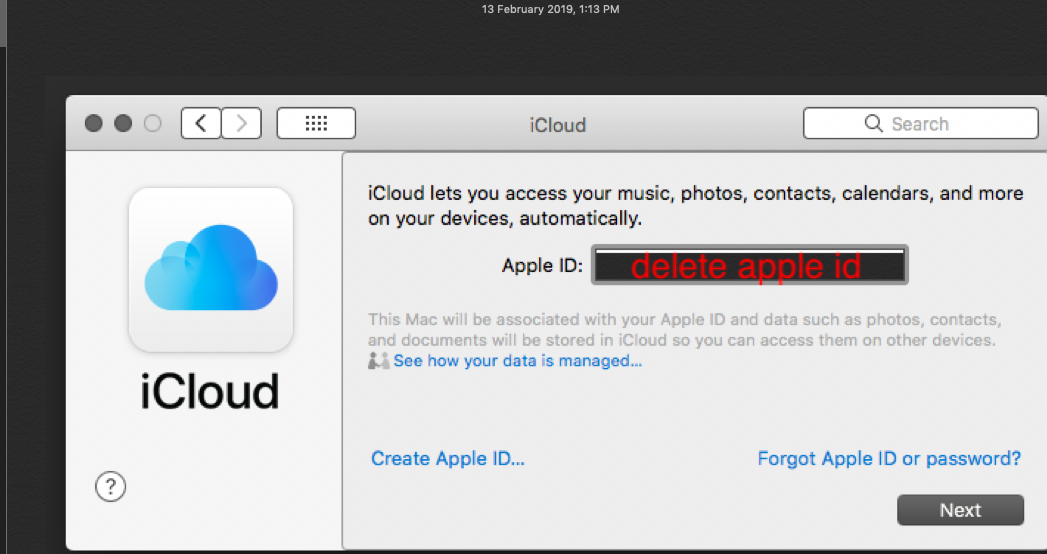


You have to completely delete apple id created in the box , take cursor on the dead end delete the id use command and delete key or press delete button continuously on the keyboard so that the field should be empty and no alphabets should be there , after that click on create Apple ID , also you can't use the same Apple ID once again either you created with gmail services or used with two factor authentication , or already created with iCloud.com .

Also three Apple IDs can be created from this Mac and not more than that .


( b ) Then check the boxes of iCloud Drive , contacts , calendars , reminders and click on continue .

 a pop window will appear . Do you want to keep a copy of safari passwords on this Mac ? 

    ( 1 ) Delete from Mac ( 2 ) cancel ( 3 ) keep on Mac .

       So its optional you can select keep on Mac or click on delete from Mac ( as some user

 write down the safari passwords in a safe place and they can autofill it again ) .


( c ) It will prompt enter the Apple ID password for mail address to turn off find my Mac , so enter your Apple ID password and click on continue , a small circle will rotate , be patient .


( d ) After some time a window will appear showing iCloud lets you access your music , photos , contacts , calendars and more on your devices , automatically , your Apple ID would be written in the field , click on next .


( e) It will prompt to enter your apple id password , so enter the password ( it will take some time to fill up the password in the password field ) and click on next a small circle will rotate .


( f ) Click on create Apple ID , the circle rotates , your date of birth is used to determine which services to set up on this Mac .

( 1 ) Date of birth - Day [ ] , Month [ ] , Year [ ] , click on drop down arrows of day , month , year and fill up the credentials and click on next .


( g ) A window appears get started with your name , email address and password 

    Name [ First ] [ Last ]

    Email address - name@example.com

    This will be your new Apple ID 

    Get a free iCloud email address 

    Password required …….

    Verify ……..

Your password must be at least 8 characters long & include a number , an uppercase letter and a lower case letter .Fill up the credentials .

Check the box of apple news and announcements …..the terms and conditions and click on next .

Enter a phone number which can be used to verify identity via text message or phone call 

Phone number …….country code will be written .

Phone number ……… enter your trusted mobile number .

Verify with - text message , phone call its optional you can check the box for text message and fill up the credentials it will show .

Did not receive code , cancel , next .So click on next .


( h ) Terms and conditions - check the box of license agreement and click on agree , a circle will rotate a prompt will appear to enter your password for admin , so enter the admin password correctly and click on ok .


( I ) A window will appear .

   Use iCloud for your documents and data .

   Use find my Mac 

   The boxes for them are checked by default , then click on next .


( j ) Again , a window will appear allow find my Mac to use the location of this Mac ?

   Not now , allow , you have to click on allow .

You are signed with new apple id and password , check the box for Siri , wait for while after few minutes you will be able to move your cursor , click on iCloud Drive option button and check the box of documents and desktop .

You will notice that the box of keychain is checked .


Note : Write down the Apple ID and password in a safe place , also you can create only three Apple ID on iCloud domain using a single Mac .


This thread has been closed by the system or the community team. You may vote for any posts you find helpful, or search the Community for additional answers.

iCloud email address

Welcome to Apple Support Community
A forum where Apple customers help each other with their products. Get started with your Apple Account.
