waiting for approval

Hi,

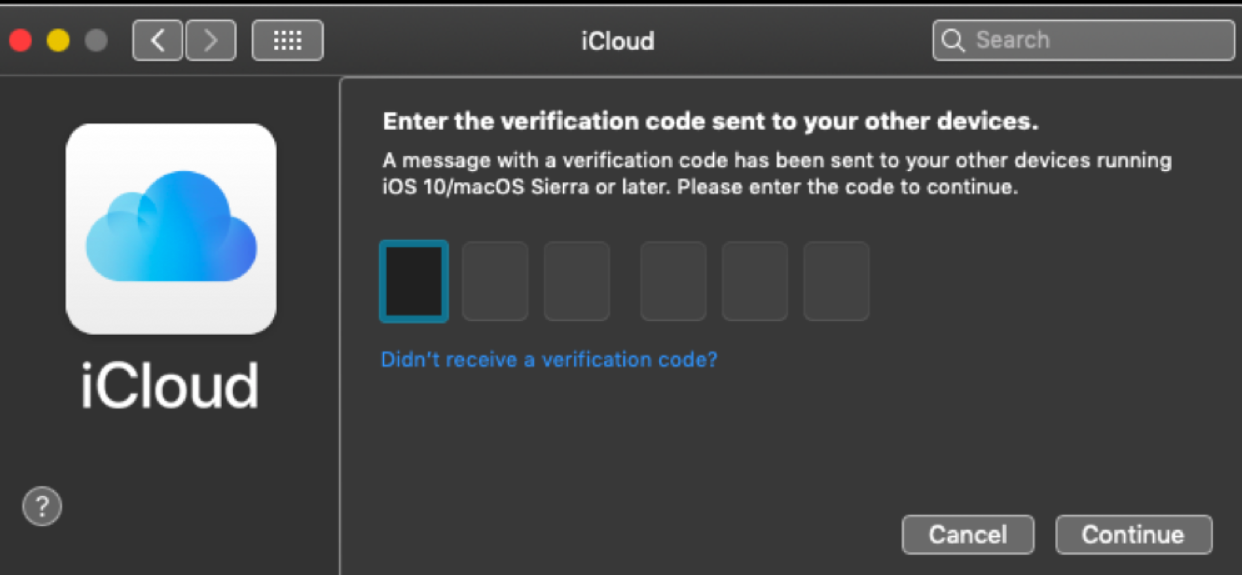
I can't restart My MacBook. it keep loading for days on waiting for approval to signing in iCloud.

I have no option to cancel or approve; also, I have access to other device with same Appl ID and iCloud but can't find how to approve or cancel.

I can see the Mac listed from my iPhone as a trusted device and can see it from find my iPhone with my appl id but, the signing in screen keep loading for ever.

may be the attached print screen will illustrate better.


MacBook Air 13", macOS 10.14

Posted on Mar 22, 2019 1:39 PM

Reply
Question marked as Top-ranking reply

Posted on Mar 22, 2019 11:10 PM

See these articles https://support.apple.com/en-us/HT204085

See the section change iCloud Keychain options in this article https://support.apple.com/en-in/guide/mac-help/change-icloud-feature-settings-mh80b67854f2/10.14/mac/10.14

Also ,

Make sure you have turned on keychain box both iOS device and Mac .

Method to sign in with same apple id and password in Mac and iOS .


A message will appear in iOS your Apple ID is being used to sign in to a Mac book near …location . Two options will be shown allow , do not allow so click on allow .


An apple verification code will appear on iOS , enter this verification code on your Mac book , click on continue .


In your Mac it will prompt to enter admin password , so enter it and click on ok , the circle will rotate in Apple ID field , wait for a while a window will appear the boxes for use iCloud for your documents and data and use find my Mac boxes are checked by default so click on next and click on allow .


Both iOS and Mac are signed in with same Apple ID and password , the approval is completed .
Similar questions

1 reply
Question marked as Top-ranking reply

Mar 22, 2019 11:10 PM in response to MelSaied

See these articles https://support.apple.com/en-us/HT204085

See the section change iCloud Keychain options in this article https://support.apple.com/en-in/guide/mac-help/change-icloud-feature-settings-mh80b67854f2/10.14/mac/10.14

Also ,

Make sure you have turned on keychain box both iOS device and Mac .

Method to sign in with same apple id and password in Mac and iOS .


A message will appear in iOS your Apple ID is being used to sign in to a Mac book near …location . Two options will be shown allow , do not allow so click on allow .


An apple verification code will appear on iOS , enter this verification code on your Mac book , click on continue .


In your Mac it will prompt to enter admin password , so enter it and click on ok , the circle will rotate in Apple ID field , wait for a while a window will appear the boxes for use iCloud for your documents and data and use find my Mac boxes are checked by default so click on next and click on allow .


Both iOS and Mac are signed in with same Apple ID and password , the approval is completed .

This thread has been closed by the system or the community team. You may vote for any posts you find helpful, or search the Community for additional answers.

waiting for approval

Welcome to Apple Support Community
A forum where Apple customers help each other with their products. Get started with your Apple Account.
