Airport extreme in airport utility issues.

Hi Guys.


Ok I have an AirPort Extreme version 7.79 6th gen which does show in the airport utility on my Mac's iPhone & iPad but if I select it or try to go into the settings it either keeps asking me for the password or it spins for about a minute then says it cannot be found with the button to forget network.


Mad thing is its the network I'm connected to & you can still surf the web or connect to other Macs on the network even after it cannot be found.


The only way I can go into settings is by physically turning the power off & unplugging the power cable for 30 seconds the powering back on but that only gives me a short time to alter any settings if I go back to it after say an hour it goes back to the issues.


It's not the easiest to get to to turn off & unplug whenever I need to do anything.


I have an older AirPort Extreme version 7.6.9 the flat one & an airport express which I have no issues connecting to or accessing via the airport utility app.


Any ideas or suggestions please would be greatly appreciated.


Thank you in advance.

AirPort

Posted on May 3, 2019 2:12 AM

Reply
Question marked as Top-ranking reply

Posted on May 3, 2019 5:04 AM

There are a few things you can do.. I will show you on my equivalent (Gen5) Time Capsule.


#1

Make sure the names are all short, no spaces and pure alphanumerics.. NOT APPLE RECOMMENDED NAMES.. They are from an ERA long past. Passwords.. same rules but can be as long as needed for your security paranoia level.


#2

Assuming as most people you are using the Airport in a network in bridge mode.. and with an IP address assigned by a different router.. more than likely a non-apple one that does not talk bonjour. Use a static IP address.


Usually you can simply swap from DHCP to Static as option in the first box.. connect using..


It is also possible to do this on your main router via dhcp reservation.. it can be named different things.. different routers have different names.. but whatever.. just make sure the IP is fixed.


You will also notice in my screenshot of the Internet tab, I have used a domain name that corresponds with the Airport.. this is a more difficult one.. you want the whole network to use a single domain name so whatever your main router is see if you can set it. This might not always be possible.. in which case just leave it blank.

BUT note.. Airports use local as their domain.. and it cannot be altered.. so everything else must comply.


#3

Set the Internet Options tab to Link Local only. This is very important if you are actually running IPv6 which is becoming more common. I had the same issue you are having when I started my main router running IPv6.. And it was by making sure the Airport does NOT have IPv6 external address, but only local that it worked.


#4

With the above setup even if you run into trouble.. you should be able to force the connection to work using manual Configure Other.


Since you have a fixed ip and password simply type those values into the box and you should be able to open it.


Your IP will match your network configuration of course.


#5

The most weird one of all.. do use ethernet.. even with the manual configuration above rather than wireless.

If you have both wireless and ethernet.. make sure you select the right one.. here.


This is really strange since both should simply connect to the same device.. why you should select one or the other I have no idea.. but it is helpful to know you need to pick the right one.

Similar questions

17 replies
Question marked as Top-ranking reply

May 3, 2019 5:04 AM in response to kennyfromhockley

There are a few things you can do.. I will show you on my equivalent (Gen5) Time Capsule.


#1

Make sure the names are all short, no spaces and pure alphanumerics.. NOT APPLE RECOMMENDED NAMES.. They are from an ERA long past. Passwords.. same rules but can be as long as needed for your security paranoia level.


#2

Assuming as most people you are using the Airport in a network in bridge mode.. and with an IP address assigned by a different router.. more than likely a non-apple one that does not talk bonjour. Use a static IP address.


Usually you can simply swap from DHCP to Static as option in the first box.. connect using..


It is also possible to do this on your main router via dhcp reservation.. it can be named different things.. different routers have different names.. but whatever.. just make sure the IP is fixed.


You will also notice in my screenshot of the Internet tab, I have used a domain name that corresponds with the Airport.. this is a more difficult one.. you want the whole network to use a single domain name so whatever your main router is see if you can set it. This might not always be possible.. in which case just leave it blank.

BUT note.. Airports use local as their domain.. and it cannot be altered.. so everything else must comply.


#3

Set the Internet Options tab to Link Local only. This is very important if you are actually running IPv6 which is becoming more common. I had the same issue you are having when I started my main router running IPv6.. And it was by making sure the Airport does NOT have IPv6 external address, but only local that it worked.


#4

With the above setup even if you run into trouble.. you should be able to force the connection to work using manual Configure Other.


Since you have a fixed ip and password simply type those values into the box and you should be able to open it.


Your IP will match your network configuration of course.


#5

The most weird one of all.. do use ethernet.. even with the manual configuration above rather than wireless.

If you have both wireless and ethernet.. make sure you select the right one.. here.


This is really strange since both should simply connect to the same device.. why you should select one or the other I have no idea.. but it is helpful to know you need to pick the right one.

May 17, 2019 5:32 PM in response to Bruce Kieffer

Have you simply reboot the whole network?


Power off everything.. any order.


Wait 2min.. power on in this order.

Modem.. wait 2min

1st Airport.. wait 2min

2nd Airport.. wait 2min

Clients.. you can power them on all at once.. that is no issue.

If you have switches or other network items.. simply power them in sequence from Modem.. to each device next in the chain.


This will often get you access to the airports for at least 1hour. Then bonjour seems to fade away and the network forgets where everything is located.

If you want more help I recommend you start a new thread.. with the full network layout.

We need to particularly know what is the main router.. and how the airports are configured.

Which model airports, and what OS you are running on computer or ipad etc doing the configuration.

May 19, 2019 7:18 PM in response to Bruce Kieffer

with that setup I should use a static IP?


Actually whether you use ethernet or not network gear should always be configured with static IP. The reason is that network infrastructure is passing out IP addresses to clients by DHCP but should really keep the hardware bits of the network static.


It is simple to do.. go to the Internet tab and click Connect Using and change it from DHCP to Static.


Is the first airport the main router in your network? Or are both of them bridged behind another router eg ISP supplied modem router?


Whatever you use as the main router will have a set range of IP addresses.


For example the Airport is going to use 10.0.1.1 by default and in router mode will set DHCP server to use addresses from 2-200
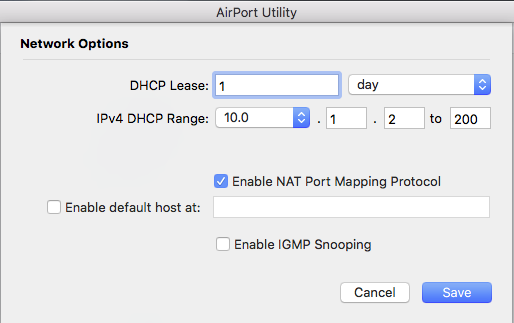


You can then set static IP above the DHCP if you wish.. so 10.0.1.201 will never interfere with allocation of addresses and will then never change address. This helps no end when you need a router or access point or say a printer to reliably work on the network.


And can you elaborate on what you mean by "correctly allocating domain?"


Domain is trickier.


Your ISP might pass the main router a domain that will be included when you open DNS page on your local network settings on the computer.

For example I am in Australia and our main ISP here called Telstra passes everyone a domain Telstra.com.au


This will likely be passed by DHCP in the router to the computer.
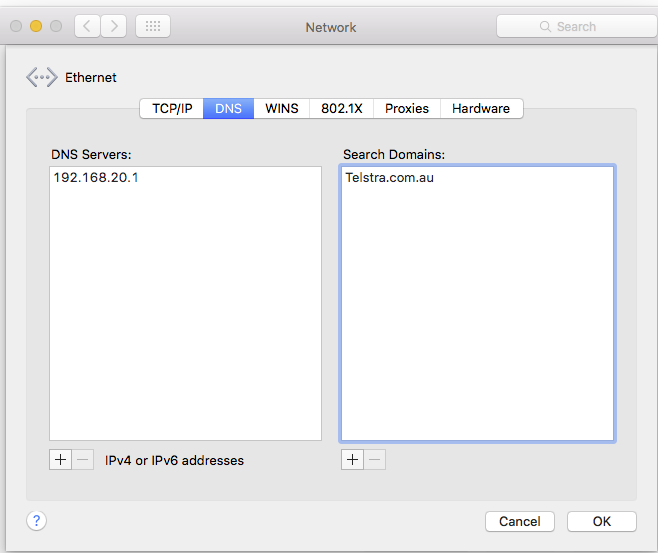


So you will have the Telstra domain set for your local network.. but this is wrong.. because the Airport is locked to local as its domain.

The v6 utility gives you no idea that this even exists.


I need to show you from the previous version of the airport utility. I configured the Time Capsule with a name of tc5c. What you don't know is that Apple append the domain .local to this name.
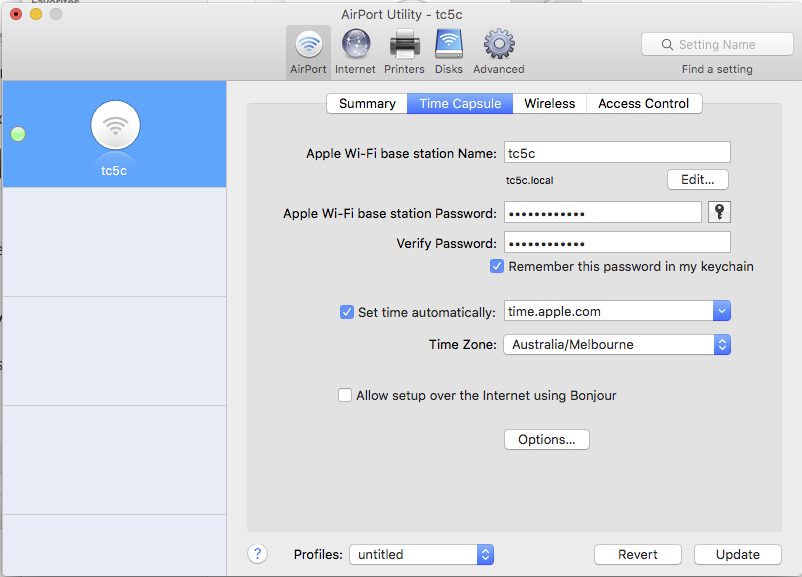


If you attempt to change the name..
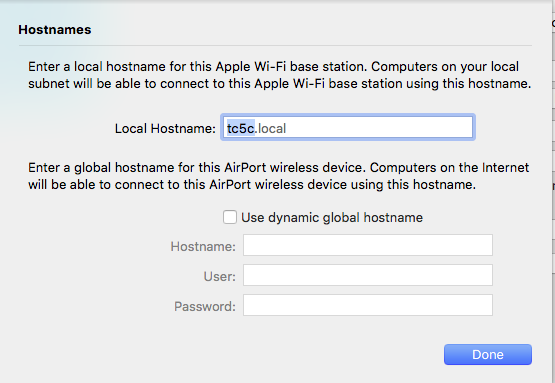


You can change the hostname.. so it is different to the Airport name.. but the domain is locked. So now your network is already going to be in a mess.

Lets say you have a different brand of router.. ie non-apple and it has name like Netgear without a domain.. or picking up the ISP domain.. so it is now Netgear.Telstra.com.au

But the Airport has a different domain i.e. tc5c.local

Even though they are directly linked and working with each other.. if search is set to Telstra.com.au then the airport is now invisible.. since it is on the wrong domain.


To fix the problem you want the main router to pass the same domain as the airports are on. Since you cannot fix the airports.


With Apple router as the main router this is not a problem.. but with other brands mixed into the network you do have a problem.. so I always set the domain on the main router to local.


eg.. my Gargoyle router normally leaves domain blank. But I have changed it to the correct domain.

This screenshot is the router configuration page.



And in the computer you should leave the domain blank or set to local.

Your DNS should also include the router IP address but may also include ISP dns or public dns like google.


Actually managing this can be difficult as it does depend on the router you use and how it's particular DHCP works.


Sorry this is complicated.. the chief problem is that apple set their routers with a fixed unalterable domain.


One way you might pickup the issue is with ping command in a terminal.


If you ping the name of the main router and it does not respond.. and cannot be found.. ping the name with domain included.. if it then does respond.. you have a domain problem.




May 18, 2019 8:07 PM in response to Bruce Kieffer

This is exactly what I pointed out in #3 part of the reply.

Bob also suggested the fix for me.. and it works!!


There is something messy in the apple IPv6 setup which causes issues.. so it must be kept on local network with IPv4 settings only. Methinks this is part of why Apple got out the router business.. they just did not want to spend the time fixing these issues.

May 19, 2019 2:57 PM in response to Bruce Kieffer

It's too bad that there's not a third party option to configure and review our AirPort routers.


Since Apple tends to license everything nobody is going to tempt Apple's lawyers to sue them for trying to actually help the unwashed masses. And now no point to it since the Apple router business closed. Apple chose to go their own way.. and this gets them good results on lots of occasions.. but when they run into trouble, there is no help.

But there is a third party way in. See below.


There are a few things you can do..


My point #2 in the first reply in the thread covers the key factors.

A static IP on each of the Airports.. makes a very big difference.

Correctly allocating domain is also very helpful.

Using ethernet as per #5 is also a great help. And remember to swap the airport utility to ethernet, which still amazes me.


It is possible to load the old airport utility onto a computer. At least up to High Sierra.. just google search for 5.6.1 airport utility and whatever OS you are running. I would not do this as normal.. only when you have issues because it seems to prevent the computer sleeping properly. And although, as you comment, the new v6 utility helps automate the setup, it greatly reduced the number of options available and frequently fails in doing auto configure unless everything is perfect.


It is also possible to get low level access via ssh. So if you really want access under any circumstances this will give it to you. Mostly this simply allows you to remotely reboot the offending airport. To actually configure it over ssh is genius territory well above my pay grade. If you would like to know how email me direct rayhav@gmail.com

The method is here if you can wade through the heavy lingo.

https://github.com/x56/airpyrt-tools

So there is a third party option.. albeit not what you were thinking of.

May 17, 2019 5:08 PM in response to LaPastenague

kennyfromhockley, have you had any luck? I have exactly the same problem. I know I'm connected to my "second" Airport Extreme even though it does not show it is connected to my network. Sure seems like a software issue to me. I will try some of the suggestions given above, but my second AirPort Extreme is connected by ethernet, and I plan to keep it that way.

May 18, 2019 5:03 AM in response to LaPastenague

"This will often get you access to the airports for at least 1hour. Then bonjour seems to fade away and the network forgets where everything is located. "


This is exactly my problem. I do know that I can restart the Airport that is not appearing in AirPort Utility and get it to appear for up to an hour. I want it to appear always as it should. This is a software bug.


May 19, 2019 2:07 PM in response to Bob Timmons

I do understand those realities. Apple did quietly update AirPort Utility to make the set up simpler, but obviously it is not 100%. It's too bad that there's not a third party option to configure and review our AirPort routers. I would pay a reasonable amount for that. And I do know that there are many more modern routers available today at costs less than $200. Thanks again for the help here.

This thread has been closed by the system or the community team. You may vote for any posts you find helpful, or search the Community for additional answers.

Airport extreme in airport utility issues.

Welcome to Apple Support Community
A forum where Apple customers help each other with their products. Get started with your Apple Account.