There are a few things you can do.. I will show you on my equivalent (Gen5) Time Capsule.
#1
Make sure the names are all short, no spaces and pure alphanumerics.. NOT APPLE RECOMMENDED NAMES.. They are from an ERA long past. Passwords.. same rules but can be as long as needed for your security paranoia level.

#2
Assuming as most people you are using the Airport in a network in bridge mode.. and with an IP address assigned by a different router.. more than likely a non-apple one that does not talk bonjour. Use a static IP address.
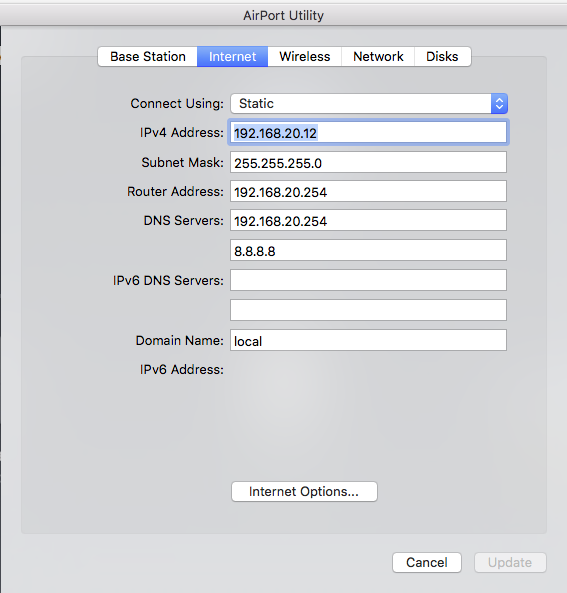
Usually you can simply swap from DHCP to Static as option in the first box.. connect using..

It is also possible to do this on your main router via dhcp reservation.. it can be named different things.. different routers have different names.. but whatever.. just make sure the IP is fixed.
You will also notice in my screenshot of the Internet tab, I have used a domain name that corresponds with the Airport.. this is a more difficult one.. you want the whole network to use a single domain name so whatever your main router is see if you can set it. This might not always be possible.. in which case just leave it blank.
BUT note.. Airports use local as their domain.. and it cannot be altered.. so everything else must comply.
#3
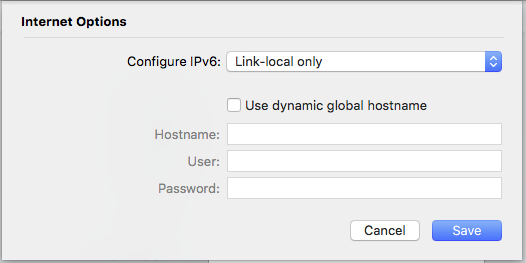
Set the Internet Options tab to Link Local only. This is very important if you are actually running IPv6 which is becoming more common. I had the same issue you are having when I started my main router running IPv6.. And it was by making sure the Airport does NOT have IPv6 external address, but only local that it worked.
#4
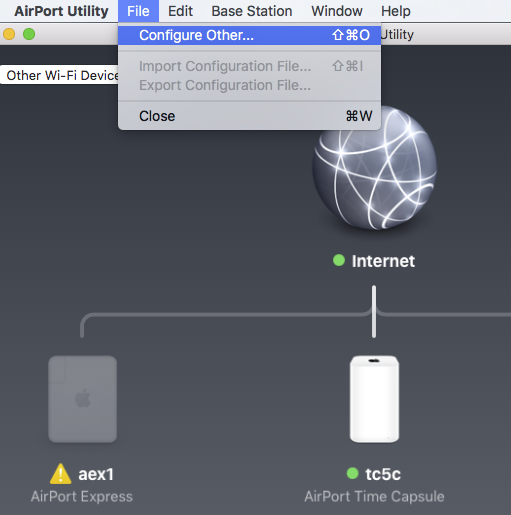
With the above setup even if you run into trouble.. you should be able to force the connection to work using manual Configure Other.
Since you have a fixed ip and password simply type those values into the box and you should be able to open it.
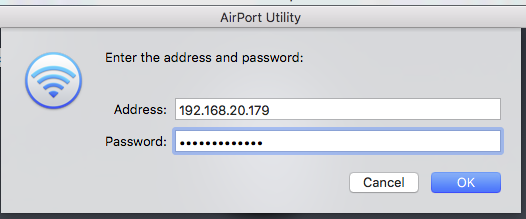
Your IP will match your network configuration of course.
#5
The most weird one of all.. do use ethernet.. even with the manual configuration above rather than wireless.
If you have both wireless and ethernet.. make sure you select the right one.. here.
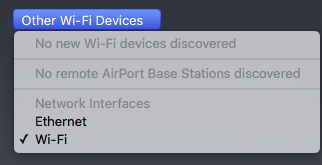
This is really strange since both should simply connect to the same device.. why you should select one or the other I have no idea.. but it is helpful to know you need to pick the right one.



