Self assigned IP-problem

I have recently moved and has gone from a router with an apple time capsule to just the Apple Time Capsule connected to the internet wall plug


My network name is the same and my ipad and iphone X will easily connect to the WiFi, but my MacBook Air says "WiFi has the self-assigned IP address and cannot connect to internet"


I've literally everything: changing location, restarted time capsule, removed wifi, deleted plist files in the Library and one million other tricks but with no luck...


Could anyone please help?

MacBook Air 13", macOS 10.14

Posted on May 25, 2019 2:51 PM

Reply
17 replies

May 26, 2019 12:54 AM in response to themabee

Yes..


Last question first.


How do I check whether " the building network is based on 10.x.x.x"?


The airport utility will show you what IP you get on the Time Capsule.


This will be easier (IMHO) to do on your laptop version airport utility.


Click the icon of the TC. I am running both a gen4 and gen5 but I can easily mess up the Gen4.


It is currently in bridge mode so it shows the same IP on both IP address and LAN IP address. If that happens to be 10.x.x.x where x is any number between 0 and 255 you will need to move the IP of the TC. If it is anything else you don't need to worry.
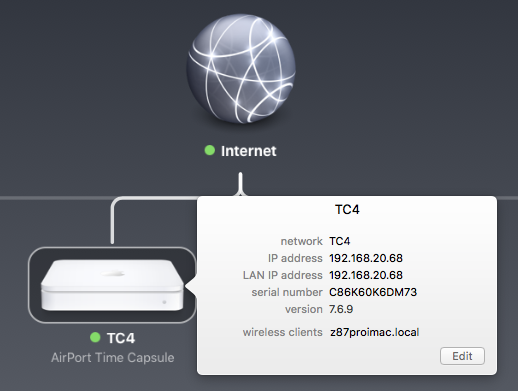


To change to DHCP and NAT.

Go to the network tab.. select choice of router mode..


Click on update.


You should then get an error.


This is double NAT.


And the fix is to ignore it.


You suggest I should change to DHCP and NAT - but then I'll get another error, that I can't do anything about?


Well it is not really a fix.. but that is required because your building is not passing you a proper public IP. This is fairly standard in hotels and apartment buildings which supply internet.


It will make very little difference to your network usage.. and will block other people in the building accessing your clients. Otherwise they can easily access whatever you connect.


Now is it all happy again.. but it is using double NAT.. which is Apple's solution as well btw.


May 26, 2019 3:13 AM in response to themabee

LaPastenague is assuming that your MacBook Air is connecting to your network.


I suggested using AirPort Utility on an iPhone or iPad because I was not sure whether your MacBook Air would be able to connect to the wireless network correctly, since you reported problems with that device.


If you are able to connect using your MacBook Air, then LaPastenague has everything laid out for you.


If you are not able to connect using the MacBook Air, then post back to let me know and I will walk you through the setup using the iOS version AirPort Utility on your iPhone or iPad.


Double NAT is a necessary evil for the type of setup that you have at your facility. It does not usually cause any issues on a simple home network, but results will vary. If it works OK on your network, then you leave well enough alone. If the Double NAT setup creates more issues for you, there is another method that we can try that is somewhat more complicated.


This thread has been closed by the system or the community team. You may vote for any posts you find helpful, or search the Community for additional answers.

Self assigned IP-problem

Welcome to Apple Support Community
A forum where Apple customers help each other with their products. Get started with your Apple Account.

