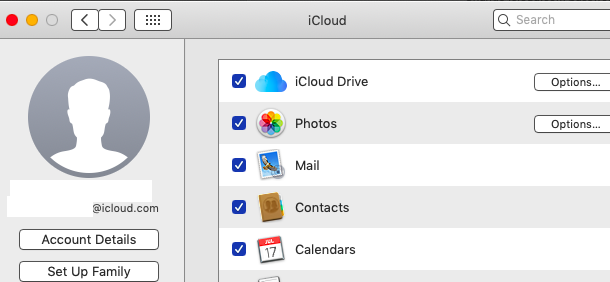
If you are signed in with Apple ID say example1@icloud.com in system preferences > iCloud the password can be changed ( the id is created with secondary authentication account ) .
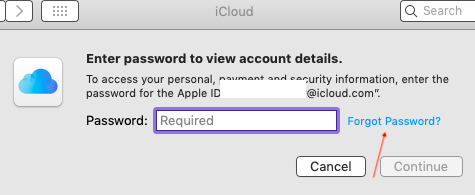
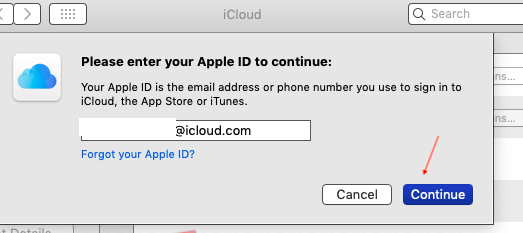
Click on account details and again click on forgot password , follow the steps in these screen shots .
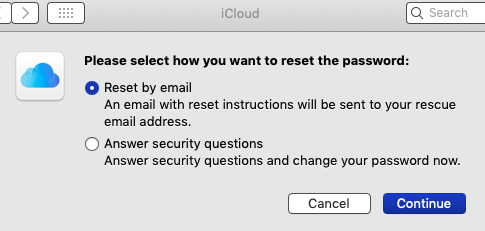
If you tap answer security questions and click on continue .
in that scenario the password can also be reset using the month / day / year of your birthday ( click on the drop down arrows of month , day and year and fill up credentials ) .
An option will be shown ( a ) back ( b ) continue .
Verify your birthday to continue , fill up the credentials and click on continue , a small circle rotates
A window appears answer your security questions , fill up the credentials and click on continue , a small circle will rotate .
It will prompt.
Enter a new password ….
Verify password …..
Your password must be at least 8 characters , include a number , an uppers case letter , & a lower case letter .
So fill up the credentials it will show ( a ) back ( b ) continue .
Click on continue and save .
And see this article https://support.apple.com/en-us/HT201487
Note : Fill up the password same as of you different apple id say example2@gmail.com
The apple ids are different but the password is now same .

