WiFi Connectivity issue on iPhone / iPad
Connecting to Wifi is one part and then getting connected to Internet is second part
- If you are connected to a Wifi, doesn't necessarily mean you are connected to internet. If you are not connected to wifi could be a problem of iPhone settings or Router/Modem Settings
- If you are not connected to internet is the sole issue of Router / Modem Settings
Connect to the WiFi network in question.
- Launch the Settings app.
- Tap Wi-Fi.
- Tap the Info button next to the WiFi network name. (It looks like a lower-case 'i' in a circle.)
- Ensure that the Auto-Join switch is on.
- If Auto-Join is off, turn it on
Have you tried forgetting the network and reconnecting for reassigning your IP address from DHCP pool. At times when you move from one network to another the wifi at times does not immediately get hooked on to home wifi.
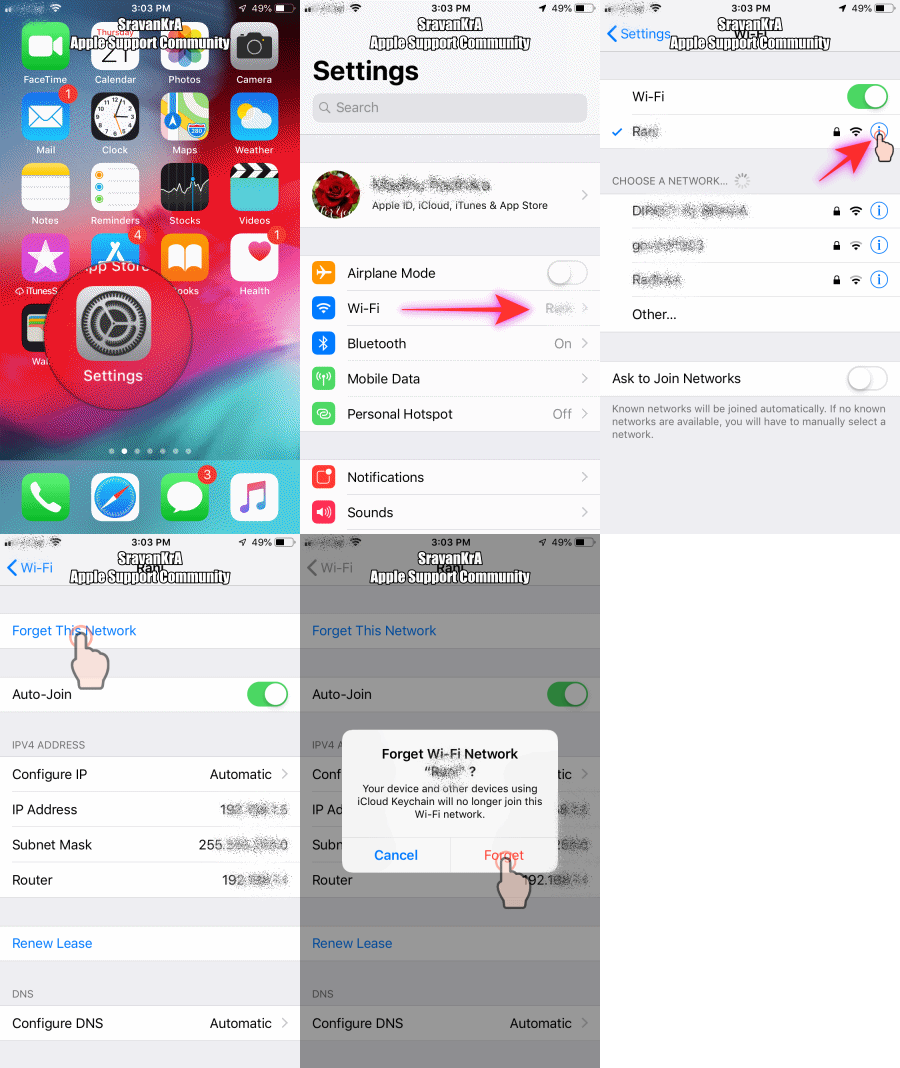
Consider more secure wifi configuration.
Change your router’s WiFi to use WPA2-AES (CCMP) with no WPA or TKIP. Updating this setting ensures that your devices always connect in one encryption mode
- TKIP is obsolete and not considered secure. Choose WPA2, the latest encryption standard, with AES encryption for optimal security
- If your router doesn’t specify TKIP or AES, the WPA2 option probably uses AES
Try a Reset ALL Settings.
This is usually the last resort since it resets all your personalised features back to factory defaults
Go to Settings > General > Reset > Reset All Settings
- This resets to default everything in Settings, including notifications, alerts, brightness, and clock settings like wake up alarms
- Resetting all settings also reverts all your personalised and customised features like wallpapers and accessibility settings back to factory defaults.
- Performing this action does not impact any of your personal device data, including photos, texts, documents, and other files
- You need to reconfigure these settings once your iPhone or iDevice restarts
Privacy Settings
- Toggle off Location Services. Go to Settings > Privacy > Location Services and turn it off
- Many users find that disabling System Services’ WiFi Networking solves the problem
- Go to Settings > Privacy > Location Services > System Services > and toggle off WiFi Networking
Restart your iDevice. If a normal restart does not help, perform a forced restart by holding down these buttons at the same time for at least ten seconds until the Apple logo appears
- On an iPhone 6S or below plus all iPads & iPod Touches, press Home and Power at the same time until you see the Apple logo
- For iPhone 7 or iPhone 7 Plus: Press and hold both the Side and Volume Down buttons for at least 10 seconds, until you see the Apple logo
- On an iPhone X Series model (XS/XR/X) or iPhone 8 or iPhone 8 Plus: Press and quickly release the Volume Up button. Then press and quickly release the Volume Down button. Finally, press and hold the Side button until you see the Apple Logo
Connect to Wi-Fi on your iPhone, iPad, or iPod touch - Apple Support
https://support.apple.com/en-in/HT202639

