Hi dfranks1,
Welcome to Apple Support Communities. I understand that you're having trouble with iTunes launching when you connect your iPhone. I also see that you used some steps to reinstall the usbaap164.inf file which temporarily resolves the issue, but it returns after a few weeks. I can see why you'd reach out about this behavior; I'd like to help. I'd recommend continuing with the steps below, including contacting Apple if necessary:
Check Device Manager to see if the Apple Mobile Device USB driver is installed. Follow these steps to open Device Manager:
- Press the Windows and R key on your keyboard to open the Run command.
- In the Run window, enter devmgmt.msc, then click OK. Device Manager should open.
- Locate and expand the Universal Serial Bus controllers section.
- Look for the Apple Mobile Device USB driver.
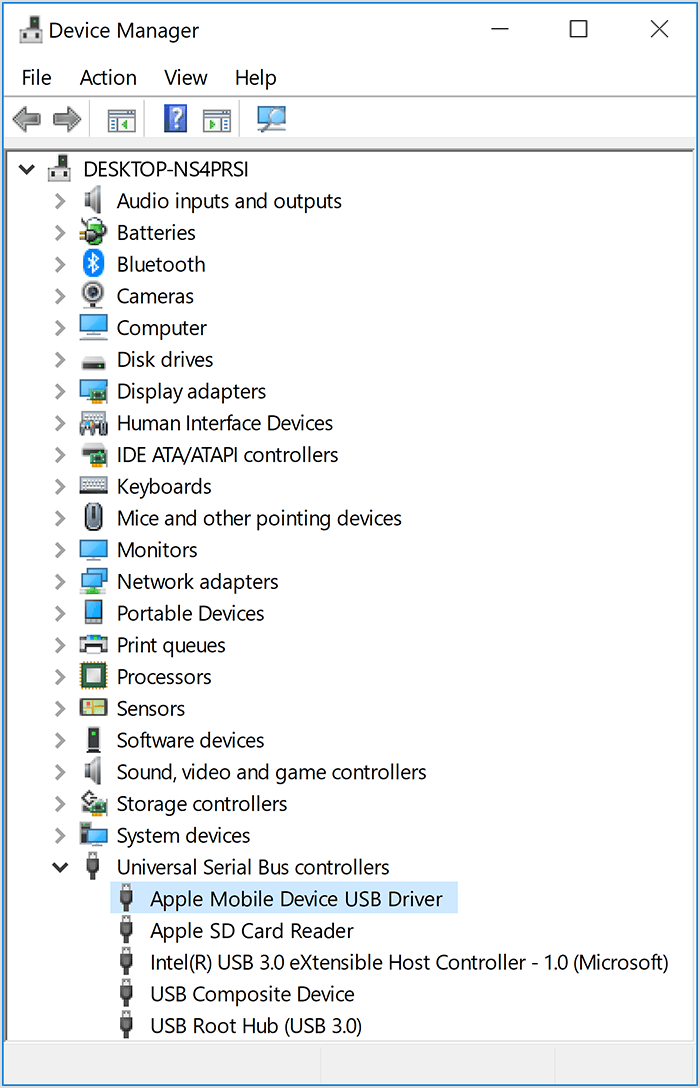
- Connect your device to your computer with a different USB cable.
- Connect your device to a different computer. If you have the same issue on another computer, contact Apple Support.
If you see  ,
,  , or
, or  next to the Apple Mobile Device USB driver, follow these steps:
- Restart the Apple Mobile Device Service.
- Check for and resolve issues with third-party security software, then restart your computer.
- Try to install the usbaapl64.inf or usbaapl.inf file again.
If the issue persists, contact Apple Support."
If iTunes doesn't recognize your iPhone, iPad, or iPod
Best Regards.


