Iphone 11 Pro Max and Carplay not working

I have the new iPhone 11 Pro Max and a 2018 Nissan Maxima with carplay. Carplay worked with my previous Iphone X even after the IOS 13 upgrade but with the Iphone 11 Pro Max carplay just keeps saying it won't start and retries again. Any ideas?

iPhone 11 Pro Max

Posted on Sep 27, 2019 8:28 AM

Reply
Question marked as Top-ranking reply

Posted on Oct 1, 2019 8:28 PM

Found a solution here. Please buy a USB male to type c female converter. Use that to connect with the type c lightening cable comes with the iPhone 11. It works immediately when I plug in.


It is the software and hardware compatibility issue. This could be a fix before the official solution comes out.

452 replies

Dec 29, 2019 1:18 PM in response to jaybarns

I think I found The ultimate solution: using the original USB-C to lightning cable coming up with the iPhone 11 Pro Max, then purchase a USB-C female to USB male.


it works!!!


I have a been troubled by this connection issue since November 8, 2019. I have a tried below solutions and it just works sometimes:


1, using a new lightning cable coming with the AirPods 2 box, it only works 20% of the chance


2, I read on the thread from the forms that I will need to reset the phone and use the iPhone as a new iPhone, do not restore all settings from the iCloud back up, this does not works


I mean USA so just go to Amazon purchase a USB-C to USB a converter I have posted the link Below


USB C Female to USB Male Adapter (2-Pack), QianLink Type C to USB A Adapter, Compatible with Laptops, Power Banks, Chargers, and More Devices with Standard USB A Ports (Gray) https://www.amazon.com/dp/B07S617LN1/ref=cm_sw_r_cp_api_i_eDrcEbB81AMP4
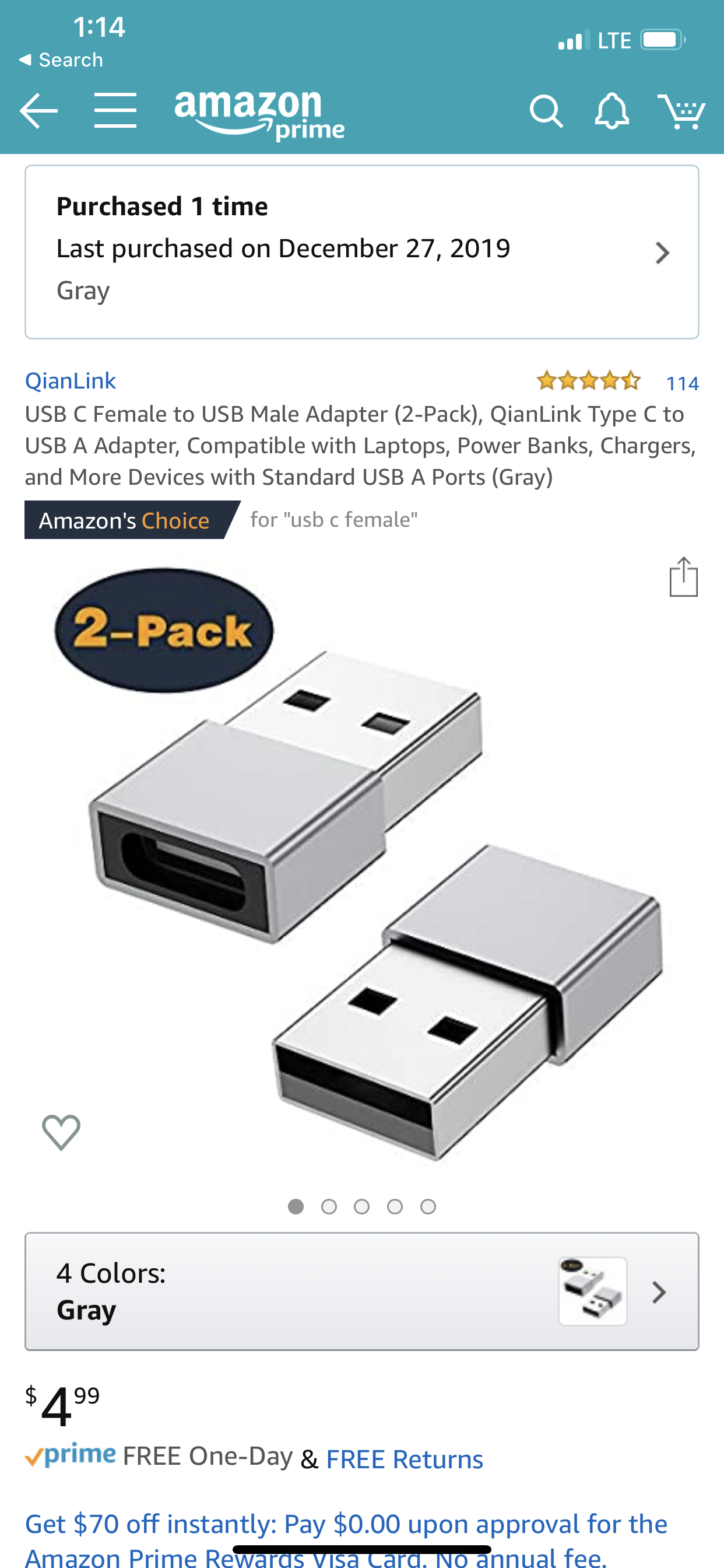


so far it works perfectly I have a been plugging and unplugging several times and each time it works flawlessly,


I assume the reason is because the USB-C to lightning cable is different with the Original lighting cable on the lightning side, you can see from the below picture it’s significantly bigger than the original one:
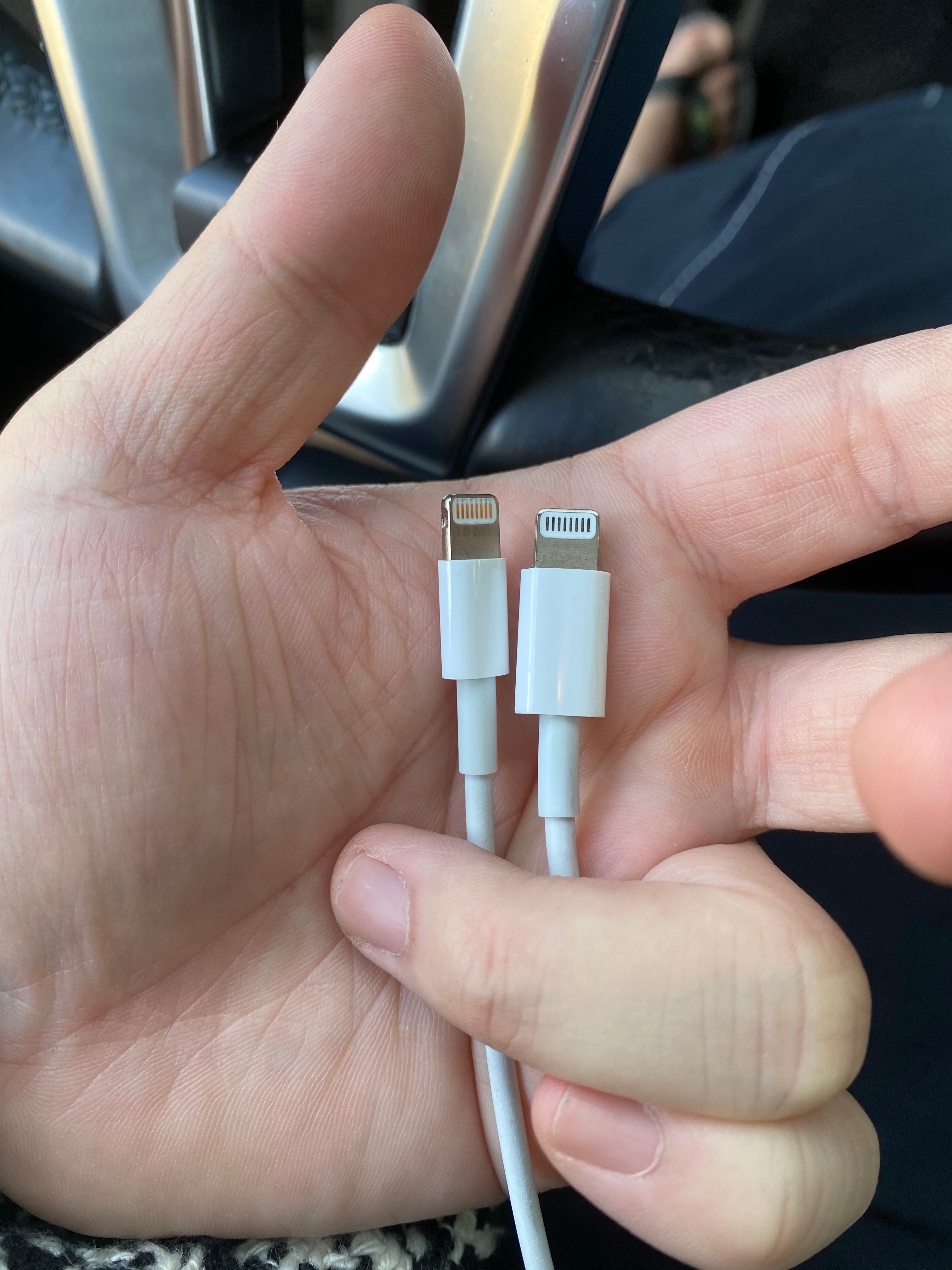


I assumed because Apple is using different chipset for this connection.


please post your feedback in this thread

Oct 31, 2019 6:03 PM in response to Tmcgoo13

My 11 Pro connects just fine to my new 2020 Tundra. Everything works. Maps, music, Spotify, etc. PHONE CALLS, however, DO NOT WORK! The call is made (or answered) but the calls become choppy and CarPlay doesn't register the "time of call" until I hang up. The only workaround for now is to literally pull the plug if a call comes in or I need to make a call, and then Bluetooth takes over and it's fine. I shouldn't have to be unplugging and plugging the phone over & over, though.


Btw I plugged in my wife's iPhone 8+ and it worked just fine. I'm kind of wishing I'd have kept my 8+ instead of opting for the $300 credit from Apple for the trade in.


I also tried almost every suggestion on here. No luck. Running 13.2.

Nov 1, 2019 10:09 AM in response to Tmcgoo13

NOTE TO ALL CONTRIBUTORS. So far I have noted two solutions that consistently work for many—either swap out your old cable for the one that came with your phone, adding a cheap generic female-Type-C to male-Type-A adapter OR update to iOS 13.2. If you have previously contributed to this thread and subsequently found a work-around that consistently works, it would be a great service if you could reply to the original post with your solution. THANKS.

Nov 1, 2019 11:52 AM in response to MisterReev

Oh boy... it doesn‘t show if Siri is inactive! For CarPlay to work siri must be activated... new phone but never used siri so far. On older iphones it shows it on screen - but not with the iPhone 11 Pro... for whatever reason.


So it‘s definitely NOT the cables. It works perfectly fine even with normal apple usbA-lightning cable. Troubles caused by SIRI which was turned off!

Nov 2, 2019 9:42 PM in response to jeremiahhouse08

Upgraded to the 11 and I have the same problem. It doesn’t seem to be a problem at all with my Chevrolet but it does not work with my Mercedes. I’ve been on the phone with Apple four times and the manufacturer (MBUSA). Mercedes claims Apple needs to do a software update and Apple acts as is if no one else is having this problem. I was on the fence when I upgraded to the 11, so since I’m within my 15 days of the purchase I plan to bring it back tomorrow and just get a Samsung. I’m so tired of Apple—they just aren’t what are used to be.

Nov 6, 2019 12:15 PM in response to jeremiahhouse08

I have a 2018 Mercedes and my new iphone 11 Pro Max will not connect to carplay. I also have an iphone 6 that works fine with carplay. Took car in to dealer for software update - the service team at Mercedes spent hours testing my car - multiple phones connected and worked fine, except the 11 Pro Max. While MB worked on my 2018, I drove a 2019 model and my 11 Pro worked fine with the newer model. I drive a LOT and rely on carplay heavily so really hoping Apple can fix the issue.

Nov 7, 2019 8:53 AM in response to Portista4581

After a couple of weeks of trial and error, I think I’ve figured out the only way it seems to work. You need the USB C cable plugged into the USB C - A adapter. Battery charge optimization needs to be turned off and the phone needs to be charged to at least 95%. Anything less than that causes lag and eventually it shuts off, which I assume is a bandwidth issue. I’ve spoken to Apple customer support three times now and they claim they have heard nothing about this issue.

Nov 7, 2019 9:34 AM in response to Tmcgoo13

I have a 19 subaru forrester and have never had more problems than with the iPhone 11 pro max! 1200.00 phone and CarPlay is broken. Tried different cables; applied an update from subaru, moved to different usb connections.


They need to fix this. This is a basic need. How can i trust using maps and CarPlay when my radio reboots arbitrarily while driving! Calls are dropped; audio doesn't work at times.


All of it leads to a broken CarPlay.

Nov 7, 2019 9:38 AM in response to acbme

That is very interesting @acbme, my sister just bought one and I tested mine since I have issues in my 2018 nissan maxima; no issues at all on her new forester.... I've also talked to Apple and was told they are aware and working on solving the issue which is interesting that they told @craigfromworcester that they've never heard about it. Who are they lying to? In any case, this is extremely frustrating, but if you haven't or anyone else for that matter, please post this on the feedback page for apple.

Nov 7, 2019 10:53 AM in response to craigfromworcester

I would be more hesitant to blame Apple and CarPlay had this been the only iPhone I used with my subaru and CarPlay. But we recently upgraded to the iPhone 11 Pro Max from an iPhone 8 Plus.


That phone rarely if ever had a problem. Occasionally the phone would need to be rebooted...but that was it.


So I am fairly confident it is CarPlay and the iPhone 11 Pro Max and not my car.

Nov 9, 2019 2:22 PM in response to craigfromworcester

After a couple of frustrating weeks of trials and no word from Apple on the matter. I can report that using iPhone 11 in conjunction with Navigation System on a 2018 Nissan Maxima. The only way I can get Carplay to work, is with Bluetooth turned off and iPhone fully charged, using cable the it came with.. I have determined to give them 1 more chance and wait for 13.3.

If that still does not fix it, I will return it and opt for Android. Finito!!

Nov 12, 2019 9:55 AM in response to Tmcgoo13

problem solved: go buy a new lightning cable from Apple directly the chip inside to Cable might be updated


I have the same issue here I recently purchased iPhone promax and it’s very lacking or not working on my aftermarket Apple CarPlay device. I have tried a lot of ways for example reset the iPhone or reset the Apple CarPlay in the car. None of them worked


but last night when I purchase a new pair of AirPods 2, I noticed there is a new lightning cable inside the box so I think about it why not try this new cable to the Apple CarPlay the cable might be the issue, and it worked curse out the lagging and no wood issue is due to the lightning cable. I have a been using the original Apple lightning cable in the CarPlay format iPhone XS Max and that it has no issue but it won’t work with Apple 11 Pro Max I do not know the reason, The result is just a go buy a new lightning cable from Apple directly the chip inside the cable might be updated in the works with iPhone 11 Pro Max and Apple CarPlay perfectly

This thread has been closed by the system or the community team. You may vote for any posts you find helpful, or search the Community for additional answers.

Iphone 11 Pro Max and Carplay not working

Welcome to Apple Support Community
A forum where Apple customers help each other with their products. Get started with your Apple Account.

