getting a new router

hi, I'm getting the new Sky Q Hub 2 on Monday, how do I reconnect the HomePod to the new hub?


I can remember internet articals that says an iOS devoice already needs to be on the new hub wifi and move iPhone close to HomePod to reconnect it to new hub wifi, but is this still the case in iOS 13?


I cant find any articles/tutorials on how to do this in iOS 13


thanks in advance

HomePod, iOS 13

Posted on Nov 9, 2019 3:15 AM

Reply
Question marked as Top-ranking reply

Posted on Nov 9, 2019 10:45 PM

It needs to be on the same wifi network as the iOS device you used to set up HomePod. Once you get the new wifi, connect your device to it. It should copy whatever the device is using.


https://support.apple.com/en-ca/HT208341


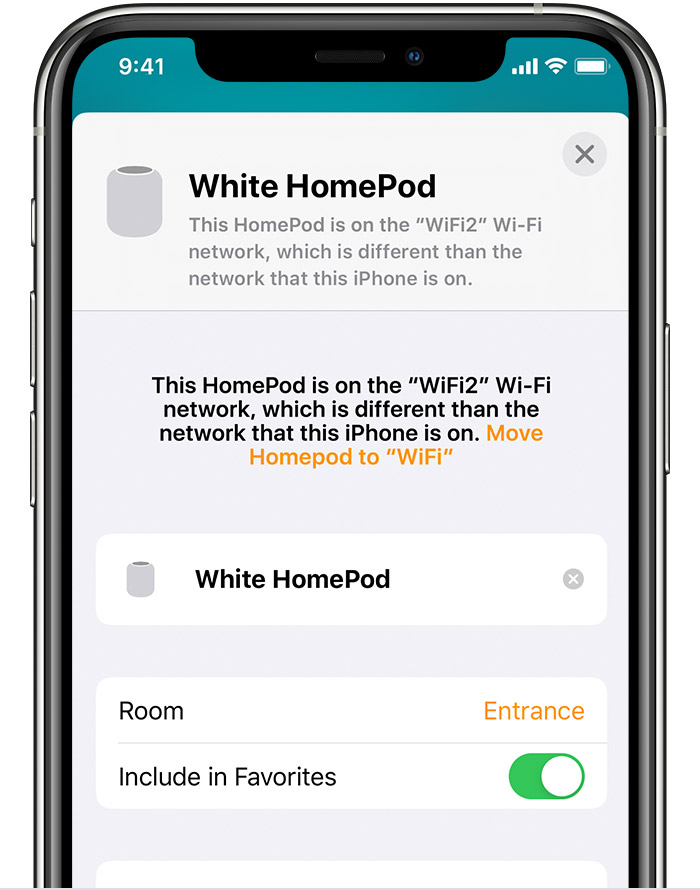
Tap Wi-Fi Address to see the Wi-Fi Network that HomePod is connected to. If it's on a different Wi-Fi network than your iOS device, tap "Move HomePod to [Wi-Fi network]" to connect HomePod to the same Wi-Fi network as your iOS device.

2 replies
Question marked as Top-ranking reply

Nov 9, 2019 10:45 PM in response to alistairmck

It needs to be on the same wifi network as the iOS device you used to set up HomePod. Once you get the new wifi, connect your device to it. It should copy whatever the device is using.


https://support.apple.com/en-ca/HT208341


Tap Wi-Fi Address to see the Wi-Fi Network that HomePod is connected to. If it's on a different Wi-Fi network than your iOS device, tap "Move HomePod to [Wi-Fi network]" to connect HomePod to the same Wi-Fi network as your iOS device.

This thread has been closed by the system or the community team. You may vote for any posts you find helpful, or search the Community for additional answers.

getting a new router

Welcome to Apple Support Community
A forum where Apple customers help each other with their products. Get started with your Apple Account.