Missing creation, modified and last opened dates in Finder on Mojave

When I click on a file on my Mac mini running High Sierra, I se three dates, something like Creation date, Last modified and Last opened. So it has always been right back to Snow Leopard.


Now suddenly on Mojave I get no dates. How can I rectify this?

MacBook Pro 13", macOS 10.14

Posted on Nov 21, 2019 4:25 AM

Similar questions

3 replies

Nov 21, 2019 6:19 AM in response to VikingOSX

Thanks, VikingOSX for taking the time and trouble.

Actually I have been using Column view, and tried your suggestions without getting the option to drag anything. I then changed to List view, found all the dates I wanted, marked them and clicked to use as default, and when I went back to Column view, the new attributes followed along. So now I have what I want.


Thanks again.

Nov 21, 2019 5:21 AM in response to Community User

I am going to assume that you are accustomed to your Finder in List view with columns. If you control-click, or if configured, two-finger tap on that List view columns bar, the secondary menu will allow you to select other data categories that appear as newly added columns. You can click and drag on these column headings to reorganize your data view.


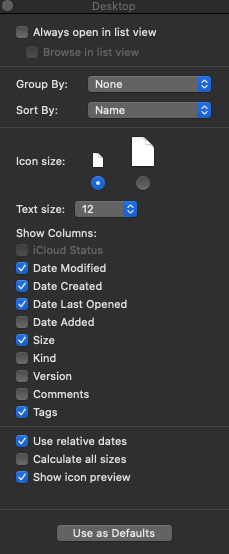
The alternative approach to the first paragraph is to click in that list view Finder window, and press ⌘-J to show view options. Now you have a pop-up that allows you check the columns you want to see, regulate the size of that default tiny icon, etc. You cannot change the selection order on this panel, so you will have to drag the list view headings into the preferred view order. Then, when your list view as needed, click the Use as Defaults button.



This thread has been closed by the system or the community team. You may vote for any posts you find helpful, or search the Community for additional answers.

Missing creation, modified and last opened dates in Finder on Mojave

Welcome to Apple Support Community
A forum where Apple customers help each other with their products. Get started with your Apple Account.