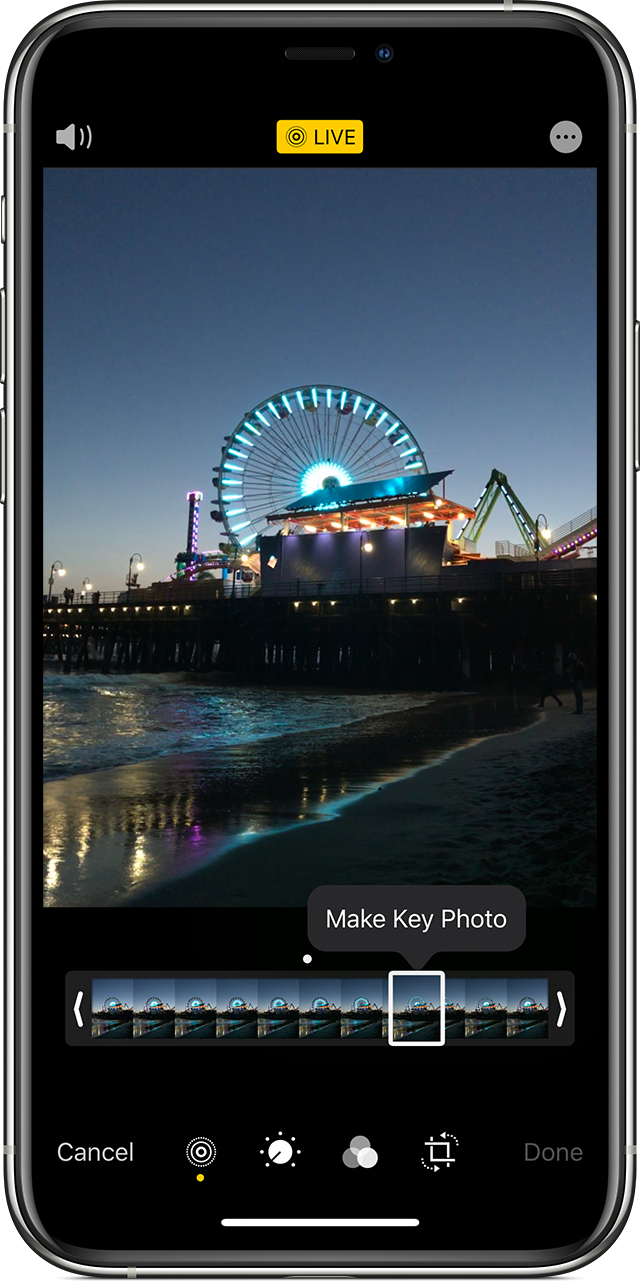
Can't view a frame from a Live Photo

I recently discovered I can no longer even view different frames for a Live Photo. Just as described on the Apple help website, I used to find this option by clicking "Edit" or just by tapping the photo and scrolling down...there was a slider bar where you could select the frame you wanted if you didn't like the auto-detected one. But now it's gone! I tried it on my MacBook Pro, iPad and iPhone...still couldn't find it! I recently updated to iOS 13.3.


I know I am taking Live Photos because the icon is still there, and if I tap the photo, it still plays like a Live Photo. Anyone else have this problem??

iPhone 8, iOS 13

Posted on Jan 4, 2020 8:59 AM

Reply
Question marked as Top-ranking reply

Posted on Jan 7, 2020 10:29 AM

Greetings Miaanh,


Thanks for visiting the Apple Support Communities! I understand you're unable to change the key photo when editing a Live Photo, as you don't see the slider to change the frame.


To change the key photo, you'll need to tap the Live Photos button in the bottom-left corner after tapping the Edit button while viewing a Live Photo. You can view those steps in the following article: Take and edit Live Photos - Apple Support


"How to change the key photo

  1. Open the Live Photo.
  2. Tap Edit.
  3. Tap the Live Photos button .
  4. Move the slider to change the frame.
  5. Release your finger, then tap Make Key Photo.
  6. Tap Done."


Cheers.

Similar questions

3 replies
Question marked as Top-ranking reply

Jan 7, 2020 10:29 AM in response to Miaanh

Greetings Miaanh,


Thanks for visiting the Apple Support Communities! I understand you're unable to change the key photo when editing a Live Photo, as you don't see the slider to change the frame.


To change the key photo, you'll need to tap the Live Photos button in the bottom-left corner after tapping the Edit button while viewing a Live Photo. You can view those steps in the following article: Take and edit Live Photos - Apple Support


"How to change the key photo

  1. Open the Live Photo.
  2. Tap Edit.
  3. Tap the Live Photos button .
  4. Move the slider to change the frame.
  5. Release your finger, then tap Make Key Photo.
  6. Tap Done."


Cheers.

Jan 7, 2020 11:28 AM in response to Miaanh

I know I am taking Live Photos because the icon is still there, and if I tap the photo, it still plays like a Live Photo. Anyone else have this problem??

I had the same problem after updating to iOS 13.3. The Live Photos have still been playing, but the control to select the keyframe has been missing. When I clicked the "Edit" button, I saw that "Live" button has been crossed out in Edit mode. And when I viewed the Live Photos enlarged, the Live button has not been yellow, but gray.

It seems, we have to enable the Live button for each and every Live photo again, even if the Photos still seems to be alive, to bring the key frame slider back. It used to be different in the previous system versions. The Live button remained enabled, unless we turned it off.


This thread has been closed by the system or the community team. You may vote for any posts you find helpful, or search the Community for additional answers.

Can't view a frame from a Live Photo

Welcome to Apple Support Community
A forum where Apple customers help each other with their products. Get started with your Apple Account.