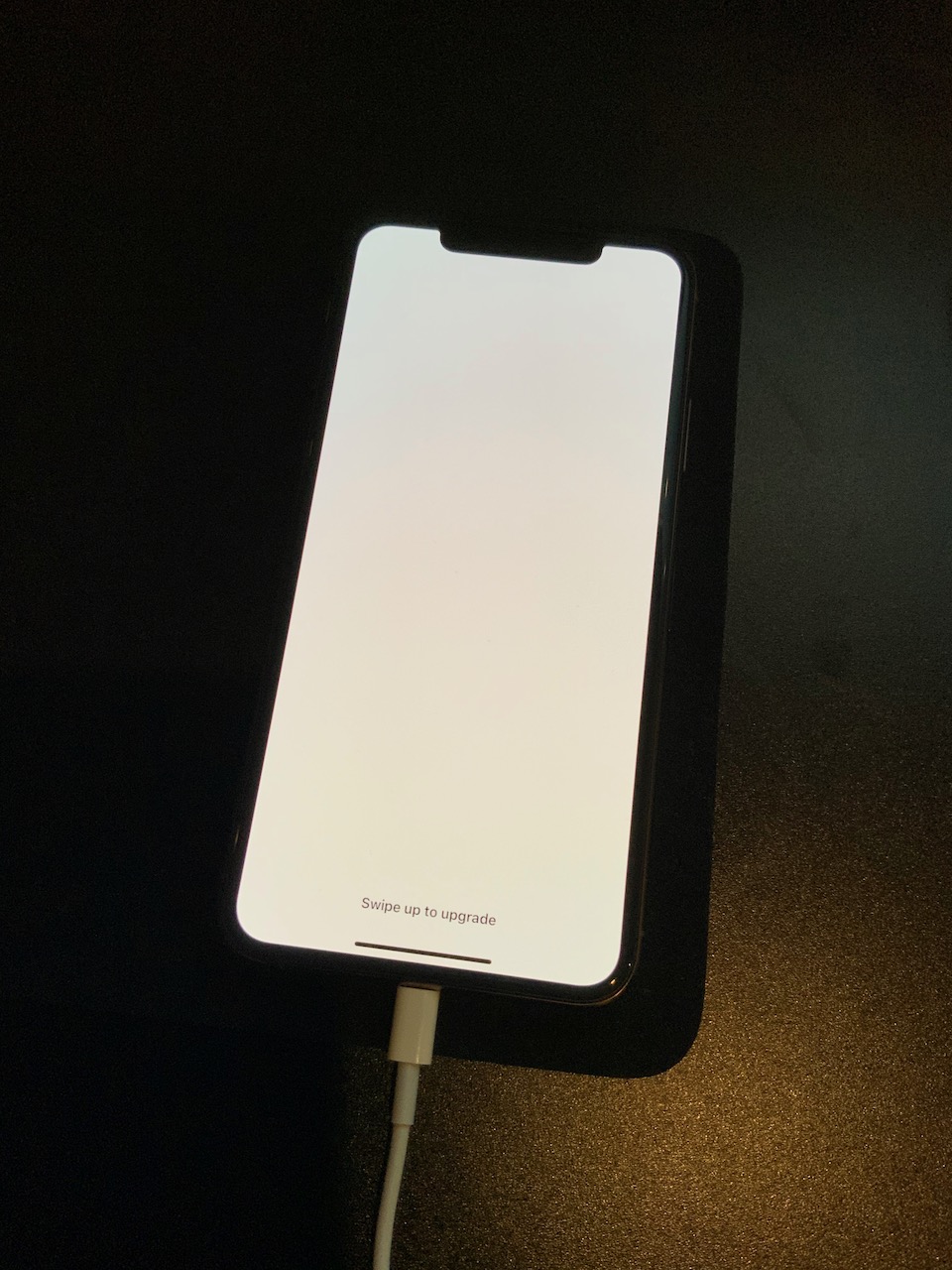
Swipe up to upgrade

I updated my iPhone X about an hour ago and now it is stuck of the white "Swipe up to upgrade" screen. It won't let me swipe up and it keeps going to a black screen and a black screen with the Apple logo and back to the white screen. I'm really nervous because my photos aren't backed up (stupid, I know). I don't want to have to restore my phone and lose everything. Please help :(

iPhone X, iOS 13

Posted on Mar 25, 2020 3:53 PM

Reply
Question marked as Top-ranking reply

Posted on Apr 13, 2020 11:34 PM

This same problem has also happened to me of the course of the past several days (on two iPhones now, I'll get to that below). My iPhone 11 Pro Max attempted to upgrade from 13.4 to 13.4.1 and experienced the white screen with "Swipe up to upgrade" as the only text. 


Swiping up seems to lock up the phone for 60 seconds and then it will reset by flashing a screen with a white background and Apple logo, or do a longer reboot with a black background and white Apple logo. Force resetting the phone also does not resolve it, and will go back to the "Swipe up to upgrade" screen.


I have AppleCare+ for my phone and called Apple about the problem. After being unable to make the phone functional again, the support rep seemed to decide it was a hardware problem and sent a replacement iPhone 11 Pro Max.


Upon receiving the replacement iPhone, I went through the setup process and restored from my iCloud backup, which caused the exact same problem to reappear! The replacement device was behaving in the same broken way: stuck on the "Swipe up to upgrade" screen. 


Finally, I followed what ulliGT said above, and used a Mac to restore and downgrade the replacement iPhone to 13.4. Then I was able to successfully complete the restoration of my data from iCloud backup.


This appears to be an issue with 13.4.1 and some configuration of the user data or settings (that is also stored in the backup). It also seems that 13.4 does not have this bug and works fine. However, now I am concerned I will be stuck on 13.4 and unable to upgrade the phone in the future without losing all my data. I have sent my original iPhone back to Apple in the replacement box.


I don't know how to draw more attention to this bug, but hopefully an engineer at Apple will investigate this problem!

50 replies
Question marked as Top-ranking reply

Apr 13, 2020 11:34 PM in response to ulliGT

This same problem has also happened to me of the course of the past several days (on two iPhones now, I'll get to that below). My iPhone 11 Pro Max attempted to upgrade from 13.4 to 13.4.1 and experienced the white screen with "Swipe up to upgrade" as the only text. 


Swiping up seems to lock up the phone for 60 seconds and then it will reset by flashing a screen with a white background and Apple logo, or do a longer reboot with a black background and white Apple logo. Force resetting the phone also does not resolve it, and will go back to the "Swipe up to upgrade" screen.


I have AppleCare+ for my phone and called Apple about the problem. After being unable to make the phone functional again, the support rep seemed to decide it was a hardware problem and sent a replacement iPhone 11 Pro Max.


Upon receiving the replacement iPhone, I went through the setup process and restored from my iCloud backup, which caused the exact same problem to reappear! The replacement device was behaving in the same broken way: stuck on the "Swipe up to upgrade" screen. 


Finally, I followed what ulliGT said above, and used a Mac to restore and downgrade the replacement iPhone to 13.4. Then I was able to successfully complete the restoration of my data from iCloud backup.


This appears to be an issue with 13.4.1 and some configuration of the user data or settings (that is also stored in the backup). It also seems that 13.4 does not have this bug and works fine. However, now I am concerned I will be stuck on 13.4 and unable to upgrade the phone in the future without losing all my data. I have sent my original iPhone back to Apple in the replacement box.


I don't know how to draw more attention to this bug, but hopefully an engineer at Apple will investigate this problem!


Mar 26, 2020 2:54 PM in response to Molly.Williams

Hello Molly.Williams,


Thanks for that info and for choosing the Apple Support Communities. If I understand correctly, you are unable to use your iPhone after updating, as it is stuck on a setup screen or goes to the Apple logo. First, a good idea is to check if your photos that are on your iPhone could have already been imported to your computer or even iCloud or have a backup you may not be aware of:


View your photos and videos on iCloud.com

Locate backups of your iPhone, iPad, and iPod touch


Next, we would like you to reinstall iOS on your device; this will help us isolate the situation further. Reinstalling iOS should not affect any of your data, so please follow the steps from the "If your device turns on but gets stuck during start up" section in this article:


If your iPhone, iPad, or iPod touch won't turn on or is frozen


Use the “Update” option and not “Restore” and these steps will reinstall the iOS software on your iPhone.


Cheers!

Apr 12, 2020 10:55 AM in response to Molly.Williams

Same problem here with iPhone X after upgrading from 13.4 to 13.4.1 yesterday.


Here's what I found out and a solution (at least if you have a backup):

  • Connect the phone to a Mac and put it into DFU/recovery mode
  • For me, this only worked on a Mac! My Windows PC didn't recognize the iPhone X in DFU mode!
  • So, I used iTunes on a Mac to freshly install iOS 13.4.1. After that the iPhone did work again but the "swipe up to upgrade"-error re-occured after I recovered my iCloud backup!
  • What now? The solution was to downgrade to the previous version of iOS:
    • I got the package for iOS 13.4 from https://ipsw.me and used this manual to install it
    • iPhone restarted fine and recovering the latest backup from iCloud also worked!


So, there seems to be something wrong with 13.4.1 that makes some phones crash. I'm a little worried that I'll be stuck with 13.4 for the rest of my iPhone X's life now... @apple, any idea? I have a first gen iPhone X. Is the reason maybe some setting for accessing the control center when the screen is locked? On the other hand, the phone keeps on restarting so there must be something else wrong.

May 2, 2020 4:51 PM in response to DribbleCastle

I’m happy to report that restoring from the local backup to my iPhone 11 Pro with 13.4.1 worked! Of course, this is a terrible workaround solution that many won’t have available. You basically need four things to do this.


  1. A device running the same iOS or newer to what yours was using prior to the failed update. (Exception is 13.4.1). For most people this will be 13.4 Note, you you cannot use a phone that has an earlier version then what you were running. Example, if you had 13.4 installed on your iPhone before the problem, you will not be able to restore your iCloud backup to a device running 13.2 as and example.
  2. The device in #1 must also be big enough to support your iCloud restore. (there may be options to workaround this per post above)
  3. A Mac or PC with enough available storage to make a local backup.
  4. A lot of time and patience. For some it may just be easier to setup your phone up as “new” but for me the amount of configuration would have been a huge pain in the butt.


If you borrow a friends or family phone for this process make sure they have a iCloud or local backup of their data and are willing to go without their phone for several hours.


I really hope we’ll see this addressed soon for everyone’s case. If you don’t take the option above make sure you keep your iCloud backup in place for now. That way if Apple does address this problem, hopefully in the coming weeks. You could then try to recover your iCloud backup at that time.


Best of luck, and if you have any questions I’ll try to respond.

May 1, 2020 8:55 PM in response to tobiasloe

Same issue. I experienced it twice. Once the day of the 13.14.1 release which I eventually restored back to 13.4 and my iCloud backup worked. Just last night my phone auto-updated again to 13.14.1. Woke up to the white screen wit the "slide to upgrade" message. Same exact problem except this time there is no downgrade option with Apple no longer signing 13.4.


I have a call with an Apple engineer tomorrow afternoon, but guess that will be more about capturing data which will go into a fix down the road in iOS development. I suppose getting a replacement device from Apple an hoping its running 13.4 is an option. Tonight I'm trying one more thing I saw from others who had a similar problem in September. I'm turning off the Find my iPhone feature of iCloud and then trying to restore the iCloud backup to the iPhone. I'm guessing this will be a big waste of time but so is setting up my phone from scratch.


Please share if you have any updates, especially those who had discussions with Apple engineers.

May 2, 2020 3:22 PM in response to DribbleCastle

Ok, just got off the phone with Apple. It wasn’t really an engineer per say but a technical liaison to that level. The only good news is he confirmed that the issue has been reported by enough people to have it sent to engineering for diagnosis. The bad news is who knows when this will be addressed.


I’m lucky enough to work with a company that has some test devices and I was able to find one (iPhone 8+) that was running 13.4. I was successfully able to restore my iCloud backup down to that phone and now am in the process of making a local iTunes/Mac backup. Per other comments above, I hope this will allow me to restore the local backup to my iPhone 11 Pro.

May 15, 2020 4:01 PM in response to Ombatay

I’ve been struggling with this since the 11th and have an active support call with Apple. In frustration this evening I restored the phone via recovery mode to 13.4.1 and then installed iOS 13.5 beta 3 which seems to be the current one. I then chose Erase and Reset all settings and chose to restore from my iCloud backup and it worked! The phone is currently downloading all the apps. Hopefully when the official 13.5 release comes out I can switch back to the mainstream version. Hope this helps! Be safe and well!

Mark

May 20, 2020 3:12 PM in response to prgrmr

Well after weeks of trying to find a solution and with all the communication directly with Apple support it turns out this problem cannot be fixed. The reason is that my original backup, that was on 13.4, was overridden by the new back up when I set up my phone as new. I really wish there was a way to create a new back up option instead of overriding a previous one.

This thread has been closed by the system or the community team. You may vote for any posts you find helpful, or search the Community for additional answers.

Swipe up to upgrade

Welcome to Apple Support Community
A forum where Apple customers help each other with their products. Get started with your Apple Account.