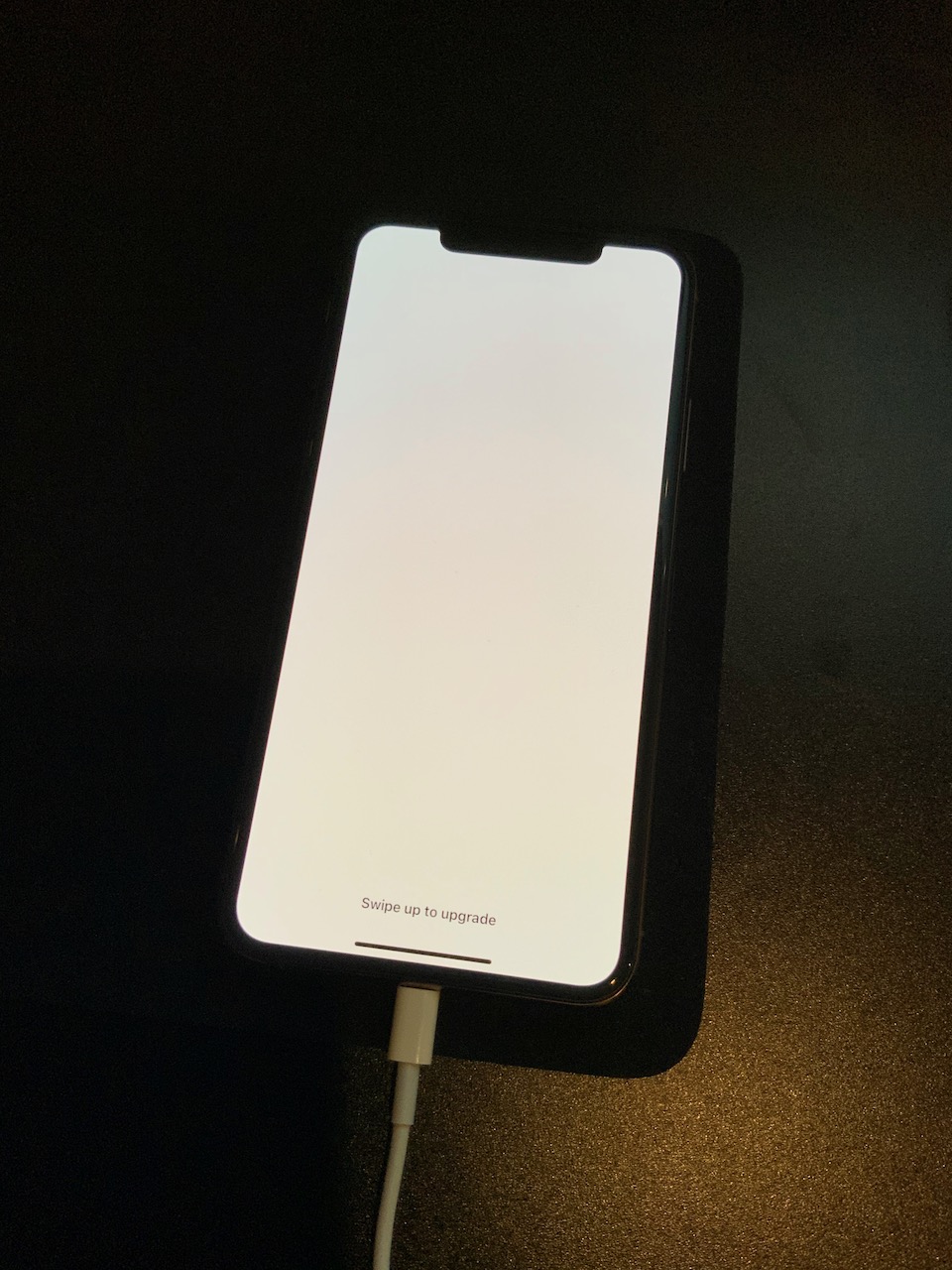
Swipe up to upgrade

I updated my iPhone X about an hour ago and now it is stuck of the white "Swipe up to upgrade" screen. It won't let me swipe up and it keeps going to a black screen and a black screen with the Apple logo and back to the white screen. I'm really nervous because my photos aren't backed up (stupid, I know). I don't want to have to restore my phone and lose everything. Please help :(

iPhone X, iOS 13

Posted on Mar 25, 2020 3:53 PM

Reply
Question marked as Top-ranking reply

Posted on Apr 13, 2020 11:34 PM

This same problem has also happened to me of the course of the past several days (on two iPhones now, I'll get to that below). My iPhone 11 Pro Max attempted to upgrade from 13.4 to 13.4.1 and experienced the white screen with "Swipe up to upgrade" as the only text. 


Swiping up seems to lock up the phone for 60 seconds and then it will reset by flashing a screen with a white background and Apple logo, or do a longer reboot with a black background and white Apple logo. Force resetting the phone also does not resolve it, and will go back to the "Swipe up to upgrade" screen.


I have AppleCare+ for my phone and called Apple about the problem. After being unable to make the phone functional again, the support rep seemed to decide it was a hardware problem and sent a replacement iPhone 11 Pro Max.


Upon receiving the replacement iPhone, I went through the setup process and restored from my iCloud backup, which caused the exact same problem to reappear! The replacement device was behaving in the same broken way: stuck on the "Swipe up to upgrade" screen. 


Finally, I followed what ulliGT said above, and used a Mac to restore and downgrade the replacement iPhone to 13.4. Then I was able to successfully complete the restoration of my data from iCloud backup.


This appears to be an issue with 13.4.1 and some configuration of the user data or settings (that is also stored in the backup). It also seems that 13.4 does not have this bug and works fine. However, now I am concerned I will be stuck on 13.4 and unable to upgrade the phone in the future without losing all my data. I have sent my original iPhone back to Apple in the replacement box.


I don't know how to draw more attention to this bug, but hopefully an engineer at Apple will investigate this problem!

50 replies

Apr 26, 2020 1:57 AM in response to Daniel06

****, that doesn't sound good. I anticipated that the signing issue might happen somewhen and unfortunately do not have another idea. Since both of you unsuccessfully tried 13.4.5 it seems like Apple did not fix our problem at least yet. All of us seem to have some configuration, app or data that does not work with iOS > 13.4 and we somehow need to make Apple aware of that. @Daniel06 when you talk to the engineer tomorrow, can you please make him aware that there are multiple people having this issue.


Looking at the latest security problems with the Mail app, I'd sure love to update to 13.4.5 better sooner than later, but if the way back to 13.4 is now blocked, we all now seem to be stuck where we are :-(

Apr 27, 2020 7:57 AM in response to Daniel06

This is bonkers...I appreciate you taking the time to investigate and post results. I had a perfectly good phone until this update and am consistent with icloud backups, but none restore and result in the same "swipe up" error. I can get the phone to work as a clean install which tells me there is no hardware issue. Without a restore from icloud though, I'm afraid I'll lose years of texts and other settings (backup photos to google thank goodness). Keep us posted...thank you!

May 2, 2020 9:44 AM in response to Molly.Williams

Okay, so I have actually not found a suitable iPhone (size of 64 GB and 13.4 installed). But I was able to restore back to the 32 GB iPhone while activating „offload apps“ and offloading lots of apps.


However, the restore process did not complete. At 5.9 MB it stopped and I left it for over 14 hours until I stopped it manually. But after that I could actually backup the iPhone via Apple Configurator 2 to my MacBook successfully and was able to restore this backup onto my iPhone X with 13.4.1 without a problem!


So I now have my backup (or 9X % of it at least) on my iPhone X and am on the newest release. I believe this is a possible path, but one would need a suitable iPhone with 13.4 available.


To all of you: Good luck!

May 3, 2020 1:37 AM in response to DribbleCastle

@DribbelCastle is correct when it comes to all those of us, who upgraded their phone just recently to 13.4.1 and due to revoked signing of the 13.4 IPSW package cannot downgrade tp 13.4 any longer. Those folks need an alternative device (as @DribbleCastle described) to recover the data from their iCloud backup. I do not know if any of the commercial offers on the internet, that promise extraction of data from your iCloud backup, might be of any use here.


For the lucky few that ran into this problem earlier and were able to downgrade to 13.4 before signing expired, the easier way described by many of you should still be open:

  1. Use your working 13.4 phone to make an iTunes backup onto your local computer
  2. Factory reset your phone and re-install it with a fresh 13.4.1
  3. Restore the backup from your iTunes


Question about this: Should this not fix the problem, will you be able to recover the iPhone including iOS 13.4 (!) from the backup?

May 18, 2020 4:13 PM in response to Daniel06

I read rumors that this error only happens on refurbished iPhones and iPads.

Is there anybody here who's iPhone or iPad has this error while the device is definitely not refurbished and has not been repaired or exchanged?


My original iPhone has been replaced because it was broken. I got a refurbished iPhone XS because of my AppleCare+ plan and it has this error.


I had problems with refurbished Apple devices in several cases.


This thread has been closed by the system or the community team. You may vote for any posts you find helpful, or search the Community for additional answers.

Swipe up to upgrade

Welcome to Apple Support Community
A forum where Apple customers help each other with their products. Get started with your Apple Account.