How to delete data error on health app

How do you delete an error you made when entering workout data?

iPhone 6s, iOS 13

Posted on Apr 1, 2020 5:44 AM

Reply
Question marked as Top-ranking reply

Posted on Apr 3, 2020 10:13 AM

Hi BigSur17,


Thanks for reaching out in Apple Support Communities. I understand that you'd like to erase an error in workout data in the Health app on your iPhone. I know it's important to keep this information accurate; I'm happy to help. Take a look below for the steps to manually adjust data in the Health app:


"View details in the health categories

Tap Browse at the bottom right to display the Health Categories screen, then do one of the following:
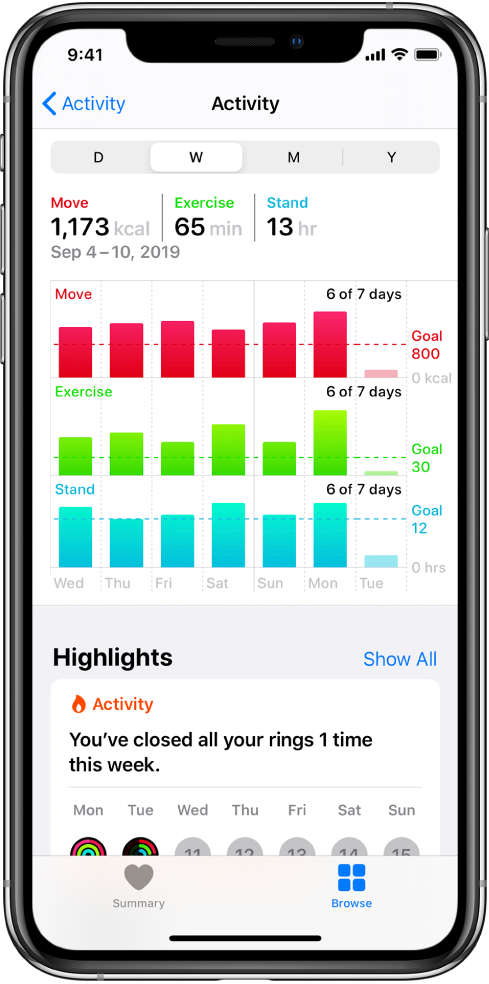
    • Tap a category. (To see all categories, scroll up and down.)
    • Tap the search field, then type the name of a category (such as Nutrition) or a specific type of data (such as Protein).

To view details about any of the data, tap . Depending on the data type, you may be able to do the following:

    • See weekly, monthly, and yearly views of the data: Tap the tabs at the top of the screen.
    • Manually enter data: Tap Add Data in the top-right corner of the screen.
    • Move a data type to Favorites on the Summary screen: Turn on Add to Favorites. (Scroll down if you don’t see Add to Favorites.)
    • View which apps and devices are allowed to share data: Tap Data Sources & Access below Options. (Scroll down if you don’t see Options.)
    • Delete data: Tap Show All Data below Options, swipe left on a data record, then tap Delete. To delete all data, tap Edit, then tap Delete All.
    • Change the measurement unit: Tap Unit below Options, then select a different unit."


View health and fitness information on iPhone


Best Regards.

1 reply
Question marked as Top-ranking reply

Apr 3, 2020 10:13 AM in response to BigSur17

Hi BigSur17,


Thanks for reaching out in Apple Support Communities. I understand that you'd like to erase an error in workout data in the Health app on your iPhone. I know it's important to keep this information accurate; I'm happy to help. Take a look below for the steps to manually adjust data in the Health app:


"View details in the health categories

Tap Browse at the bottom right to display the Health Categories screen, then do one of the following:

    • Tap a category. (To see all categories, scroll up and down.)
    • Tap the search field, then type the name of a category (such as Nutrition) or a specific type of data (such as Protein).

To view details about any of the data, tap . Depending on the data type, you may be able to do the following:

    • See weekly, monthly, and yearly views of the data: Tap the tabs at the top of the screen.
    • Manually enter data: Tap Add Data in the top-right corner of the screen.
    • Move a data type to Favorites on the Summary screen: Turn on Add to Favorites. (Scroll down if you don’t see Add to Favorites.)
    • View which apps and devices are allowed to share data: Tap Data Sources & Access below Options. (Scroll down if you don’t see Options.)
    • Delete data: Tap Show All Data below Options, swipe left on a data record, then tap Delete. To delete all data, tap Edit, then tap Delete All.
    • Change the measurement unit: Tap Unit below Options, then select a different unit."


View health and fitness information on iPhone


Best Regards.

This thread has been closed by the system or the community team. You may vote for any posts you find helpful, or search the Community for additional answers.

How to delete data error on health app

Welcome to Apple Support Community
A forum where Apple customers help each other with their products. Get started with your Apple Account.