Front Camera not working after ios 13.4.1 update

I'm using an iphone 7 and after i updated the os to 13.4.1 my front camera works perfectly fine on the app but on 3rd party apps (facebook,messenger,insta,snapchat, etc.) rear camera works but when I flip it to front the app would freeze. I did the restart, relaunch, reset settings, reinstall apps, but none of it fixed the problem.

iPhone 7, iOS 13

Posted on Apr 17, 2020 12:30 AM

Reply
Question marked as Top-ranking reply

Posted on Sep 30, 2020 7:27 AM

For disabled people I paste the solution post from page 14:


I've finally solved the problem!


I restored the iPhone 7 Plus with all available iOS versions (13.5, 13.5.1, 14beta1, 14beta2) and no version helped. It was just a waste of time! Apple will probably never fix this problem! Accept that a software update will not help.

I found a way to solve this problem.


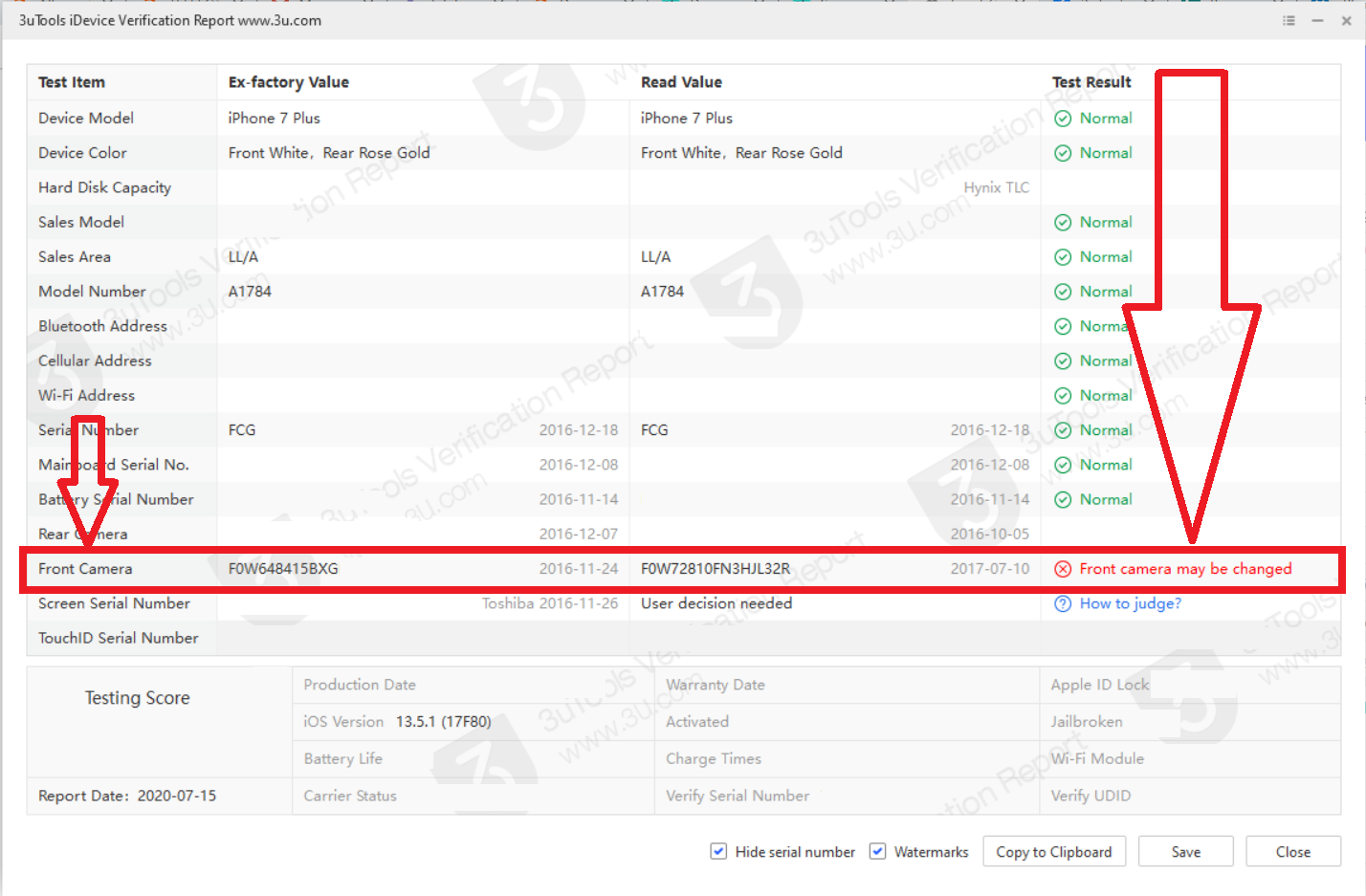
First of all, I checked with 3uTools that I had the front camera replaced with a Chinese non-original camera! Apple has killed Chinese replacements parts and to solve the problem you need to replace your front camera with the original part from disassembly!


Step by step list of how to deal with the problem:


1. Install 3uTools (Windows only).

2. Connect iPhone to the computer via cable.

3. On the "iDevice" tab, click "View Verification Report".

4. If the front camera has a different serial number than the one assigned to the motherboard, the program will show the information in red "Front camera may be changed". This means, no less, that in your phone camera has been replaced with a non-original part. Replace the front camera with the original one from the disassembly. However, if the program shows the information in green "Normal" (although this is not possible in my opinion), I do not promise that changing the camera will help something.
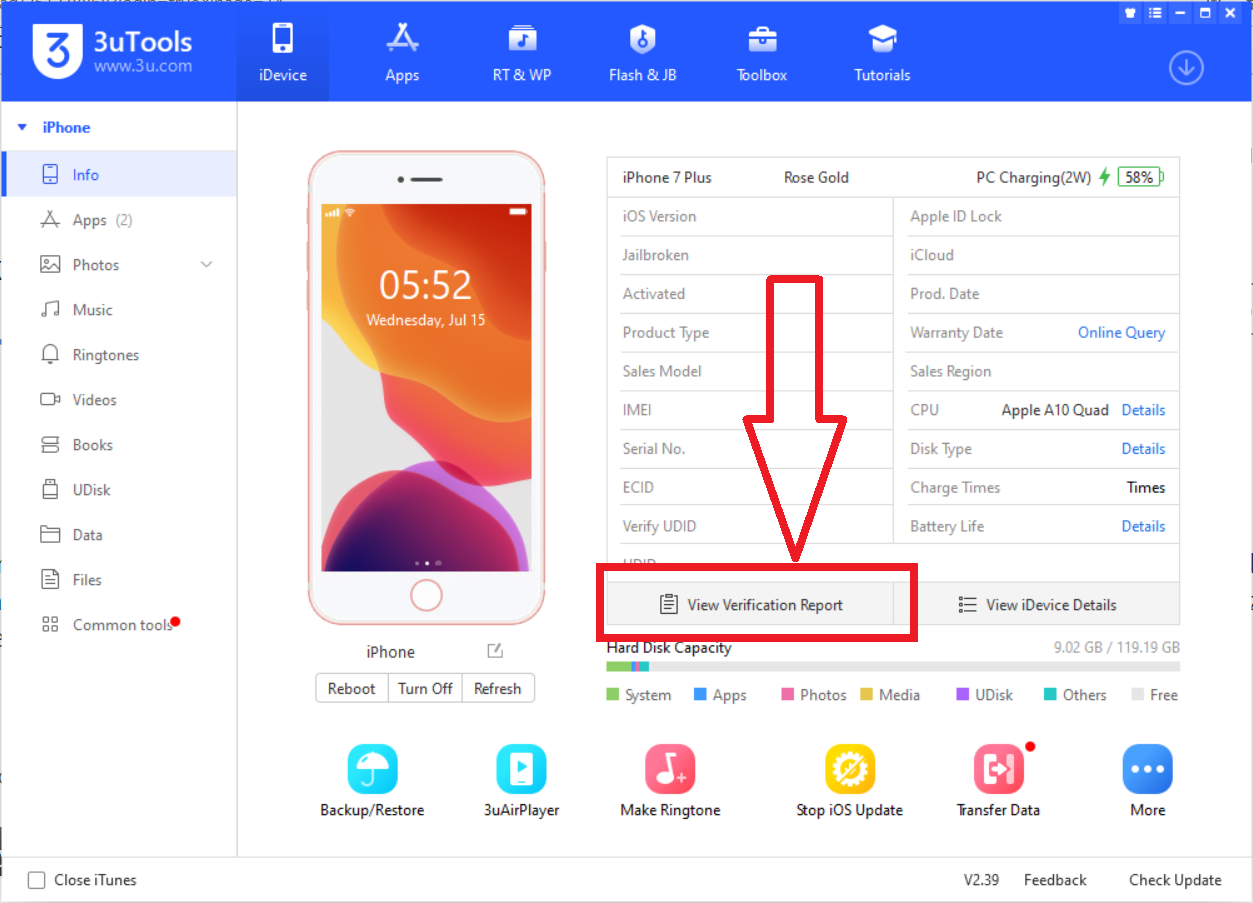
5. Look after the original disassembly camera. Search on local auction sites. Do not buy the camera on Aliexpress because you will get the cheapest replacement part there. Even the substitutes have the Apple logo, but of poor graphics quality! Therefore, if you want your front camera to work, try to get the original part. The price of original part is around $ 10 - $ 50.

6. Get the right tools for your phone. You will need: screwdrivers (pentalobe, tri-point Y000 and Phillips), suction cup and spudger. In addition, if you want to remain waterproof, a screen tape will be useful.

However, if you are not good at manual work, go to a technician! Wrong screws can kill your phone's motherboard!

A guide on how to replace the front camera can be found here: https://www.ifixit.com/Guide/iPhone+7+Plus+Front+Camera+and+Sensor+Cable+Replacement/95688

7. No need to restore the phone after replacement front camera.


If you found this post helpful, click "Helpful"

268 replies

May 2, 2020 8:45 AM in response to Kobe14

I have the same problem I would like just to add that neither with Facetime I'm able to do videocalls, I have contacted Apple Support and the told me to try reset the phone to factory setting and try (1) to restore a backup and (2) set it up as a new iphone. I tried both approaches but the problem is not solved. I'm quite sure that the problem depends on iOS 13.4.1, Apple please release a fix ASAP.

May 21, 2020 2:42 AM in response to harry_fu

I have spoken in length with a lovely chap at apple who has has the technical team looking into this issue since last Friday. He has called me back now to say that Apple are aware of this issue and are looking into it. He has advised me to wait for the next update as he said it is a software issue. I don't know what to do know though as I need to have video meetings for work and have no working phone. The update some are saying has not helped. It is so frustrating!

Jun 14, 2020 3:08 AM in response to jmarciano1971

Dear all,

I was at Apple Store in Madrid yesterday.

They tested my iPhone 7 plus and they assumed that the hardware of my phone was working perfectly apart my battery but it is irrelevant.

They understood that it is a software problem and I clearly state them that I have no idea to replace my iphone for this problem and they assumed this fact. At the offical technical support they can't solve the problem but they will talk with engineering department and they will call my with a solution. I'm the only case with this problem in Madrid.

Please everyone of you with the same problem try to show the problem at technical support of any Apple Store probably this is a better channel to speed up the release of the fix.

Jun 25, 2020 11:38 AM in response to Kimmybie

Dear all,


the technical support contacted me yesterday to try to solve the issue on camera not working on iOS 13.4.1.


I went today at the AppleStore in Madrid and the comment they received from engineering department was to re-try to install the operating system from scratch. I made this test with the technical support at Apple Store and it did not solve the issue.


At the end fo the game what they said me is that as my phone is not in guarantee the only option that they gave me is a new "iPhone 7 plus" paying 359€ because the engineering department does not assume that is a bug on the the new version of the operating system and probably my phone has something broken so they will not solve the bug.


As I disagree with this solution they proposed me, now next step is an official claim trough the AppleCare.


I'll keep you update on the issue.


[Edited by Moderator]

May 11, 2020 3:13 PM in response to Kobe14

I have the same problem with my iPhone 7 plus. Everything had been working perfectly until I updated to iOS14.3.1.

After update, every app that uses the front camera crashes. Even FaceTime app which is not a third party app, fails when I want to start a video call. I tried FaceTime, Skype, WhatsApp, google Duo, Viber, SnappChat, Facebook Messenger, and Zoom. All are the same.

I called Apple support center, but they didn’t accept that there is a problem with the new update. I think more people is needed to report this problem and force them fix this issue.

May 13, 2020 2:58 PM in response to eugenio-gaeta

I logged mine over two months ago, not been looked at as far as I can tell :(.


What I did notice today, and this is not a joke:

  1. I opened the the camera app, gave it a shake like a snap with the hand shake (not sure if the next step is necessary)
  2. changed between front/back camera

-> camera is alive again!


Now the only problem I have is that face id doesn't work, but the flashlight and the camera do work.


Btw my problem was only black camera viewfinder and no flashlight, I did not get crashes in any app.

This thread has been closed by the system or the community team. You may vote for any posts you find helpful, or search the Community for additional answers.

Front Camera not working after ios 13.4.1 update

Welcome to Apple Support Community
A forum where Apple customers help each other with their products. Get started with your Apple Account.
