Front Camera not working after ios 13.4.1 update

I'm using an iphone 7 and after i updated the os to 13.4.1 my front camera works perfectly fine on the app but on 3rd party apps (facebook,messenger,insta,snapchat, etc.) rear camera works but when I flip it to front the app would freeze. I did the restart, relaunch, reset settings, reinstall apps, but none of it fixed the problem.

iPhone 7, iOS 13

Posted on Apr 17, 2020 12:30 AM

Reply
Question marked as Top-ranking reply

Posted on Sep 30, 2020 7:27 AM

For disabled people I paste the solution post from page 14:


I've finally solved the problem!


I restored the iPhone 7 Plus with all available iOS versions (13.5, 13.5.1, 14beta1, 14beta2) and no version helped. It was just a waste of time! Apple will probably never fix this problem! Accept that a software update will not help.

I found a way to solve this problem.


First of all, I checked with 3uTools that I had the front camera replaced with a Chinese non-original camera! Apple has killed Chinese replacements parts and to solve the problem you need to replace your front camera with the original part from disassembly!


Step by step list of how to deal with the problem:


1. Install 3uTools (Windows only).

2. Connect iPhone to the computer via cable.

3. On the "iDevice" tab, click "View Verification Report".

4. If the front camera has a different serial number than the one assigned to the motherboard, the program will show the information in red "Front camera may be changed". This means, no less, that in your phone camera has been replaced with a non-original part. Replace the front camera with the original one from the disassembly. However, if the program shows the information in green "Normal" (although this is not possible in my opinion), I do not promise that changing the camera will help something.
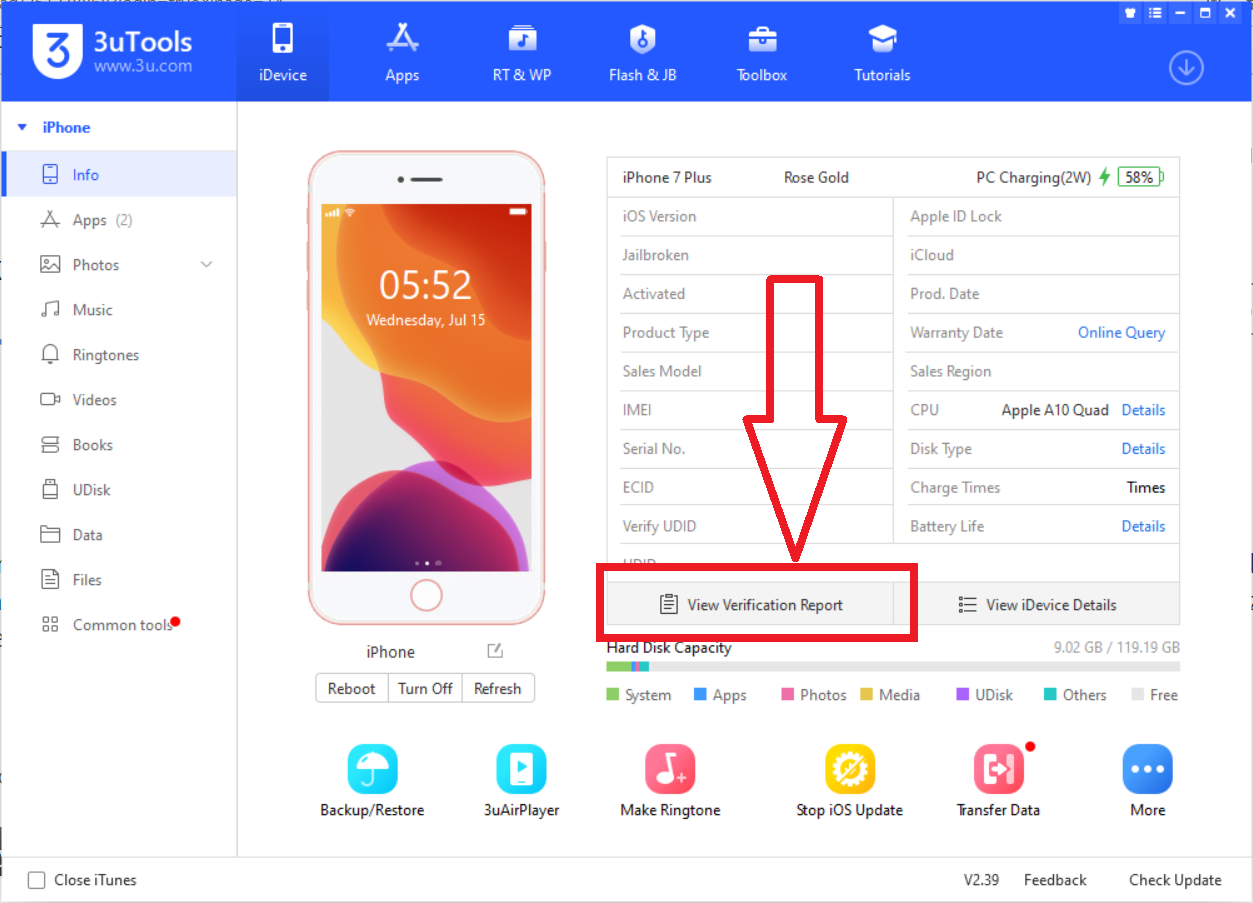
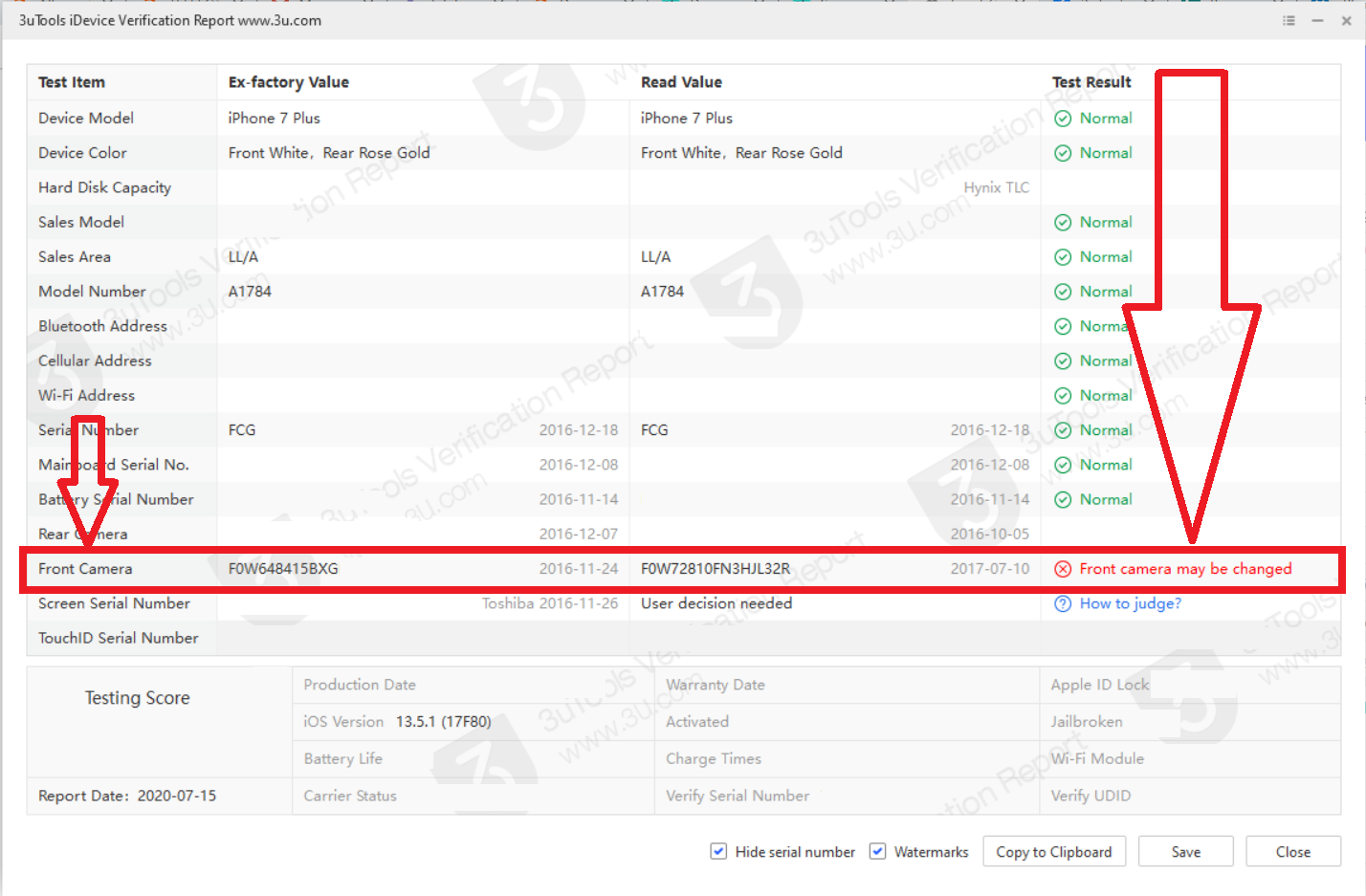
5. Look after the original disassembly camera. Search on local auction sites. Do not buy the camera on Aliexpress because you will get the cheapest replacement part there. Even the substitutes have the Apple logo, but of poor graphics quality! Therefore, if you want your front camera to work, try to get the original part. The price of original part is around $ 10 - $ 50.

6. Get the right tools for your phone. You will need: screwdrivers (pentalobe, tri-point Y000 and Phillips), suction cup and spudger. In addition, if you want to remain waterproof, a screen tape will be useful.

However, if you are not good at manual work, go to a technician! Wrong screws can kill your phone's motherboard!

A guide on how to replace the front camera can be found here: https://www.ifixit.com/Guide/iPhone+7+Plus+Front+Camera+and+Sensor+Cable+Replacement/95688

7. No need to restore the phone after replacement front camera.


If you found this post helpful, click "Helpful"

268 replies

May 14, 2020 11:01 PM in response to annyeonglia07

The exact same issue with me. Snapchat will glitch out when I use my from camera, kick me off the app and the only way I can go back on it is if I delete and reinstall the app. All my other apps like FaceTime, Instagram and TikTok are having similar problems. Tried 2 different types of factory resets but they did not work. Also tried setting the phone to the last update which didn’t work either

May 15, 2020 12:03 AM in response to Courtmac87

They told me they’d never seen this before. Which is clearly lies. They ran diagnostics and said fault with a sensor? Then it got escalated to a senior person who told me to reset it or send the phone off. He said there had been an error when the phone installed updates and said it was definitely a hardware issue not the phone. I’ve requested a call back today at 12.15 and going to tell them to read this thread.

May 20, 2020 12:15 AM in response to Kobe14

I tried to update from 13.5 beta 4 to the GM version and got stuck in recovery mode.

Updating didn't work but recovery to 13.4.1 did, that did solve my problem.


Note that a shake had solved the partially, except for face id, on my iPhone 11 Max Pro.

In the beginning I had no cameras nor flashlight (nor face id).

After giving the device a shake the camera worked but not face id (this worked on one of the iOS 13.5 betas).

After the recovery to 13.4.1, all works fine.


Still no excuse for leaving me without a cameras, flashlight (use it a lot) nor faceid for two months for a device that's less than a year old.

This thread has been closed by the system or the community team. You may vote for any posts you find helpful, or search the Community for additional answers.

Front Camera not working after ios 13.4.1 update

Welcome to Apple Support Community
A forum where Apple customers help each other with their products. Get started with your Apple Account.
