Why can I not pair my Apple Pencil 2nd generation to my iPad Pro?

My Apple Pencil is not working either in Notability nor notes. I have restarted my iPad, reconnected my Pencil through Bluetooth but it still doesn’t work. What can I do now?

iPad Pro, iPadOS 13

Posted on Apr 17, 2020 4:05 AM

Reply
Question marked as Top-ranking reply

Posted on Apr 17, 2020 9:50 AM

Okay, I suggest that you un-pair/remove the Apple Pencil from your iPad setup:

Settings > Bluetooth - select “i” icon for the Apple Pencil, then select Forget this Device.


After removing the Apple Pencil, close the Settings App, then force-restart the iPad:


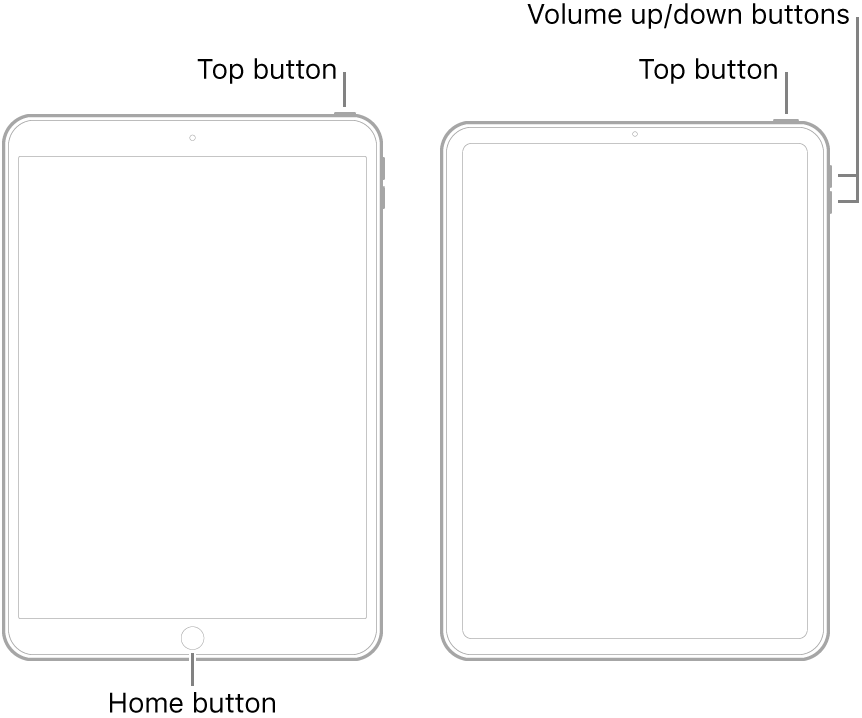
  • On an iPad with a Home button: Press and hold the top button and the Home button at the same time. When the Apple logo appears, release both buttons.
  • On an iPad with Face ID: Press and quickly release the volume up button, press and quickly release the volume down button, then press and hold the top button. When the Apple logo appears, release the button.


After restart, connect the Pencil to the iPad and re-pair.

21 replies
Question marked as Top-ranking reply

Apr 17, 2020 9:50 AM in response to TonyK505

Okay, I suggest that you un-pair/remove the Apple Pencil from your iPad setup:

Settings > Bluetooth - select “i” icon for the Apple Pencil, then select Forget this Device.


After removing the Apple Pencil, close the Settings App, then force-restart the iPad:


  • On an iPad with a Home button: Press and hold the top button and the Home button at the same time. When the Apple logo appears, release both buttons.
  • On an iPad with Face ID: Press and quickly release the volume up button, press and quickly release the volume down button, then press and hold the top button. When the Apple logo appears, release the button.


After restart, connect the Pencil to the iPad and re-pair.

Apr 19, 2020 9:57 AM in response to TonyK505

Okay, so the Apple Pencil is believed to be good. So, standard diagnostic steps are required - restart, reset, restore.


Assuming you followed the forced-restart without improvement, you’ll need to reset your iPad. First, ensure you have a current iCloud or iTunes backup - then:

Settings > General > Reset All Settings


The reset should not delete any data - but may resolve the problem. If still no improvement, you should fully reset the iPad:

Settings > General > Erase All Content & Settings


After the reset, you have the option of restoring your data from backup. For expediency of testing, I recommend that you defer restoring your data until you have established that your Pencil is working normally.


If the problem remains unresolved, you’ll need to restore the iPad to factory settings. This process will both erase/reset the iPad and install a fresh copy of iPadOS. Again, you’ll have the option of restoring your data - but again, it is recommended that you first confirm normal operation prior to restoring your data from backup.


Apr 19, 2020 10:40 AM in response to TonyK505

If you followed our earlier exchanges, you’ll recall that you confirmed that it was previously working. Whilst we can’t preclude failure of the Pencil (perhaps unlikely, noting that you confirmed BT pairing) we have to work with what we’ve got - unless you have another iPad with which to independently test your Apple Pencil...


Unlike the First Gen’ Apple Pencil, with a physical connection with which basic communication can be verified, the second Gen’ Pencil has no direct interface connection. Testing options are therefore very limited.

Apr 19, 2020 12:29 PM in response to TonyK505

When it works, it’s great, but for some reason the Bluetooth pairing between your iPad Pro and your Apple Pencil isn’t quite as robust as you might like. If your iPad Pro restarts you may need to re-pair the Pencil, for example. Apple Pencil doesn’t hold onto power very long – in my experience I’ve usually had to charge it up after not using it for a few days.


[Link Edited by Moderator]

Apr 19, 2020 12:36 PM in response to thepcsoft

Thank you. The Apple Pencil is showing 97% charged right now. And over the past 1-2 days I I have un-paired, restarted my iPad Pro and then re-paired the iPad with my Apple Pencil several times.


I would like to resolve this matter rather urgently as I rely on the Pencil for note taking as part of my work. Can someone please help me get to some outcome?

This thread has been closed by the system or the community team. You may vote for any posts you find helpful, or search the Community for additional answers.

Why can I not pair my Apple Pencil 2nd generation to my iPad Pro?

Welcome to Apple Support Community
A forum where Apple customers help each other with their products. Get started with your Apple Account.


