Why can I not pair my Apple Pencil 2nd generation to my iPad Pro?

My Apple Pencil is not working either in Notability nor notes. I have restarted my iPad, reconnected my Pencil through Bluetooth but it still doesn’t work. What can I do now?

iPad Pro, iPadOS 13

Posted on Apr 17, 2020 4:05 AM

Reply
Question marked as Top-ranking reply

Posted on Apr 17, 2020 9:50 AM

Okay, I suggest that you un-pair/remove the Apple Pencil from your iPad setup:

Settings > Bluetooth - select “i” icon for the Apple Pencil, then select Forget this Device.


After removing the Apple Pencil, close the Settings App, then force-restart the iPad:


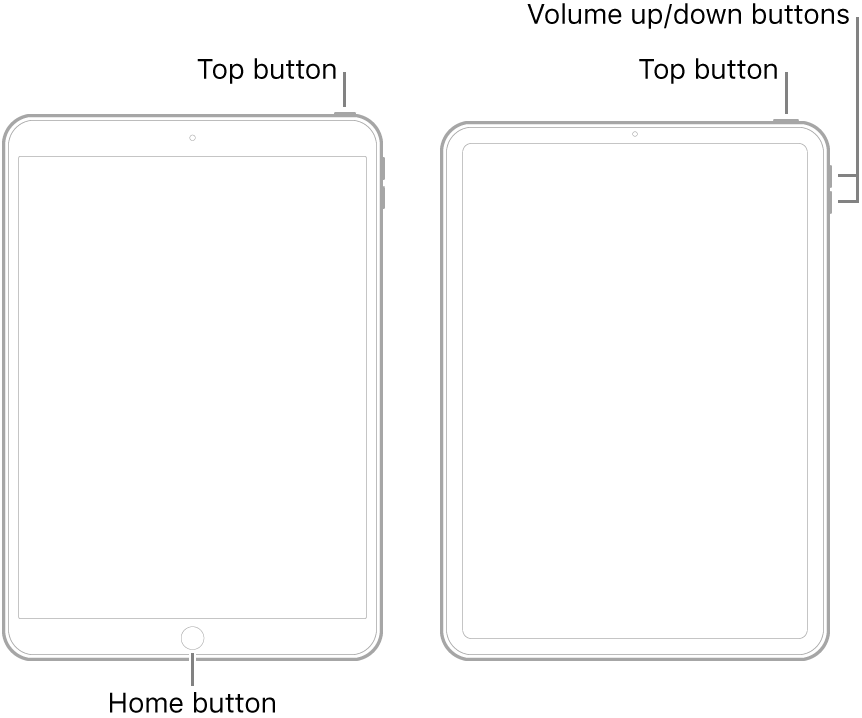
  • On an iPad with a Home button: Press and hold the top button and the Home button at the same time. When the Apple logo appears, release both buttons.
  • On an iPad with Face ID: Press and quickly release the volume up button, press and quickly release the volume down button, then press and hold the top button. When the Apple logo appears, release the button.


After restart, connect the Pencil to the iPad and re-pair.

21 replies

Apr 28, 2020 8:58 AM in response to LotusPilot

Many thanks for your latest feedback.


I have so far ‘Reset All Settings’ and as the pencil was still not working, I then proceeded to all ‘Erase All Content & Settings’. Unfortunately, even after this second step, the pencil is still not functioning.


At this point I am not clear whether, based on your earlier instructions, there is a 3rd potential step to ‘help restore the iPad to factory settings. If this is indeed an additional possibility, can you please let me know how to go about this 3rd step?


Thanks


This thread has been closed by the system or the community team. You may vote for any posts you find helpful, or search the Community for additional answers.

Why can I not pair my Apple Pencil 2nd generation to my iPad Pro?

Welcome to Apple Support Community
A forum where Apple customers help each other with their products. Get started with your Apple Account.