Air Print

I have a new iPad Pro 2020 11", also an iPhone 11 Pro Max with a HP Officejet 6700 printer.

I can use AirPrint from both but NOT when using Pages documents - anybody know why?

From a Pages document - Printer Options - Looking for Printer - No AirPrint printer found.

BUT it works from other documents not Pages.

Help please.


iPad Pro 11-inch Wi-Fi

Posted on Apr 21, 2020 3:02 AM

Reply
4 replies

Apr 21, 2020 3:04 AM in response to BobandI

A forced-restart might be helpful:


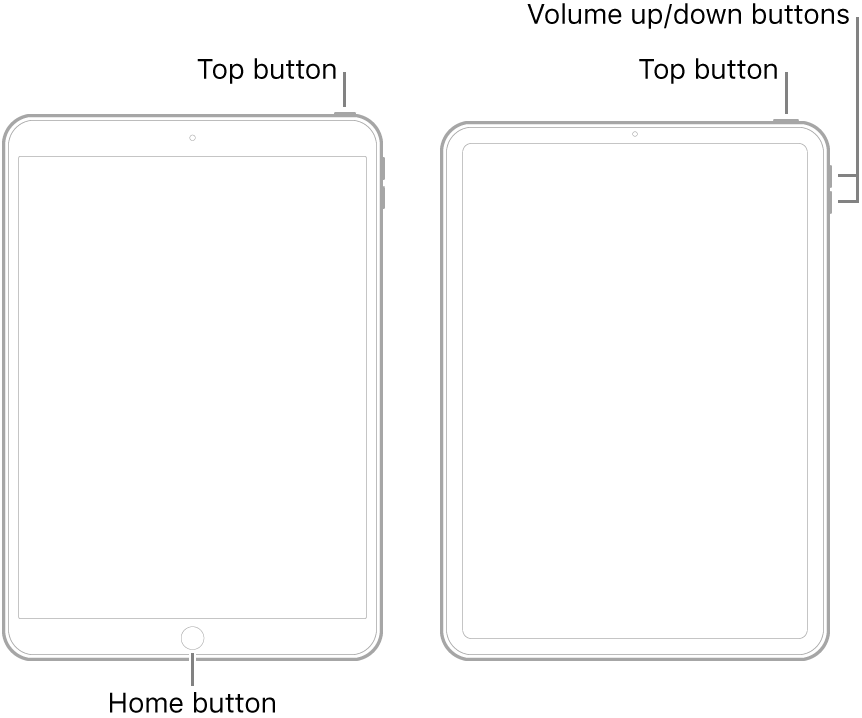
  • On an iPad with a Home button: Press and hold the top button and the Home button at the same time. When the Apple logo appears, release both buttons.
  • On an iPad with Face ID: Press and quickly release the volume up button, press and quickly release the volume down button, then press and hold the top button. When the Apple logo appears, release the button.


Apr 21, 2020 3:36 AM in response to BobandI

The restart was well worth an initial punt as this often clears isolated issues.


The next steps are to progress through increasingly invasive reset procedures. Your locally stored data will be preserved if you take the appropriate precautions. Before proceeding, ensure that you have a current iCloud or iTunes backup of your device.


When you’re happy to proceed, you need to reset your iPad settings. This initial reset will not delete any data - but will reset all system settings; you’ll need to rejoin your WiFi network post-reset:

Settings > General > Reset > Reset All Settings


After you iPad restarts - and you have rejoined your WiFi network, test your printer connectivity.


If this is not successful, the next step is to fully reset the iPad - which will delete all data - but you will be invited to restore your data from your backup (for which you have already diligently created):

Settings > General > Reset > Erase All Content & Settings


Again, after you iPad restarts - and you have rejoined your WiFi network and restored your data, test your printer connectivity.


If this still doesn’t work, we’ll worry about this later.



Apr 22, 2020 12:11 AM in response to LotusPilot

Thank you for your help but I have now resolved my problem.

The HP printer was connected via ethernet cable and I thought that I could only have ethernet or wireless (which I believe is true) BUT on the HP Printer 6700 there is a setting WIRELESS DIRECT which must be switched ON. This solved my problem somehow with PAGES documents not printing from AIR PRINT on my iPhone / iPad.


This thread has been closed by the system or the community team. You may vote for any posts you find helpful, or search the Community for additional answers.

Air Print

Welcome to Apple Support Community
A forum where Apple customers help each other with their products. Get started with your Apple Account.