iPhone 7 won't turn on after hard reset

Hello, I was wondering if anyone had the same issues as me regarding the iPhone 7 and/or might there be a proper term for it / solution?


So, I left my phone to charge overnight and when I woke up, I tried turning it on but it was unresponsive. I tested the plug in the wall and the charging cable with another phone and it charged that separate phone just fine. So, I deduced the problem to be something with the phone itself, unrelated to the plug and charger. I looked around on the Internet and tried that "Power button + Volume Down" reset several times- up to a minute of holding down- and still nothing. I also tried holding down those same buttons and plugging in my charger at the end of the interval. I did clean out my charging port with a plastic toothpick, until no clumps of lint could be found, and retried that reset after letting my phone charge for 30 minutes but I still had nothing. I've never dropped and cracked the screen on this phone and have owned it since August '17 though I've never had something like this happen. I do share the Life360 app with someone and they said that my phone was reportedly at 68%. I have also tried connecting it to my computer and putting it in DFU mode but it wasn't detecting the phone.


Are there any other possible solutions I should try and is there a proper name for this kind of error?

iPhone 7

Posted on May 4, 2020 3:06 PM

Reply
1 reply

May 4, 2020 3:27 PM in response to x-Domo_Love

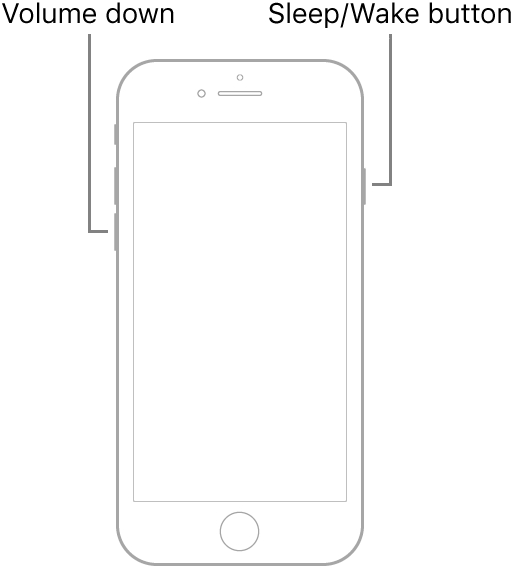
Force restart iPhone - Apple Support ⬇︎⬇︎TRY THIS AGAIN AND RECOVERY MODE ALSO


Press and hold both the volume down button and the Sleep/Wake button.

When the Apple logo appears, release both buttons.

Note: If iPhone still doesn’t turn on, or if it gets stuck during start up, see the Apple Support article If your iPhone, iPad, or iPod touch won’t turn on or is frozen.


If that does not work try to put your phone in Recovery Mode...⬇︎⬇︎ full instructions in the link above...⬆︎⬆︎


Short instructions...⬇︎⬇︎


Connect your device to a computer. On a Mac with macOS Catalina 10.15, open Finder. On a Mac with macOS Mojave 10.14 or earlier, or on a PC, open iTunes.


Press and hold the Top (or Side) and Volume Down buttons at the same time. Keep holding them until you see the recovery mode screen.


It may take a few tries to get into Recovery Mode but when you do then the phone will be recognized...


IF ALL THE ABOVE DOES NOT WORK CLICK "CONTACT SUPPORT" TOP RIGHT CORNER OF THIS PAGE...

This thread has been closed by the system or the community team. You may vote for any posts you find helpful, or search the Community for additional answers.

iPhone 7 won't turn on after hard reset

Welcome to Apple Support Community
A forum where Apple customers help each other with their products. Get started with your Apple Account.