iPad Pro Cellular SMS issue

I am having issues receiving sms on my iPad Pro, I don’t see see the option on my iPhone for text forwarding, SMS works fine on my MacBook Pro, same iMessage account on each device, iCloud account has iMessage enabled.

iPad Pro, iPadOS 13

Posted on May 7, 2020 9:45 AM

Reply
Question marked as Top-ranking reply

Posted on May 14, 2020 9:55 PM

I ended up fixing the issue, this is how I solved it:


Apple Documentation, "* Don't see the Text Message Forwarding setting on

your iPhone? Go to Settings > Messages, turn off iMessage, turn it

back on, tap Send & Receive, tap Use Your Apple ID for iMessage,

then sign in with the same Apple ID used on your other devices."


But they failed to specify that "Start New Conversations From" HAS TO BE your AppleID email address and not your phone number, after selecting your email address associated with your AppleID, the text forwarding option enables itself. From there it was easy as I enabled both my Macbook and iPad ON.


Similar questions

8 replies
Question marked as Top-ranking reply

May 14, 2020 9:55 PM in response to LotusPilot

I ended up fixing the issue, this is how I solved it:


Apple Documentation, "* Don't see the Text Message Forwarding setting on

your iPhone? Go to Settings > Messages, turn off iMessage, turn it

back on, tap Send & Receive, tap Use Your Apple ID for iMessage,

then sign in with the same Apple ID used on your other devices."


But they failed to specify that "Start New Conversations From" HAS TO BE your AppleID email address and not your phone number, after selecting your email address associated with your AppleID, the text forwarding option enables itself. From there it was easy as I enabled both my Macbook and iPad ON.
May 7, 2020 9:57 AM in response to RubenVilchez

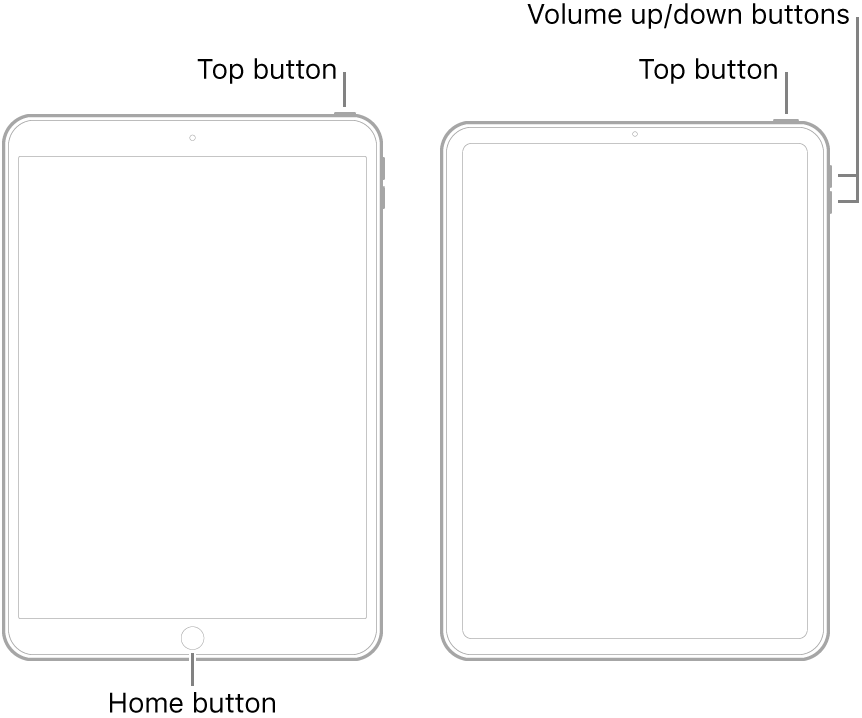
A forced restart of both devices may be beneficial:


  • On an iPad with a Home button: Press and hold the top button and the Home button at the same time. When the Apple logo appears, release both buttons.
  • On an iPad with Face ID: Press and quickly release the volume up button, press and quickly release the volume down button, then press and hold the top button. When the Apple logo appears, release the button.


If this provokes no improvement, as the issue apparently lies with the iPhone, then reset of the iPhone may be necessary - first to Network Settings, followed, if needed, by a reset of All Settings:

Settings > General > Reset >


May 7, 2020 10:01 AM in response to RubenVilchez

Leading us to the nuclear option:

https://support.apple.com/en-gb/HT201252


Before embarking upon the restore process, ensure that you have a current iCloud or iTunes backup - as your locally stored data may be optionally restored at conclusion of the restore process.


The Restore to factory settings will wipe the device, reset all settings - and reinstall iOS.

May 15, 2020 11:16 PM in response to RubenVilchez

I have had the same issue since I upgraded to a new iPad Mini two weeks ago. My phone no longer has the option to forward sms messages to other devices associated with my AppleID, although they continue to go to my MacBook Air (from which I can also send sms messages back via the iPhone).

So the Mac works fine (as previously set up), but I cannot get the same to work on the iPad. Otherwise iMessage works normall across all devices - just not the sms function.

I have tried everything, but to no avail.

This thread has been closed by the system or the community team. You may vote for any posts you find helpful, or search the Community for additional answers.

iPad Pro Cellular SMS issue

Welcome to Apple Support Community
A forum where Apple customers help each other with their products. Get started with your Apple Account.
