My old emails keep flooding back in my inbox as “unread”

Hi, for the last month or so my old emails keep flooding back in my inbox as “unread” I open them, then delete they were retuning over and over. Now the notification icon just shows I have emails (over 1000 - ughh) but the are not in my inbox, junk, spam.... I have tried resetting data network connection, did the update to the latest software, turned it off (I do this everyday almost...) still nothing is working. I cannot stand the red notification! Ahh help!!! Thank you!!


[Re-Titled by Moderator]

iPhone XS Max, iOS 13

Posted on May 9, 2020 7:48 PM

Reply
Question marked as Top-ranking reply

Posted on May 10, 2020 2:39 AM

Which email account are you referring to? Google, iCloud, AOL, Exchange, Outlook, Yahoo or any Other


This may be an issue if you have used POP3 configuration for your email account. If you add IMAP email accounts this issue wouldn't be there, iOS mail app does add IMAP by default.


When you set up an email address in an email client, you will need to decide if you want to set it up as POP3 or IMAP. Both of them are ways to connect to the mail server so you can read your emails through an email client.

  • IMAP is short for Internet Message Access Protocol. With IMAP, the message does not remain on the local device, such as a computer, it remains on the server.
  • POP3 is short for Post Office Protocol. With POP3 mail, it will connect and attempt to keep the mail located on the local device (computer or mobile).


Pop3 vs. IMAP: Which is better?

  • IMAP is better if you are going to be accessing your email from multiple devices, such as a work computer and a smart phone.
  • POP3 works better if you are only using one device, but have a very large number of emails. It is also better if you have a poor internet connection and need to access your emails offline. For most people, IMAP will suit their needs better.


Note: If emails start appearing or disappearing from your inbox without you initiating them, it almost always means one of your devices is on POP3. Backing up the emails and then resetting up the email account as IMAP will fix the problem.


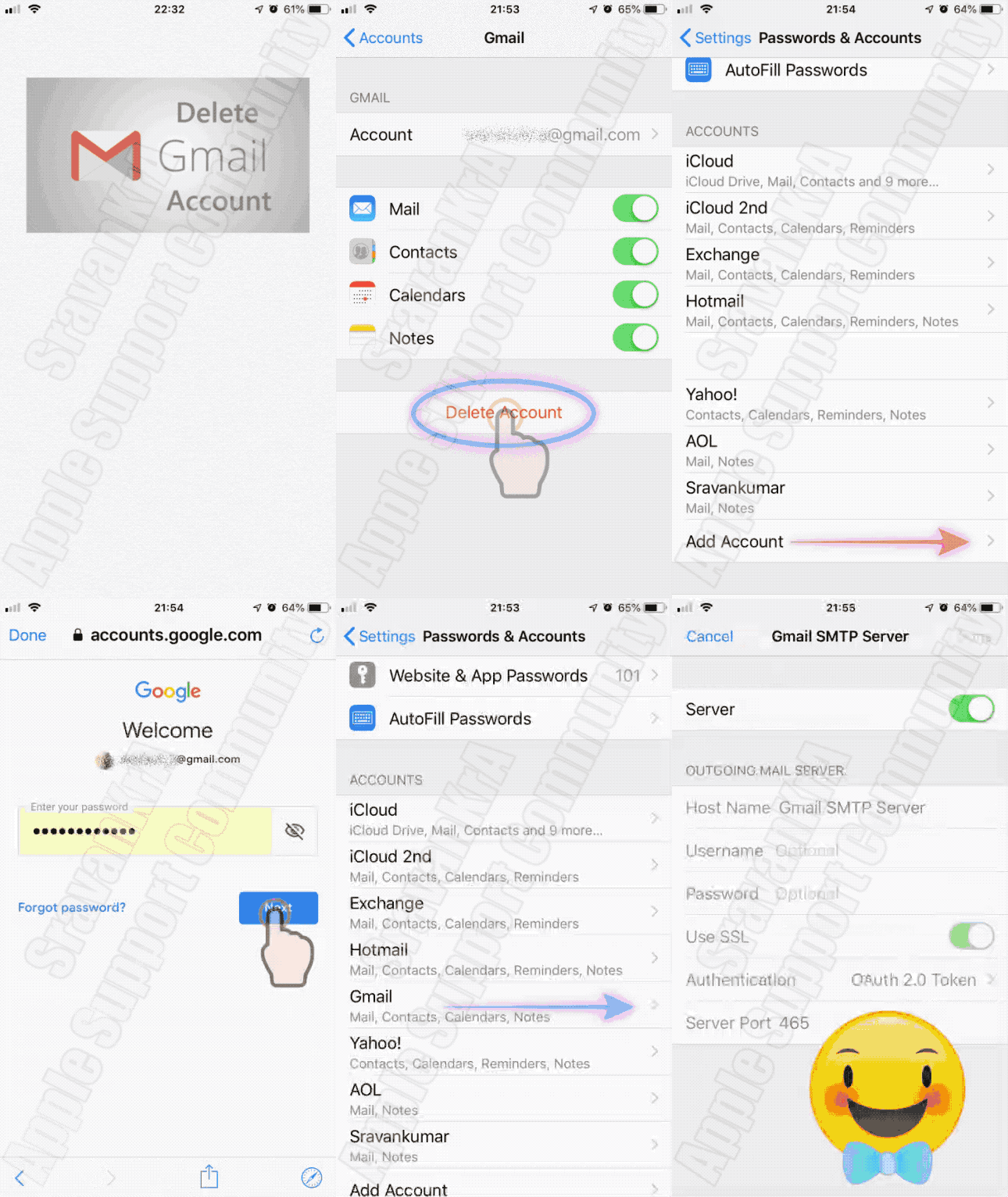
Delete and Add the account watch the three GIFs

  1. iCloud
  2. Outlook and Exchange
  3. Gmail


1 reply
Question marked as Top-ranking reply

May 10, 2020 2:39 AM in response to Nostrain

Which email account are you referring to? Google, iCloud, AOL, Exchange, Outlook, Yahoo or any Other


This may be an issue if you have used POP3 configuration for your email account. If you add IMAP email accounts this issue wouldn't be there, iOS mail app does add IMAP by default.


When you set up an email address in an email client, you will need to decide if you want to set it up as POP3 or IMAP. Both of them are ways to connect to the mail server so you can read your emails through an email client.

  • IMAP is short for Internet Message Access Protocol. With IMAP, the message does not remain on the local device, such as a computer, it remains on the server.
  • POP3 is short for Post Office Protocol. With POP3 mail, it will connect and attempt to keep the mail located on the local device (computer or mobile).


Pop3 vs. IMAP: Which is better?

  • IMAP is better if you are going to be accessing your email from multiple devices, such as a work computer and a smart phone.
  • POP3 works better if you are only using one device, but have a very large number of emails. It is also better if you have a poor internet connection and need to access your emails offline. For most people, IMAP will suit their needs better.


Note: If emails start appearing or disappearing from your inbox without you initiating them, it almost always means one of your devices is on POP3. Backing up the emails and then resetting up the email account as IMAP will fix the problem.


Delete and Add the account watch the three GIFs

  1. iCloud
  2. Outlook and Exchange
  3. Gmail


This thread has been closed by the system or the community team. You may vote for any posts you find helpful, or search the Community for additional answers.

My old emails keep flooding back in my inbox as “unread”

Welcome to Apple Support Community
A forum where Apple customers help each other with their products. Get started with your Apple Account.