why aren't all the photos in my photos library also in iCloud?

My photos library file is about 82GB, but in iCloud the photos section has only 67GB. Presumably there are a lot of photos not in iCloud that should be.


What am I doing wrong?

iMac 27", macOS 10.14

Posted on May 18, 2020 6:07 PM

Reply
13 replies

May 19, 2020 3:20 AM in response to léonie

One more thing - some external editors can increase the size of the edited versions considerably.

When I edit a photo with Luminar, for example, the saved JPEGs are huge.

Here is an example of sorting the jpegs in the resources folder by size:
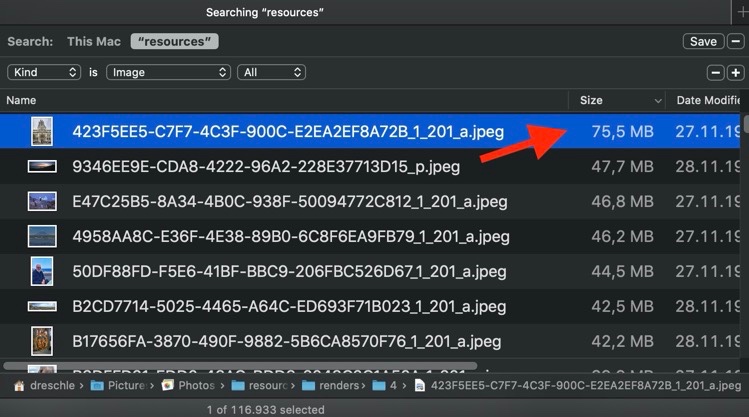

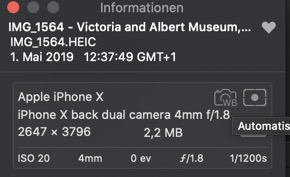
The largest files have all been edited in external editors. The "render" file on top has a whopping size of 75.5 MB, but the original in Photos is shown as a JPEG of just 2.2 MB.

If you are using external editors or photo editing extensions, they might increase the size of the library considerably.



May 19, 2020 3:00 AM in response to jdh9846

j'ski wrote:

I had been wondering about that. But would you expect to find 20+ GB of 'auxiliary' files?

Or is it possible that iCloud doesn't have the very large number of dupes that I see in Photos App?

That is normal. The auxiliary files can be taking up a lot of storage. For example, my local Photos Library has an "originals" folder with the original master image files with a size so 178.87 GB (corresponding to the size in iCloud) and the working copies in the folder "resources" are taking up 54.42 GB. These are mostly rendered JPEG previews and thumbnails of the adjusted images or HEIC files or edited versions created by external editors.

Here is a screenshot showing the sizes of the folders in the package contents:


I am in the process of converting the RAW files and the JPEG files in my library to HEIC files to save storage on my iPhone and iPad. But for every new space saving HEIC image the resources folder keeps increasing, probably because of the additional JPEG previews.


May 18, 2020 7:05 PM in response to jdh9846

I had been wondering about that. But would you expect to find 20+ GB of 'auxiliary' files?

Again, Apple has not published what is stored where.


r is it possible that iCloud doesn't have the very large number of dupes that I see in Photos App?

Only you can tell that by looking for duplicates. I have used Mac Photos for years and have never experienced there being photos in it that are not reflected on iCloud. your mileage may vary of course.

May 18, 2020 7:08 PM in response to Eric Root

I had not, but if all fails I will. I say if all fails bec there are so many photos I'm feeling overwhelmed by trying to deal with the sheer numbers! 😱 It certainly might be illuminating to check out a handful of items that have multiple copies (I have no idea how I managed to pile up so many dupes over the years -- some pix have a dozen copies!


I was hoping someone knew whether iCloud has a way of not accepting dupes. Photos says it is only importing items not already in the program, but in fact often doesn't recognize dupes when I plug in my iPhone or my husbands iPhone, just to make sure everything is there... Hmm, that's probably how we got so many dupes to begin with. But I trusted the App to be smarter than that! <sigh>

May 18, 2020 7:12 PM in response to jdh9846

One option is to make albums with specific subjects or dates - like vacations or Jan-Jun 2018 and start placing relevant images in them. You may be a little better organized and also have a chance to see the dupes as they arise. By the way as I am sure you know - when you bring up photos on your iDevice - you can select to delete by running your fingertip across the photos if they are in sequence - no need to lift your finger from the screen

May 18, 2020 6:34 PM in response to jdh9846

If you are comparing it to your Mac's photo library, keep in mind it has many other files that are not photo files. Indexes, faces, album data are a few items that don't exist in your iCloud Library.


It would be considered normal for the local library to be larger than the iCloud version.


I don't believe Apple has or will publish further details of what is stored where.

May 18, 2020 7:02 PM in response to ManSinha

I was under the impression that the optimization worked the other way. That is, the full-size files would be in iCloud and the smaller 'optimized' files would be on my devices. So the iCloud photos would be larger rather than smaller.


In any case, I have always selected the option to keep my full-size (higher resolution) files on all devices.

This thread has been closed by the system or the community team. You may vote for any posts you find helpful, or search the Community for additional answers.

why aren't all the photos in my photos library also in iCloud?

Welcome to Apple Support Community
A forum where Apple customers help each other with their products. Get started with your Apple Account.
